
All articles in the series
The fourth part of the PostgreSQL course - let’s figure out where PostgreSQL gets parameter values from, how SET differs from ALTER SYSTEM, and why some settings apply instantly while others only apply after restart 🐧.
🖐️Hey!
Subscribe to our Telegram channel @r4ven_me📱, so you don’t miss new posts on the website 😉. If you have questions or just want to chat about the topic, feel free to join the Raven chat at @r4ven_me_chat🧐.
Preamble
In the first, second, and third parts we barely touched server settings - except for a quick glance at shared_buffers and work_mem via SHOW. Today we’ll dig much deeper: where PostgreSQL gets the value for each parameter, what happens if you change it via SET, and what happens if you use ALTER SYSTEM instead, and why these two methods can affect the same parameter in completely different ways.
We’ll demonstrate again using two parallel psql sessions, just like in the last lesson on MVCC - this approach works great for configuration too, because parameter changes have their own scope of visibility, and it’s easier to see it once than to remember from explanation.
Initial Data
Software used in this article:
| Software | Version |
|---|---|
| PostgreSQL (image) | 18 |
| psql (in image) | 18 |
| DBeaver Community | 26 |
The test setup is the same postgres container from the first part, running and accessible at 127.0.0.1:5432.
Where settings are physically stored
cd ~/Postgres

docker compose exec postgres psql -U ivan -d ravenLet’s ask the server itself where things are:
SHOW config_file;

SHOW hba_file;

SHOW data_directory;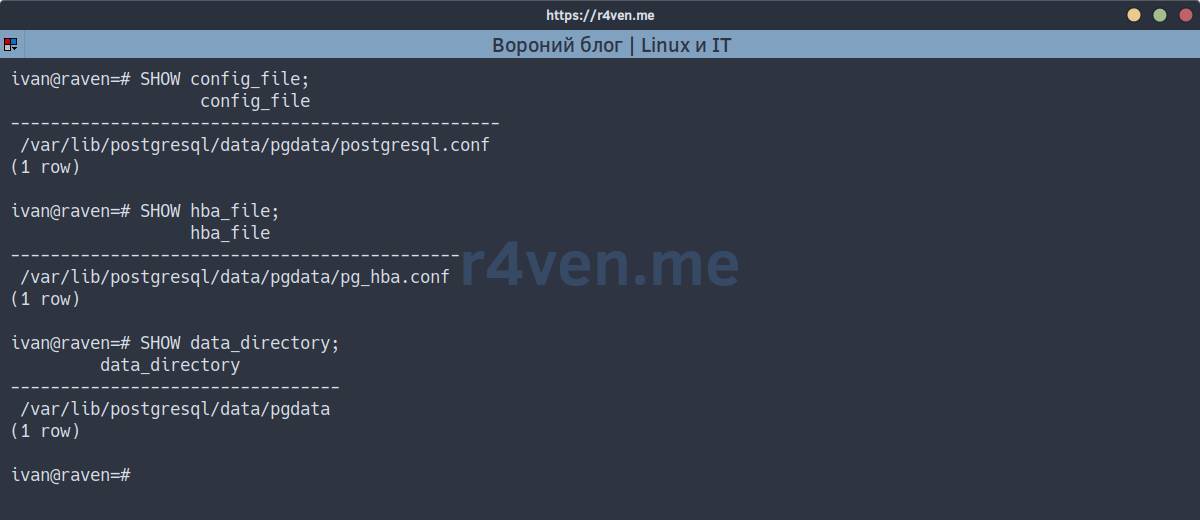
Since in the first part we explicitly set PGDATA=/var/lib/postgresql/data/pgdata, data_directory and config_file will point to that location - initdb generated postgresql.conf, postgresql.auto.conf, and pg_hba.conf with default values in this directory on first container startup.
📝 Note
postgresql.conf- main server config: memory, connections, logging, WAL, planner, etc.postgresql.auto.conf- overrides written via ALTER SYSTEM; read afterpostgresql.confand takes priority.pg_hba.conf- authentication/access rules: who, from which addresses, to which databases, and via which method (md5, peer, trust, etc.) can connect.
You can look into files directly from the host without interactively entering the container:
docker compose exec postgres cat /var/lib/postgresql/data/pgdata/postgresql.conf | head -n 30

docker compose exec postgres cat /var/lib/postgresql/data/pgdata/postgresql.auto.conf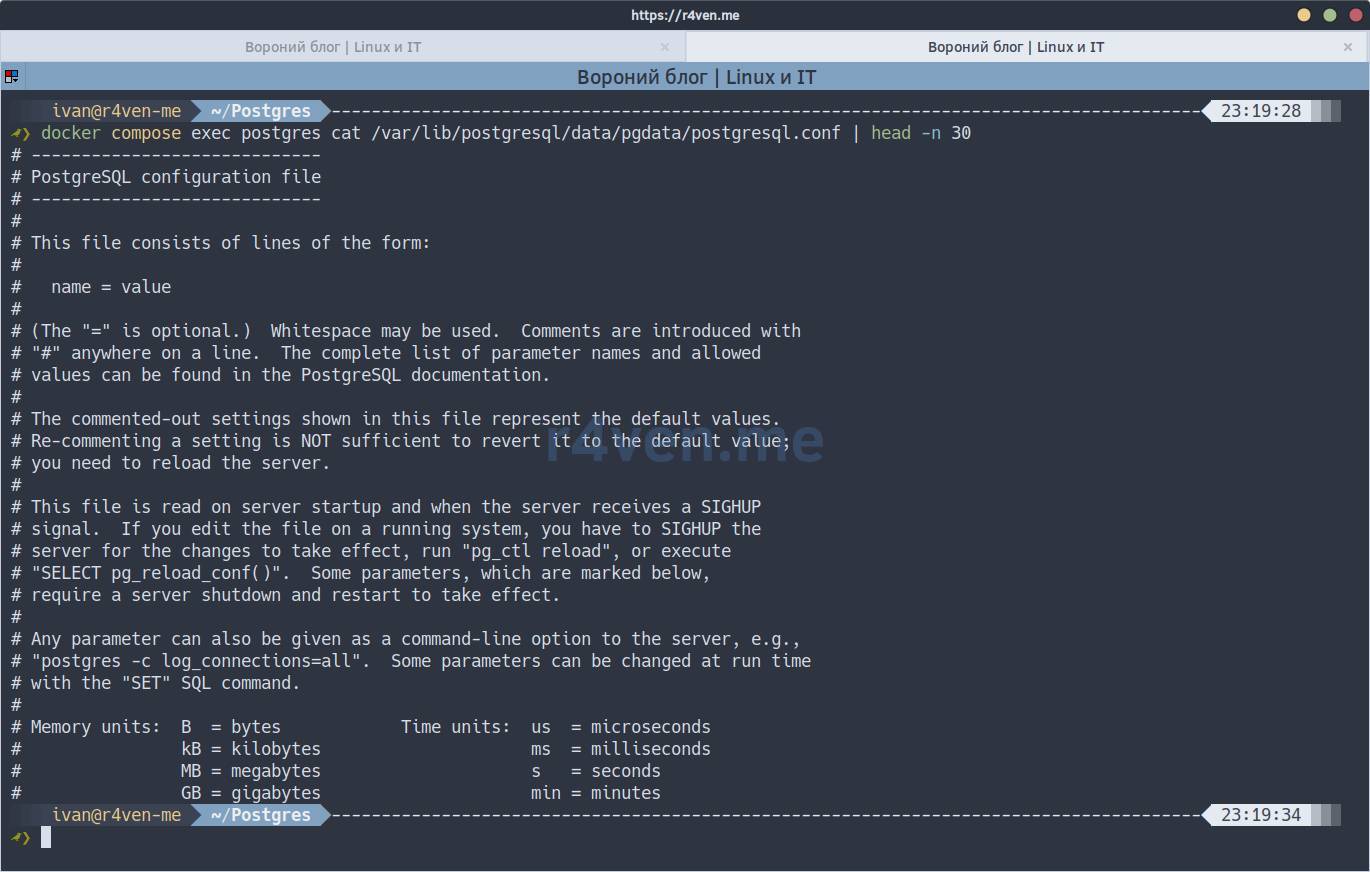
postgresql.auto.confon a fresh setup is almost empty - it just has a service comment-warning:
# Do not edit this file manually!
# It will be overwritten by the ALTER SYSTEM command.The ALTER SYSTEM command writes its changes to this exact file, as described below.
📝 Editing postgresql.conf manually via vim inside the container, as we would on a “real” server, is inconvenient - the standard postgres image doesn’t contain text editors. For a containerized setup it’s much more “natural” to manage parameters via SQL - ALTER SYSTEM, SET, SHOW. Which is what we’ll do.
Priority of sources: pg_settings view
All parameters, their current values, and where they came from are visible in a single system view:
SELECT name, setting, source, context FROM pg_settings WHERE name = 'work_mem';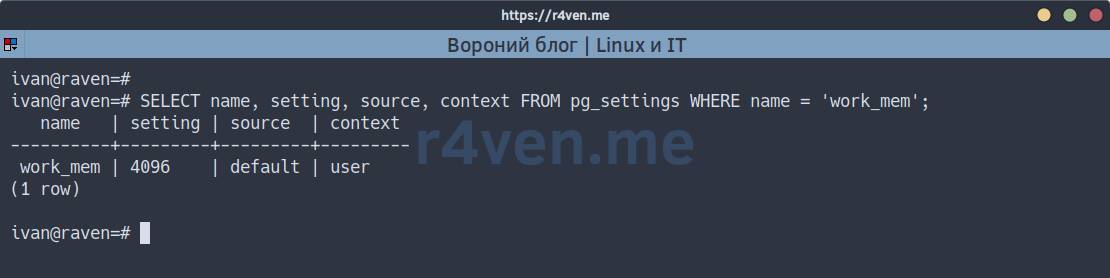
source- where the current value came from (default,configuration file,session, etc.);context- under what conditions the parameter can be changed at all; we’ll return to this separately.
The order in which PostgreSQL searches for a parameter value, from lowest to highest priority:
- built-in default value (compiled into the server itself);
postgresql.conf;postgresql.auto.conf(i.e.,ALTER SYSTEM);- settings at the level of a specific database or role (
ALTER DATABASE ... SET,ALTER ROLE ... SET); - current session settings (
SET,PGOPTIONS, connection string parameters).
Each next level overrides the previous one, but only for the one who set it - this is the source of all the interesting effects below.
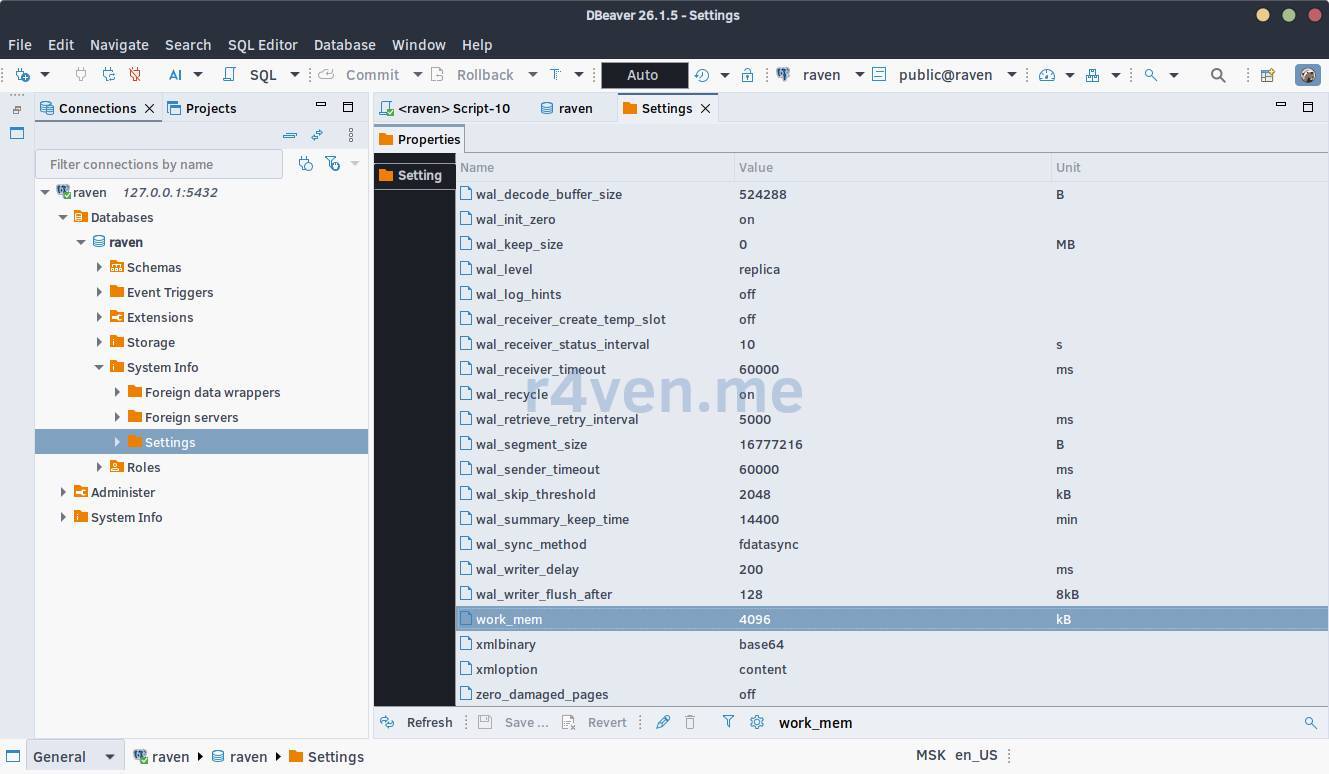
In DBeaver the same view is available without a single line of SQL - in connection properties, the Configuration tab, which we already opened in the previous part: there’s a search by parameter name and a column with the current value.
SET - session-level changes
Open two psql sessions, just like in the previous lesson - without this the difference between SET and ALTER SYSTEM isn’t as clear.
docker compose exec postgres psql -U ivan -d ravenIn both sessions first check the default value:
Session A
SHOW work_mem; work_mem
----------
4MBSession B
SHOW work_mem; work_mem
----------
4MBChange the value only in session A:
Session A
SET work_mem = '64MB';

SHOW work_mem; work_mem
----------
64MBSession B
SHOW work_mem; -- as if nothing happened work_mem
----------
4MBSET changes the parameter only within the current connection. Session B doesn’t know about it and won’t, until it runs its own SET.
There’s also a narrower variant - SET LOCAL, which lives only until the end of the current transaction:
BEGIN;

SET LOCAL work_mem = '128MB';

SHOW work_mem; -- 128MB

COMMIT; -- or ROLLBACK

SHOW work_mem; -- back to the normal session value☝️ SET LOCAL outside a transaction behaves like a normal SET for the rest of the session - the point of restricting scope only appears inside an explicit BEGIN ... COMMIT.
To revert the value to what it was before SET, use the RESET command:
RESET work_mem;📝 Note
The value work_mem = 4MB is a conservative default, so the server doesn’t consume all memory on “weak” hardware, since actual memory consumption is multiplied by the number of operations, workers, and connections: work_mem × operations_in_query × parallel_workers × active_connections.
ALTER SYSTEM - persistent changes
ALTER SYSTEM is a SQL wrapper around editing postgresql.auto.conf, available only to superusers:
ALTER SYSTEM SET work_mem = '32MB';Let’s check what was actually written to disk:
docker compose exec postgres cat /var/lib/postgresql/data/pgdata/postgresql.auto.conf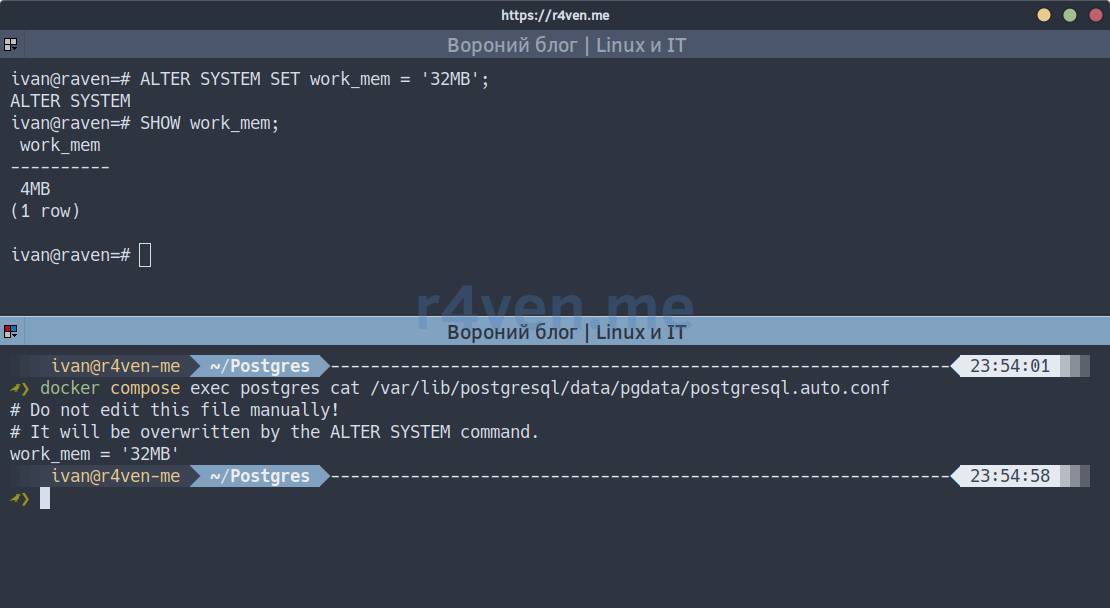
But in both open psql sessions SHOW work_mem; will still show the old value - the file changed, but the server doesn’t know about it yet. You need to reload the configuration:
SELECT pg_reload_conf();And now the interesting part - look at both sessions:
Session B (didn’t do SET)
SHOW work_mem; work_mem
----------
32MBSession A (did SET to 64MB)
SHOW work_mem; work_mem
----------
64MBSession B, which didn’t have its own SET, picked up the new value from postgresql.auto.conf right after pg_reload_conf(), without reconnecting. Session A has 64MB - its personal SET overrides the config value, until it does RESET:
Session A
RESET work_mem;

SHOW work_mem; work_mem
----------
32MBFrom this comes a practical rule: if a parameter “doesn’t apply” after ALTER SYSTEM + pg_reload_conf() - it’s most likely that a manual SET was executed in this same session before.
To remove the persistent value and go back to postgresql.conf:
ALTER SYSTEM RESET work_mem;

SELECT pg_reload_conf();Context: when reload is enough and when you need restart
Not all parameters are the same - each has a context that determines how it can be changed:
| context | What it means |
|---|---|
internal | Changes only when building PostgreSQL, not accessible at all |
postmaster | Only at server startup - requires restart |
sighup | Applied via pg_reload_conf() immediately for all sessions |
backend | Picked up only by new connections |
superuser/user | Can be changed on the fly via SET within a session |
work_mem from the example above is context = user. But max_connections is a classic postmaster:
ALTER SYSTEM SET max_connections = 300;

SELECT pg_reload_conf();

SELECT name, setting, pending_restart FROM pg_settings WHERE name = 'max_connections'; name | setting | pending_restart
-----------------+---------+-----------------
max_connections | 100 | tThe pending_restart = t column says: the value is recorded, but won’t apply until the server restarts. For us that’s one command:
systemctl --user restart postgresSHOW max_connections; -- now 300⚠️ Look ahead at the list of context = 'postmaster' parameters if you’re preparing changes for a production server - SELECT name, setting FROM pg_settings WHERE context = 'postmaster';. Such changes mean downtime during restart, worth planning in advance rather than finding out afterwards.
Custom parameters
PostgreSQL lets you create your own “variables” - handy for passing application context into triggers or RLS policies. The only requirement is the name must have a dot, namespace.key:
SELECT set_config('raven.tenant', 'demo', false);

SELECT current_setting('raven.tenant'); current_setting
-----------------
demoThe third argument to set_config - is_local: false lasts until the end of the session (like normal SET), true - only until the end of the transaction (like SET LOCAL). Such parameters can also be pinned permanently via ALTER SYSTEM SET raven.tenant = 'demo';, if it should be the default value for the entire cluster.
Possible issues
- changed ALTER SYSTEM, but SHOW shows the old value
Forgot SELECT pg_reload_conf(); - ALTER SYSTEM only writes the file, reload/restart is what applies the changes.
- did reload, but it’s still the old value anyway
Check the point about SET/SET LOCAL in this same session above - session value overrides config value until RESET.
- error in config doesn’t kill the server, but doesn’t apply either
If you manually edit postgresql.conf (for example, in a custom image with a mounted file) and make a typo - PostgreSQL on reload will simply ignore the incorrect line and continue working on the old value. To check what didn’t apply and why:
SELECT * FROM pg_file_settings WHERE applied = false;By the way, after our changes to connection count, we’ll see one applied = false:
Afterword
From this part of the course, take away one key thought: SET is about “here and now, for me”, ALTER SYSTEM is about “for everyone and forever, but not instantly”.
In the next lesson - maintenance: VACUUM and WAL. We’ll come back to settings like autovacuum_vacuum_scale_factor and checkpoint_timeout, which we only heard about in passing via pg_settings today, with real substance.
Thank you for reading. Good luck learning PostgreSQL! 🐧
All articles in the series
References
👨💻And…
Don’t forget about our Telegram channel 📱 and chat
Or maybe you want to become a co-author? Then click here🔗
💬 All the best ✌️
That should be it. If not, check the logs 🙂
