
Automating nftables configuration in Linux with a universal Bash script using a basic rule set for filtering network traffic.
The nftables.sh script proposed in this article was created under a long-standing impression from an article on serveradmin.ru dedicated to configuring iptables.
🖐️Hey!
Subscribe to our Telegram channel @r4ven_me📱, so you don’t miss new posts on the website 😉. If you have questions or just want to chat about the topic, feel free to join the Raven chat at @r4ven_me_chat🧐.
I will say right away that this is not a manual for working with nftables, but only an example of using this program for quick and convenient configuration of a basic firewall in Linux.
It is assumed that you have some idea of what Netfilter is and how tools for configuring it work, such as iptables, nftables, ufw, firewald.
If you previously worked with iptables but have only heard about nftables, I recommend a useful introductory article by my colleague: 🔗 Firewall configuration - Nftables.
☝️All actions from the article were tested in Debian 12 and 13 distributions.
Preface
Like many other Linux system administrators, I somewhat “slept through” the moment when popular distributions switched to using nftables as the default backend for firewall management.
Yes, yes, if you use iptables:
sudo iptables -L -nThen, with a high degree of probability, your rules have already been translated into nftables:
sudo nft list ruleset📝 Note
Of course, this behavior depends on the distribution and its settings.
The developers tried to make the transition as smooth as possible and created a tool for compatibility of iptables rules with nftables. At the moment, many distributions make a symlink for the iptables command that points to a special nftables binary.
For example, in Linux Mint Debian Edition 7, the iptables command is a symbolic link to the xtables-nft-multi utility.
You can determine the final symlink target with this scary command:
current="$(command -v iptables)"; while [[ -L "$current" ]]; do target=$(readlink "$current"); echo "$current -> $target"; if [[ "$target" == /* ]]; then current="$target"; else current="$(dirname "$current")/$target"; fi; done; echo "Final: $current"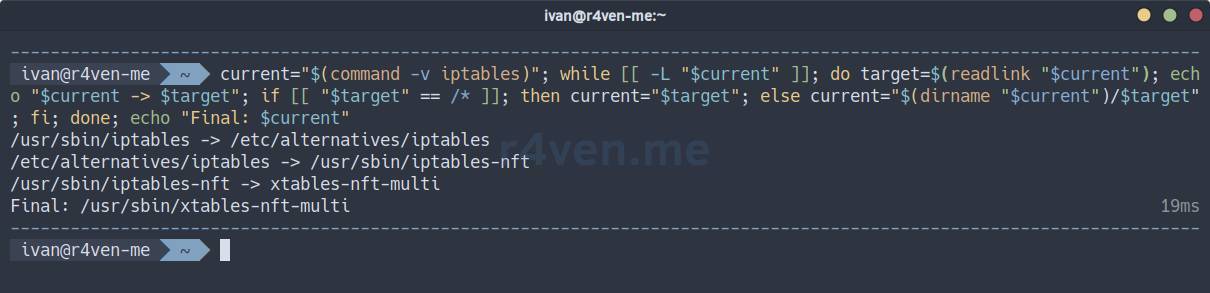
This is also done so as not to break the operation of many network programs in Linux that still use iptables. For example, the ufw firewall or Docker:
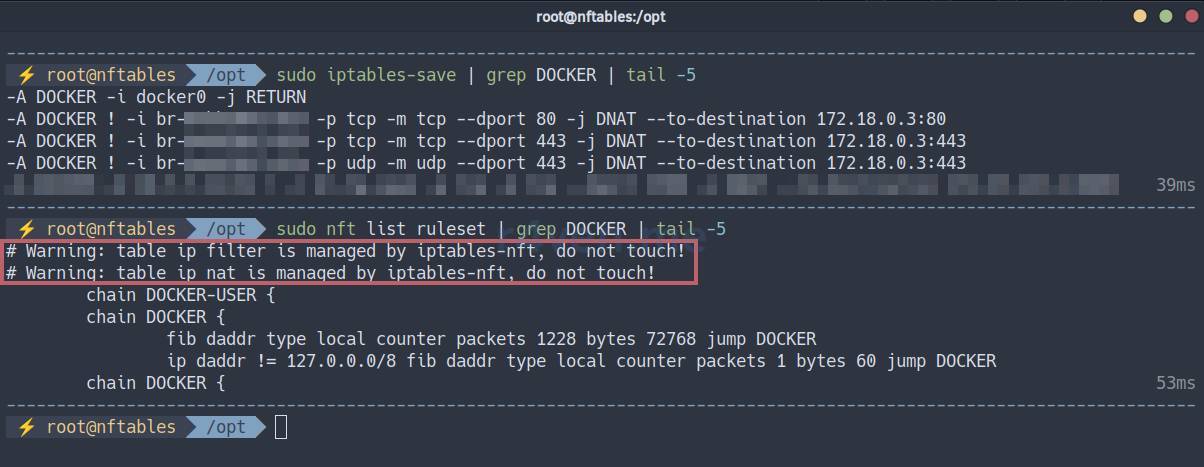
💡By the way, the script from the article accounts for the moment when third-party programs create their own firewall rules. To avoid disrupting their work, the script interacts with specific tables. In your case, some refinement of exceptions may be required.
A bit about nftables specifics
Most often, when reading materials about nftables, you will see the following diagram:
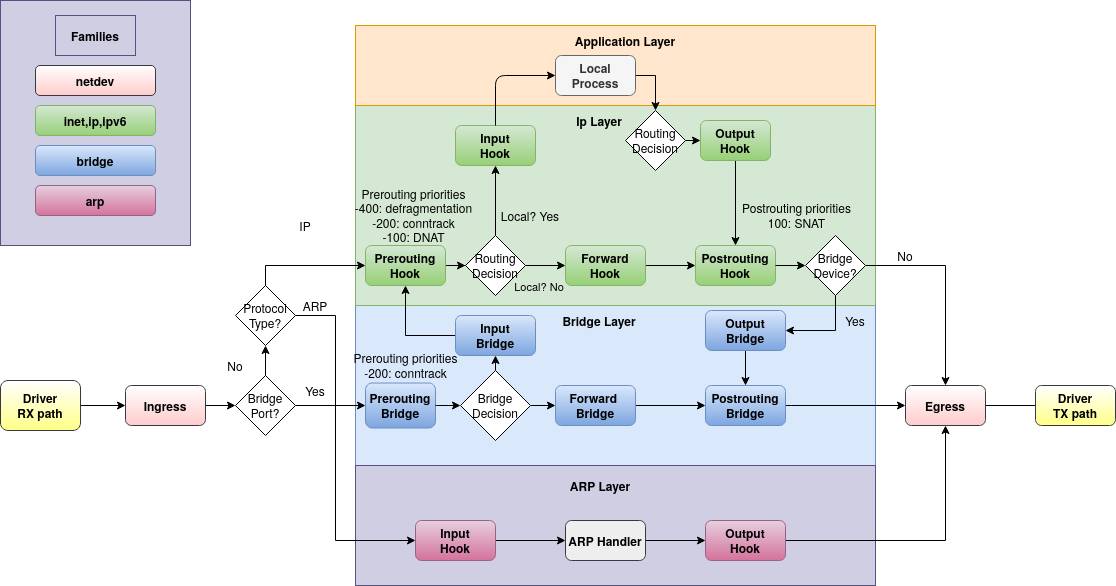
It visualizes the operation of the Linux firewall, Netfilter, and the paths packets take through it.
Today, there is no need to learn the entire diagram; we will talk only about the IPv4 and IPv6 families and, respectively, the IP layer and Application layer. This includes the following filtering hooks (entry points, see the diagram): prerouting, input, output, forward, postrouting.
Before starting the configuration, you need to understand the main entities of a modern Linux firewall:
- Protocol families:
ip(IPv4),ip6(IPv6),inet(IPv4 and IPv6),arp,bridge,netdev; - Hook - an entry point for a packet relative to the protocol family (
prerouting,input, etc.); - Table - a container for chains, bound to a protocol family;
- Chain - a container for a set of rules, bound to a table;
- Chain priority - defines the order in which chain rules are processed in one hook (for example, in
input); - Rule - one specific condition (
match) and action (verdict) in a chain, for example, “block from IP 1.2.3.4”; - Expressions - conditions in rules:
ip saddr,tcp dport,ct state,iifname, and so on. - Actions - what to do with a packet:
accept,drop,reject,jump,queue,return
And the key differences and innovations of nftables compared to iptables:
- A unified framework - one
nftcommand instead ofiptables,ip6tables,arptables,ebtables, which simplifies management; - More readable and logical syntax;
- The
inetfamily allows writing the same rules for both IPv4/IPv6 protocols at once; - Dynamic sets - set elements can be changed without reloading rules;
- Associative arrays (maps) that allow matching “key-value” pairs (for example, IP –> action);
- Chain actions can return values like functions (
jump,return); - A more efficient architecture, especially with many rules;
- The ability to work with rules in JSON format.
Historical note for the curious
ipfwadm -> ipchains -> iptables: This was the evolution of packet filtering tools in Linux. Each next one was better than the previous one, but they all had one common trait: each was a monolithic structure. That is, code for IPv4 (iptables), IPv6 (ip6tables), working with ARP requests (arptables), and filtering at the Ethernet frame level (ebtables) were different, although similar, code bases inside the kernel.
iptables problems:
- Code duplication: a huge amount of similar code for IPv4, IPv6, and so on;
- Extension complexity: adding new functionality often required patching the kernel itself;
- Inconsistent API: different tools (
iptables,ip6tables) had different interfaces; - Low performance: with a large number of rules.
Architectural shift: nftables as a kernel backend
Linux kernel developers solved the problem radically by dividing the architecture into two main parts:
Userspace - Frontend:
- This is the command you enter in the terminal:
nft; - Its task is to accept commands and rules from the administrator, process them, and pass them to the kernel through a special API (Netlink);
Kernelspace - Backend:
- This is
nftablesitself in its primary meaning; - This is a common, unified engine inside the kernel that does all the “dirty work” of packet filtering;
- It provides a common instruction set (virtual machine) that can describe almost any rule for any network protocol (IPv4, IPv6, ARP, Bridge, and so on).
I think I have covered everything I wanted to say. The topic of firewalls in Linux is very large. It is difficult to cover everything at once. Let’s not bloat the article; move on to the script and its description.
nftables configuration script

❗️ Caution
I strongly ask you to thoroughly test the rules in a test environment before applying them on production servers!
If you configure the firewall remotely, make sure the server console is available from the hypervisor.
The material in this article is provided for educational purposes only. You perform all actions at your own risk and under your own responsibility. Thank you for understanding.
Ivan Cherniy
The purpose of writing such a script is to have a universal tool at hand for quickly configuring a local Linux firewall, with the ability to easily customize the filtering rule set for different needs. This set is built according to the principle “Everything is forbidden except what is explicitly allowed”. It is well suited for protecting hosts that have a public IP with services running on it.
The script defines the NFT_RULES array, which contains rule commands for nftables. If necessary, edit/change/add the required rules (following the syntax and escaping double quotes inside rules).
When started, the script creates a temporary file with a rule set in nft format (its command variant), and then works with that file: checks syntax/applies rules. The script also provides flags for backing up the current configuration file (specified in the NFT_CONFIG variable) and saving the current rule set (nft -s list table inet filter) to this configuration file (overwriting it).
The script is run as root with one or more parameters:
-a/--apply- apply rules;-s/--save- save current rules (by default to/etc/nftables.conf);-b/--backup- create a backup copy of the configuration (a file next to the config named/etc/nftables.conf_<timestamp>;-c/--check- create a temporary file with rules and check syntax without applying.
The script is intended to automate full firewall configuration: creating tables, address sets, chains, and filtering rules, including handling exceptions for container, virtualization, and VPN interfaces, plus a bit of NAT (port forwarding and masquerading) as an example.
Detailed description of the rule set logic from the script under the spoiler
TABLE inet filter
The input chain processes incoming packets directed to the host itself.
Basic stages:
- Invalid connections are dropped (
ct state invalid drop); - Established and related connections are allowed (
ct state established,related); - Loopback traffic is allowed (
iif lo accept); - Packets from trusted IPs are allowed;
- ICMP and ICMPv6 are allowed (with rate limiting);
- Packets are classified by source:
@lan4/@lan6–> jump toinput_lan;- not from LAN –> jump to
input_wan;
- Everything else goes to
log_drop(logged and blocked).
The input_lan chain
- Processing packets from internal networks;
- By default, allows all TCP/UDP from LAN (can be restricted to specific ports).
The input_wan chain
- Controls incoming connections from the external network (WAN);
- Behavior:
- Allows SSH (port 22);
- Allows web traffic (80, 443) and basic UDP services (53, 123);
- Configures DNAT 443–>43443 (as an example);
- All other new connections from WAN are logged and blocked.
The forward chain
- Manages routing between interfaces;
- Logic:
- Established and related connections are allowed;
- Traffic directions for containers (Docker, K8s), virtual machines, and VPN interfaces (
cni*,br-*,virbr*,tun*,wg*, etc.) are allowed; - The rest of the traffic is logged and blocked.
The log_drop chain
- Logging and final packet dropping;
- Logs up to 5 events per second;
- Drops all packets without allow rules.
TABLE inet nat
The prerouting chain
- DNAT before routing;
- Redirects incoming connections from port 443 to port 43443 (as an example).
The postrouting chain
- SNAT after routing;
- Performs masquerading of outgoing traffic from VPN interfaces (
tun*, also an example).
nvim ./nftables.sh 1#!/usr/bin/env bash
2
3# Script security parameters
4set -Eeuo pipefail
5
6# Explicit PATH definition
7export PATH="/usr/local/bin:/usr/bin:/bin:/usr/local/sbin:/usr/sbin:/sbin"
8
9# =============================================================
10# ========== BEGINNING OF USER CONFIGURATION SECTION ==========
11
12NFT="$(command -v nft)"
13NFT_CONFIG="/etc/nftables.conf"
14NFT_RULES=(
15# =====================
16# TABLES & SETS
17# =====================
18# "flush ruleset"
19"add table inet filter"
20"flush table inet filter"
21"add table inet nat"
22"flush table inet nat"
23
24"add set inet filter lan4 { type ipv4_addr; flags interval; elements = { 10.0.0.0/8, 172.16.0.0/12, 192.168.0.0/16, 169.254.0.0/16 } }"
25"add set inet filter lan6 { type ipv6_addr; flags interval; elements = { fd00::/8, fe80::/10 } }"
26"add set inet filter trusted { type ipv4_addr; elements = { 123.34.56.78 } }"
27
28# =====================
29# CHAINS
30# =====================
31"add chain inet filter input { type filter hook input priority 0; policy drop; }"
32"add chain inet filter forward { type filter hook forward priority 50; policy drop; }"
33"add chain inet filter output { type filter hook output priority -200; policy accept; }"
34"add chain inet nat prerouting { type nat hook prerouting priority dstnat; policy accept; }"
35"add chain inet nat postrouting { type nat hook postrouting priority srcnat; policy accept; }"
36
37"add chain inet filter input_wan"
38"add chain inet filter input_lan"
39"add chain inet filter log_drop"
40
41# =====================
42# INPUT BASE
43# =====================
44"add rule inet filter input ct state invalid drop comment \"Drop invalid connections\""
45"add rule inet filter input ct state { established, related } accept comment \"Allow established connections\""
46"add rule inet filter input iif lo accept comment \"Allow loopback\""
47"add rule inet filter input ip saddr @trusted accept comment \"Allow trusted IPs\""
48
49# ICMP
50"add rule inet filter input meta l4proto icmp icmp type { echo-request, destination-unreachable, time-exceeded } limit rate 10/second accept comment \"ICMP rate limited\""
51"add rule inet filter input meta l4proto ipv6-icmp icmpv6 type { destination-unreachable, packet-too-big, time-exceeded, parameter-problem, mld-listener-query, mld-listener-report, mld-listener-reduction, nd-router-solicit, nd-router-advert, nd-neighbor-solicit, nd-neighbor-advert, mld2-listener-report } accept comment \"Necessary IPv6 ICMP\""
52
53# UDP traceroute
54"add rule inet filter input_wan udp dport 33434-33534 reject comment \"Allow UDP traceroute\""
55
56# LAN/WAN
57"add rule inet filter input ip saddr @lan4 jump input_lan comment \"LAN IPv4 processing\""
58"add rule inet filter input ip6 saddr @lan6 jump input_lan comment \"LAN IPv6 processing\""
59"add rule inet filter input ip saddr != @lan4 jump input_wan comment \"WAN IPv4 processing\""
60"add rule inet filter input ip6 saddr != @lan6 jump input_wan comment \"WAN IPv6 processing\""
61"add rule inet filter input jump log_drop comment \"Default drop\""
62
63# =====================
64# INPUT LAN
65# =====================
66# Allow all
67"add rule inet filter input_lan meta l4proto { tcp, udp } accept comment \"Allow all TCP/UDP from LAN\""
68# Or allow selected and drop others
69# "add rule inet filter input_lan tcp dport { 80, 443 } accept comment \"Allowed TCP ports from LAN\""
70# "add rule inet filter input_lan udp dport { 53, 123 } accept comment \"Allowed UDP ports from LAN\""
71# "add rule inet filter input_lan ct state new jump log_drop comment \"Drop all from LAN with log\""
72
73# =====================
74# INPUT WAN
75# =====================
76"add rule inet filter input_wan tcp dport 22 accept comment \"Allow SSH from WAN\""
77"add rule inet filter input_wan tcp dport { 80, 443 } accept comment \"Allowed TCP ports from WAN\""
78"add rule inet filter input_wan udp dport { 53, 123 } accept comment \"Allowed UDP ports from WAN\""
79"add rule inet filter input_wan iifname \"eth0\" tcp dport 443 accept comment \"DNAT: 443->43443\""
80"add rule inet filter input_wan iifname \"eth0\" ct status dnat tcp dport 43443 accept comment \"DNAT: 443->43443\""
81"add rule inet filter input_wan ct state new jump log_drop comment \"Drop all from WAN\""
82
83# =====================
84# FORWARD
85# =====================
86"add rule inet filter forward ct state established,related accept"
87"add rule inet filter forward iifname \"cni*\" accept comment \"Allow K8s forward in\""
88"add rule inet filter forward oifname \"cni*\" accept comment \"Allow K8s forward out\""
89"add rule inet filter forward iifname \"flannel.*\" accept comment \"Allow K8s forward in\""
90"add rule inet filter forward oifname \"flannel.*\" accept comment \"Allow K8s forward out\""
91"add rule inet filter forward iifname \"vxlan.calico\" accept comment \"Allow K8s forward in\""
92"add rule inet filter forward oifname \"vxlan.calico\" accept comment \"Allow K8s forward out\""
93"add rule inet filter forward iifname \"br-*\" accept comment \"Allow Docker forward in\""
94"add rule inet filter forward oifname \"br-*\" accept comment \"Allow Docker forward out\""
95"add rule inet filter forward iifname \"virbr*\" accept comment \"Allow VMs forward in\""
96"add rule inet filter forward oifname \"virbr*\" accept comment \"Allow VMs forward out\""
97"add rule inet filter forward iifname \"tun*\" accept comment \"Allow OC forward in\""
98"add rule inet filter forward oifname \"tun*\" accept comment \"Allow OC forward out\""
99"add rule inet filter forward iifname \"wg*\" accept comment \"Allow WG forward in\""
100"add rule inet filter forward oifname \"wg*\" accept comment \"Allow WG forward out\""
101"add rule inet filter forward ct state new jump log_drop comment \"Drop all forward\""
102
103# =====================
104# LOG & DROP
105# =====================
106"add rule inet filter log_drop limit rate 5/second log prefix \"NFT-DROP: \" flags all counter comment \"Drop logging\""
107# "add rule inet filter input meta l4proto tcp reject with tcp reset comment \"Reject TCP\""
108# "add rule inet filter input meta l4proto udp reject comment \"Reject UDP\""
109# "add rule inet filter input counter reject with icmpx type port-unreachable comment \"Reject other protocols\""
110# "add rule inet filter input pkttype host limit rate 5/second counter reject with icmpx type admin-prohibited comment \"Protection from port scanning\""
111"add rule inet filter log_drop drop comment \"Drop all\""
112
113# =====================
114# NAT
115# =====================
116"add rule inet nat prerouting iifname \"eth0\" tcp dport 443 redirect to 43443 comment \"DNAT: 443->43443\""
117# "add rule inet nat prerouting iifname \"eth0\" tcp dport 443 dnat to :43443 comment \"DNAT: 443->43443 \""
118# "add rule inet nat postrouting oifname != lo masquerade comment \"SNAT: NAT processing for all\""
119# "add rule inet nat postrouting oifname \"eth0\" masquerade comment \"SNAT: NAT procesing for eth0\""
120"add rule inet nat postrouting oifname \"tun*\" masquerade comment \"SNAT: NAT procesing for VPN\""
121)
122
123# ========== END OF USER CONFIGURATION SECTION ==========
124# =======================================================
125
126SCRIPT_DIR=$(cd "$(dirname "${BASH_SOURCE[0]}")" &> /dev/null && pwd -P)
127SCRIPT_NAME="$(basename "${BASH_SOURCE[0]}")"
128SCRIPT_TMP=$(mktemp "${SCRIPT_DIR}"/"${SCRIPT_NAME}"_XXXXXXXX)
129
130cleanup() {
131 trap - SIGINT SIGTERM SIGHUP SIGQUIT ERR EXIT
132
133 rm -f "$SCRIPT_TMP"
134}
135
136trap cleanup SIGINT SIGTERM SIGHUP SIGQUIT ERR EXIT
137
138
139usage() {
140 cat <<EOF
141Usage: $SCRIPT_NAME OPTIONS
142
143Description:
144 Script to configure the firewall via nftables.
145
146Options:
147 -h, --help Show this help message and exit
148 -a, --apply *Apply new rules from this script
149 -s, --save *Save current ruleset to /etc/nftables.conf
150 -b, --backup *Create a backup of /etc/nftables.conf
151 -c, --check *Dry-run mode (check syntax without applying changes)
152
153Note:
154 One of the * options is required.
155
156Examples:
157 nftables.sh -a
158 nftables.sh --check --apply
159 nftables.sh --apply --save --backup
160EOF
161}
162
163
164parse_params() {
165 APPLY=0 SAVE=0 BACKUP=0 CHECK=0
166
167 while [[ $# -gt 0 ]]; do
168 case $1 in
169 -h|--help) usage; exit 0 ;;
170 -a|--apply) APPLY=1 ;;
171 -s|--save) SAVE=1 ;;
172 -b|--backup) BACKUP=1 ;;
173 -c|--check) CHECK=1 ;;
174 *) usage; exit 1 ;;
175 esac
176 shift
177 done
178
179 (( APPLY || SAVE || BACKUP || CHECK )) || { usage; exit 1; }
180
181 # echo "apply=$APPLY save=$SAVE backup=$BACKUP"
182}
183
184
185save_current_rules() {
186 echo -e "#!${NFT} -f\n\nflush ruleset\n\n$($NFT -s list table inet filter)" > "$NFT_CONFIG"
187 chmod 644 "$NFT_CONFIG"
188 echo "Rules successfully saved at $NFT_CONFIG"
189}
190
191
192backup_current_config() {
193 local datetime
194 datetime="$(date +%Y-%m-%d_%H-%M-%S)"
195
196 if [[ -f "$NFT_CONFIG" ]]; then
197 cp "${NFT_CONFIG}"{,_"${datetime}"}
198 echo "Backup created: ${NFT_CONFIG}_${datetime}"
199 fi
200}
201
202
203# =====================
204# Main script flow
205# =====================
206parse_params "$@"
207
208# Check for root privileges
209if [[ $EUID -ne 0 ]]; then
210 echo "Please run as root"
211 exit 1
212fi
213
214if (( BACKUP )); then backup_current_config; fi
215
216if (( CHECK )); then
217 for rule in "${NFT_RULES[@]}"; do
218 echo "$rule" >> "$SCRIPT_TMP"
219 done
220
221 "$NFT" -c -f "$SCRIPT_TMP"|| { echo "Syntax - error"; exit 1; }
222 cat "$SCRIPT_TMP"
223 echo -e "-----------\nSyntax - ok"
224fi
225
226if (( APPLY )); then
227 for rule in "${NFT_RULES[@]}"; do
228 echo "$rule" >> "$SCRIPT_TMP"
229 done
230
231 if ! (( CHECK )); then
232 "$NFT" -c -f "$SCRIPT_TMP" || { echo "Syntax - error"; exit 1; }
233 fi
234
235 "$NFT" -f "$SCRIPT_TMP" && echo "Rules applied"
236fi
237
238if (( SAVE )); then save_current_rules; fi
⚠️ Warning
Be sure to replace the main interface name eth0 in the rules with your own. Example:
sed -i 's/eth0/enp0s5/g' ./nftables.sh📝Note that nftables allows setting comments for rules directly in the rules themselves. The comment parameter👍.
Rule breakdown in order:
Tables and sets
add table inet filterCreates the filter table for packet filtering. The table name is arbitrary.
flush table inet filterFlushes the filter table before adding new rules.
add table inet natCreates the nat table for NAT translation.
flush table inet natFlushes the nat table.
add set inet filter lan4 { type ipv4_addr; flags interval; elements = { 10.0.0.0/8, 172.16.0.0/12, 192.168.0.0/16, 169.254.0.0/16 } }Creates a set of LAN IPv4 networks.
add set inet filter lan6 { type ipv6_addr; flags interval; elements = { fd00::/8, fe80::/10 } }Creates a set of LAN IPv6 networks.
add set inet filter trusted { type ipv4_addr; elements = { 123.34.56.78 } }Defines a list of trusted IP addresses.
Chains
add chain inet filter input { type filter hook input priority 0; policy drop; }Creates the input chain with the default DROP policy.
add chain inet filter forward { type filter hook forward priority 50; policy drop; }Creates the forward chain with the DROP policy.
add chain inet filter output { type filter hook output priority -200; policy accept; }Creates the output chain, allowing outgoing connections.
add chain inet nat prerouting { type nat hook prerouting priority dstnat; policy accept; }Creates the prerouting chain for incoming NAT (DNAT).
add chain inet nat postrouting { type nat hook postrouting priority srcnat; policy accept; }Creates the postrouting chain for outgoing NAT (SNAT).
add chain inet filter input_wan
add chain inet filter input_lan
add chain inet filter log_dropCreates user-defined chains for traffic separation and logging.
Basic INPUT rules
add rule inet filter input ct state invalid dropDrops invalid connections.
add rule inet filter input ct state { established, related } acceptAllows established and related connections (the contrack mechanism).
add rule inet filter input iif lo acceptAllows local traffic (loopback).
add rule inet filter input ip saddr @trusted acceptImmediately allows access for trusted IPs.
ICMP
add rule inet filter input meta l4proto icmp icmp type { echo-request, destination-unreachable, time-exceeded } limit rate 10/second acceptAllows the main ICMP IPv4 types with rate limiting (minor protection against flood and DoS attacks).
add rule inet filter input meta l4proto ipv6-icmp icmpv6 type { ... } acceptAllows required ICMPv6 packets (ND, MLD, and others).
Thanks to user Comm from the Raven chat for the ICMP block.
Traceroute
add rule inet filter input_wan udp dport 33434-33534 rejectAllows UDP traceroute (through reject notifications).
LAN/WAN separation
add rule inet filter input ip saddr @lan4 jump input_lan
add rule inet filter input ip6 saddr @lan6 jump input_lanPasses traffic from LAN to the input_lan chain.
add rule inet filter input ip saddr != @lan4 jump input_wan
add rule inet filter input ip6 saddr != @lan6 jump input_wanPasses external traffic to the input_wan chain.
add rule inet filter input jump log_dropPasses remaining traffic to logging and blocking.
INPUT LAN chain
add rule inet filter input_lan meta l4proto { tcp, udp } acceptAllows all TCP/UDP traffic from LAN.
Alternatively, you can allow selected ports
add rule inet filter input_lan tcp dport { 80, 443 } accept
add rule inet filter input_lan udp dport { 53, 123 } accept
add rule inet filter input_lan ct state new jump log_dropBy commenting out the allow rule:
add rule inet filter input_lan meta l4proto { tcp, udp } acceptINPUT WAN chain
add rule inet filter input_wan tcp dport 22 limit rate 20/minute acceptAllows SSH.
add rule inet filter input_wan tcp dport { 80, 443 } acceptAllows HTTP(S).
add rule inet filter input_wan udp dport { 53, 123 } acceptAllows DNS and NTP.
add rule inet filter input_wan iifname "eth0" tcp dport 443 accept
add rule inet filter input_wan iifname "eth0" ct status dnat tcp dport 43443 acceptHandles DNAT redirection from port 443 to port 43443 in the input hook. For correct operation, it also requires a rule in the forward hook (see below).
add rule inet filter input_wan ct state new jump logdropBlocks new unauthorized connections from WAN.
FORWARD chain
add rule inet filter forward ct state established,related acceptAllows established connections.
add rule inet filter forward iifname "cni*" accept
add rule inet filter forward oifname "cni*" acceptAllows routing for Kubernetes.
add rule inet filter forward iifname "flannel.*" accept
add rule inet filter forward oifname "flannel.*" acceptAllows traffic through Flannel.
add rule inet filter forward iifname "vxlan.calico" accept
add rule inet filter forward oifname "vxlan.calico" acceptAllows Calico traffic.
add rule inet filter forward iifname "br-*" accept
add rule inet filter forward oifname "br-*" acceptAllows Docker networks.
add rule inet filter forward iifname "virbr*" accept
add rule inet filter forward oifname "virbr*" acceptAllows virtual machine traffic.
add rule inet filter forward iifname "tun*" accept
add rule inet filter forward oifname "tun*" accept

add rule inet filter forward iifname "wg*" accept
add rule inet filter forward oifname "wg*" acceptAllows VPN traffic (OpenConnect, WireGuard).
add rule inet filter forward ct state new jump log_dropBlocks unknown forwarding.
Logging and drop
add rule inet filter log_drop limit rate 5/second log prefix "NFT-DROP:" flags all counterEnables logging of dropped packets with the “NFT-DROP:” prefix, limits logging rate to 5 packets per second, and counts dropped packets. flags all specifies logging all packet flags.
add rule inet filter log_drop dropFinally blocks all remaining traffic.
NAT
add rule inet nat prerouting iifname "eth0" tcp dport 443 redirect to 43443Redirects port 443 to 43443 (DNAT) and requires an allow rule in the input hook to work (see above).
add rule inet nat postrouting oifname "tun*" masqueradePerforms SNAT (masquerading) for VPN interfaces.
Short summary of the rules:
- The script creates isolated
filterandnattables, fully flushing old rules; - Incoming connections are allowed only from trusted networks, LAN, or for specific WAN ports;
- A strict default policy is applied:
dropfor incoming and forwarding chains; - ICMP limiting is implemented;
- Routing is allowed for Docker, KVM, Kubernetes, and VPN (WireGuard, OpenConnect);
- All unauthorized packets are logged and blocked;
- NAT is configured for redirection and VPN masquerading (
tun*interfaces).
Demonstrating how nftables.sh works
If nftables is not installed in your system yet, install it
sudo apt update && sudo apt install -y nftablesMake the script executable:
chmod +x ./nftables.sh

./nftables.sh --helpCheck rule syntax:
☝️Working with the script requires superuser privileges, for example through sudo.
sudo ./nftables.sh -c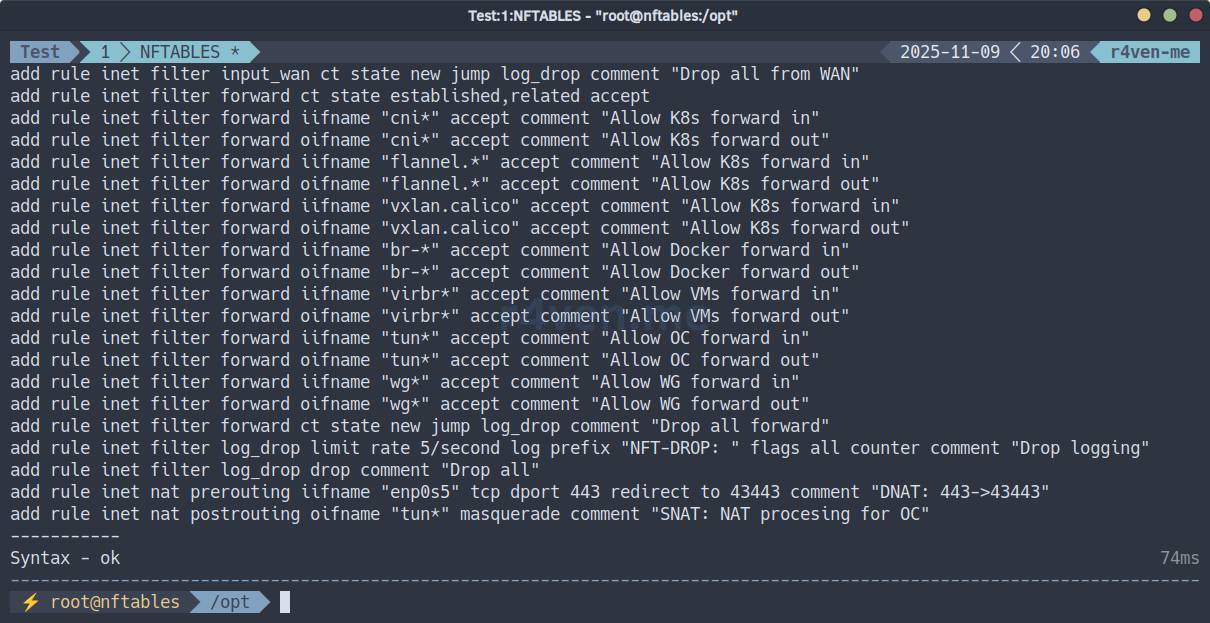
As responsible users, make a backup of the current configuration:
☝️It is recommended to do this before every change to the working configuration.
sudo ./nftables.sh -b
Apply the rules:
sudo ./nftables.sh -a
View the list of all nftables rules:
sudo nft list ruleset
Check the current session to make sure our SSH was not dropped:
w

date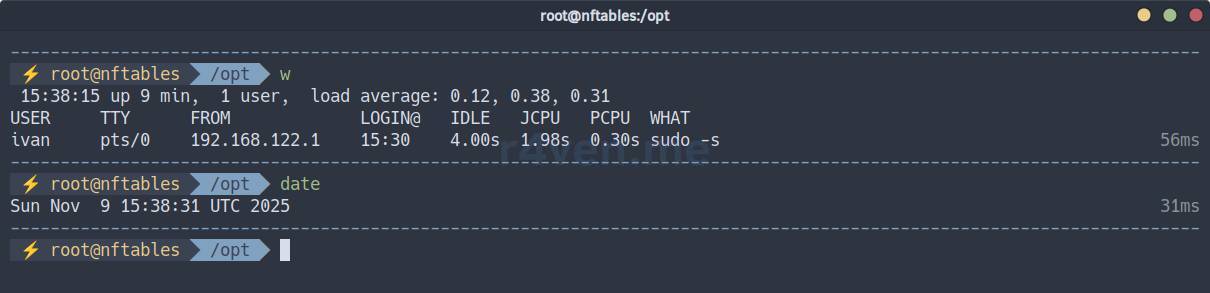
Now open a neighboring tab and check that we can connect to the server:
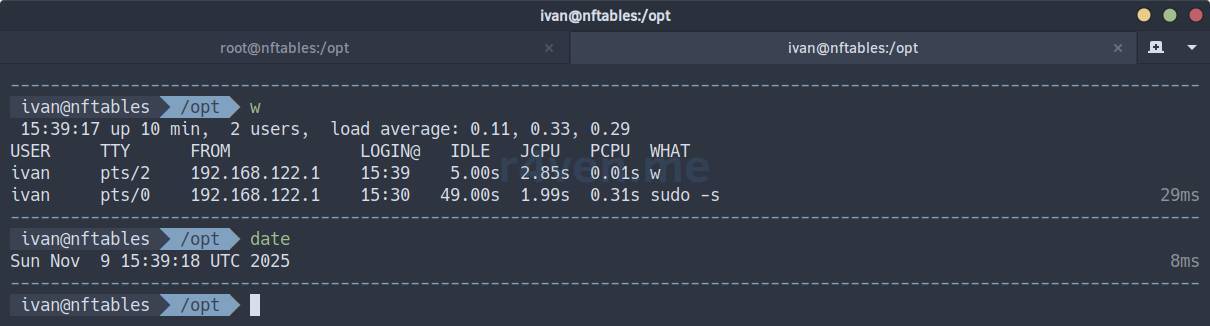
So far, everything is OK. Continue checking the firewall operation.
☝️If you need to roll back changes, run:
sudo nft delete table inet filter

sudo nft delete table inet nat

sudo nft -f /etc/nftables.conf_<timestamp>ICMP - run from the client machine:
ping -c3 nftables.r4ven.meTrace (UDP):
traceroute nftables.r4ven.me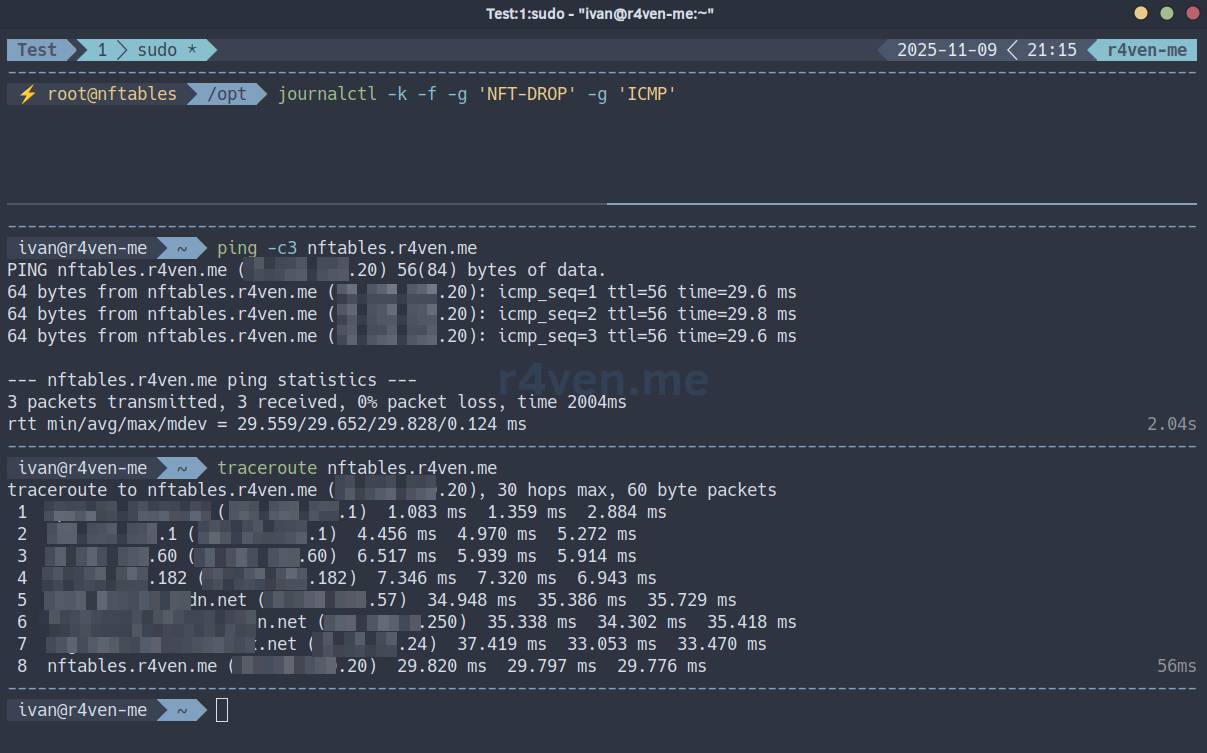
Everything passes.
Now check blocking ICMP above 10 packets per second.
The rule set includes one rule for logging: it writes events to the system journal.
On the server, view the drop log filtered by ICMP:
sudo journalctl -k -f -g 'NFT-DROP' -g 'ICMP'📝This command uses journalctl to view the kernel system journal (-k) in real time (-f). It filters records containing both “NFT-DROP” and “ICMP” (-g 'NFT-DROP' -g 'ICMP').
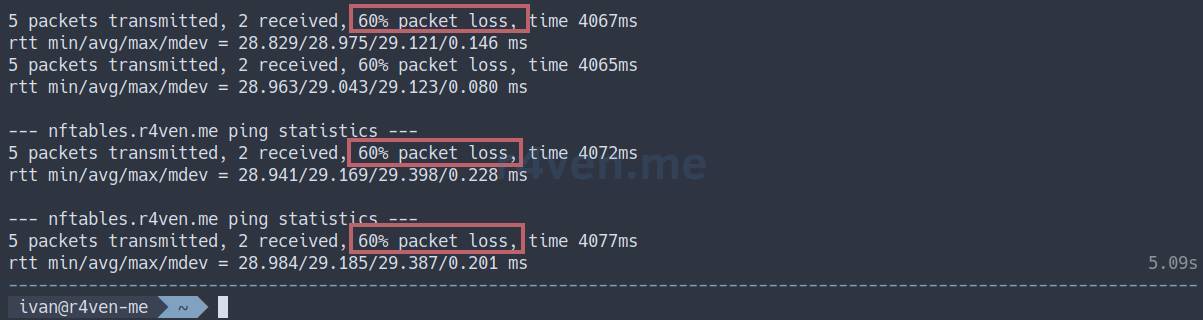
On the client, start 20 parallel ping processes:
seq 20 | xargs -n1 -P20 sh -c 'ping -c5 nftables.r4ven.me'Drop messages will be visible in the log:

And packet loss will be visible on the client:
For the following tests, install the socat utility for working with network connections on the client and on the server:
sudo apt update && sudo apt install -y socatNow, with its help, on the host with the configured firewall, start a TCP server on port 443, access to which we allowed when configuring the firewall.
On the server, start a process that sends pong when it receives a TCP packet:
sudo socat -v TCP-LISTEN:443,fork SYSTEM:"echo 'pong'"Send a test request from the client:
echo "ping" | socat - TCP:nftables.r4ven.me:443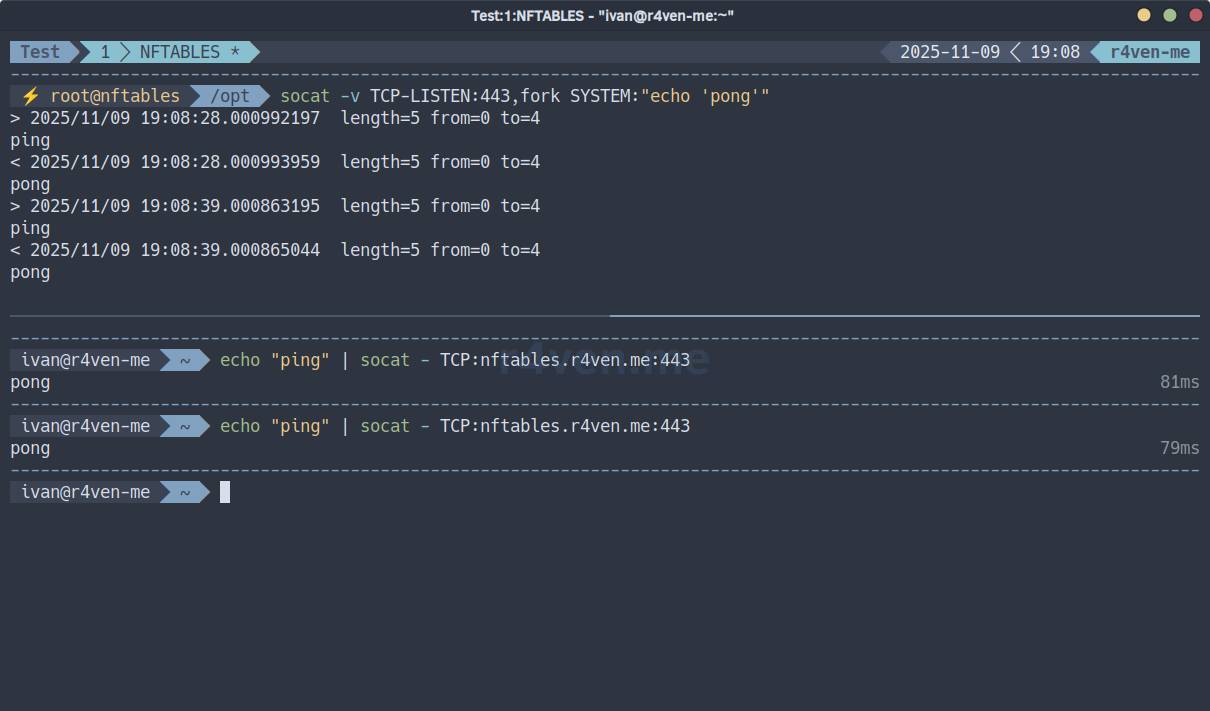
It works. Now check some unopened port.
On the server:
sudo socat -v TCP-LISTEN:444,fork SYSTEM:"echo 'pong'"On the client:
echo "ping" | socat - TCP:nftables.r4ven.me:444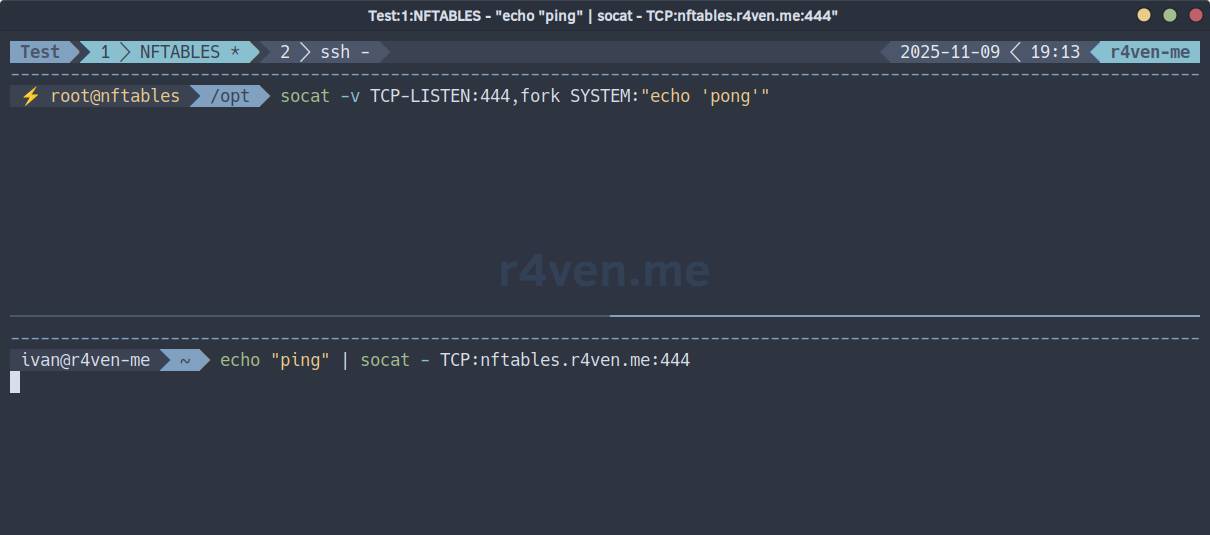
As we can see, the connection is not established.
View the nftables drop log:
sudo journalctl -k -f -g 'NFT-DROP' -g '12.34.56.78'Where 12.34.56.78 is your external IP from which you perform the client connection.
💡You can find out your external IP with this command from the client:
curl eth0.me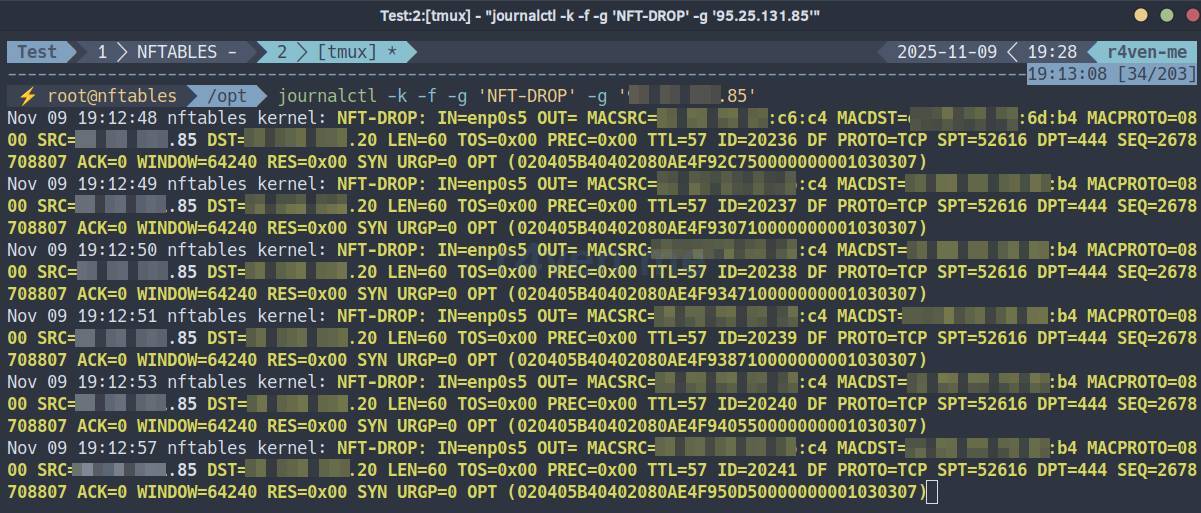
Great, the firewall works as expected😅.
Now check port forwarding. In our rules, port 443 was redirected in the prerouting hook to port 43443 (and there is an allow rule in the input hook).
On the server, listen on TCP port 43443:
sudo socat -v TCP-LISTEN:43443,fork SYSTEM:"echo 'pong'"On the client, send a request to TCP port 443:
echo "ping" | socat - TCP:nftables.r4ven.me:443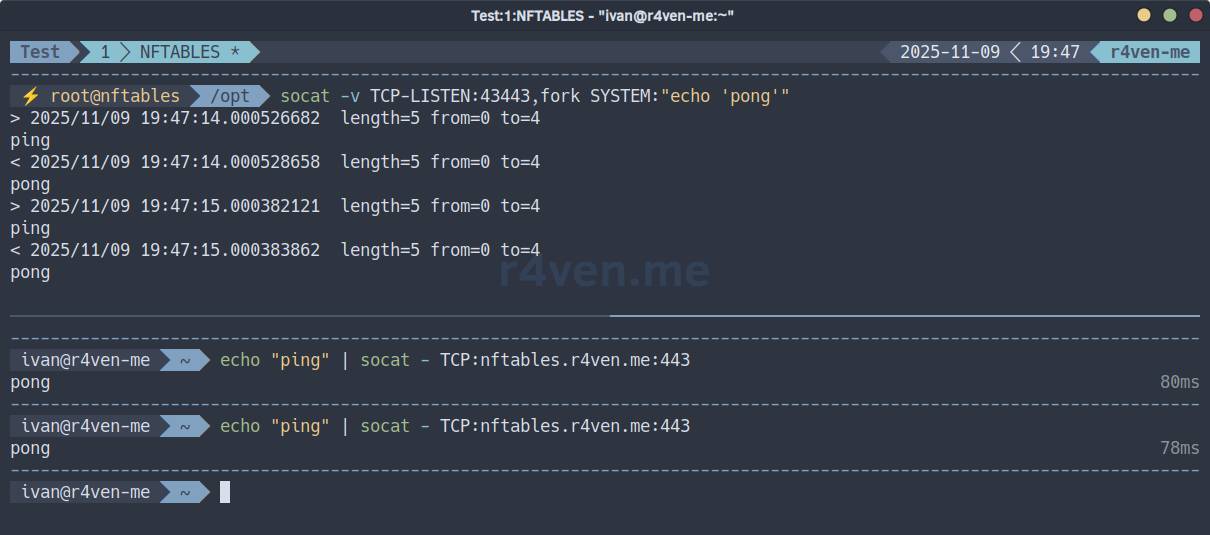
It works!
Check UDP operation in a similar way. In our rules, we opened port 123.
Run on the server:
sudo socat -v UDP-RECVFROM:123,fork SYSTEM:"echo 'pong'"And on the client:
echo "ping" | socat - UDP:nftables.r4ven.me:123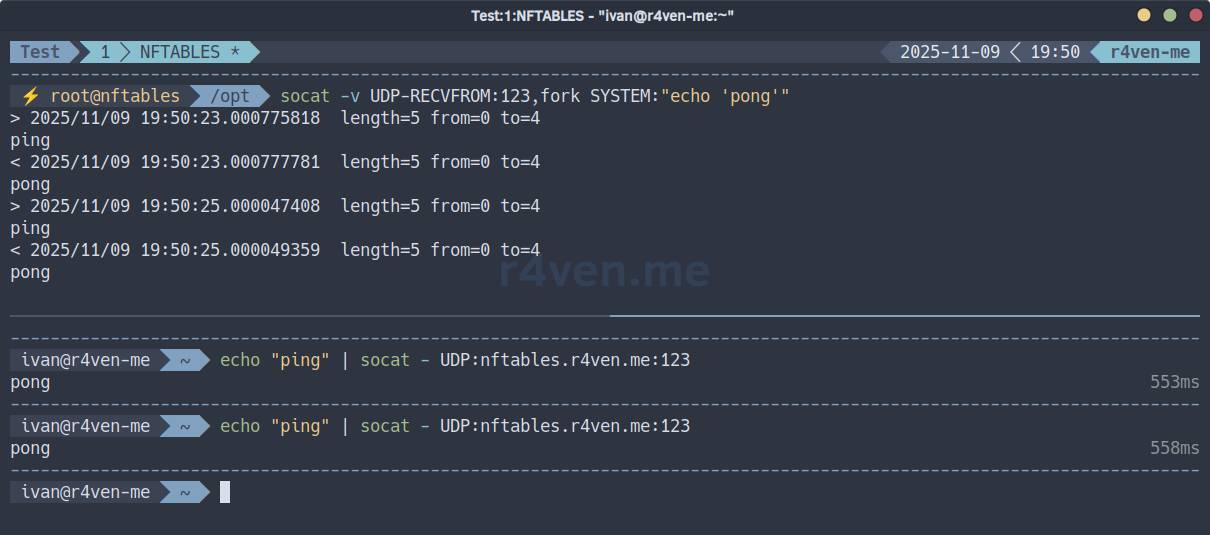
Everything is good. Also check drop for unauthorized UDP:
On the server:
sudo socat -v UDP-RECVFROM:12345,fork SYSTEM:"echo 'pong'"On the client:
echo "ping" | socat - UDP:nftables.r4ven.me:12345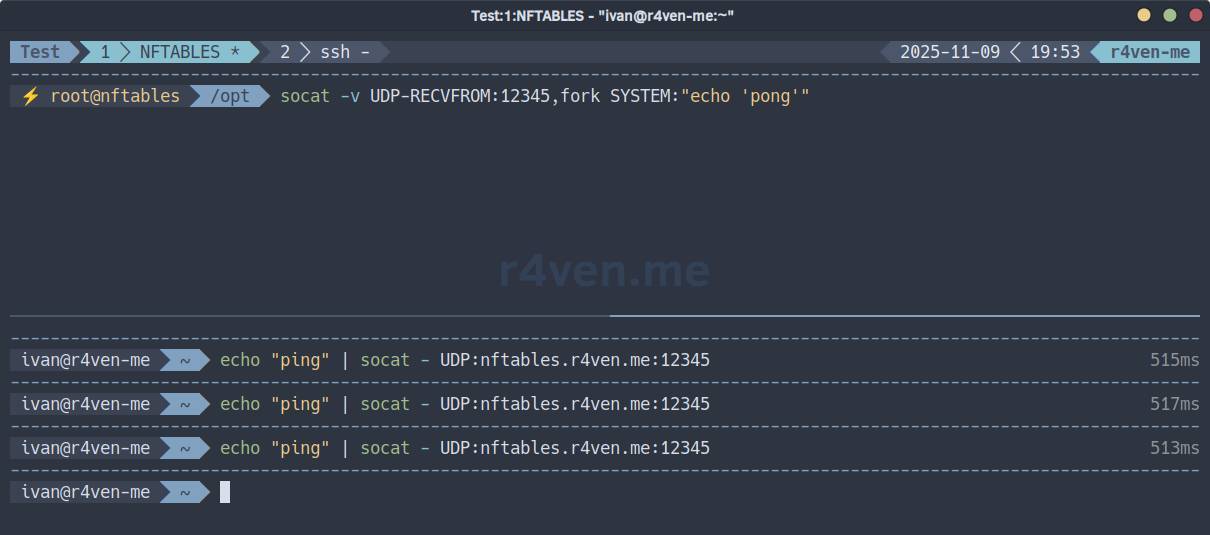
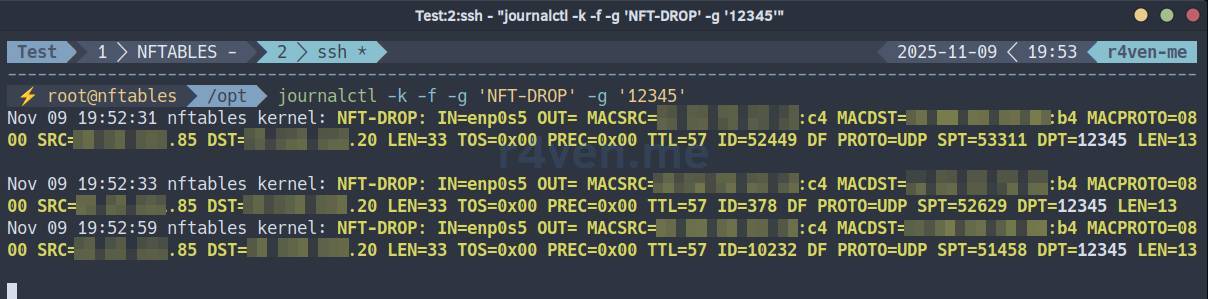
Empty. But when viewing the journal:
sudo journalctl -k -f -g 'NFT-DROP' -g '12345'We see the corresponding records:
After making sure that the firewall configuration is correct, save the rules:
sudo ./nftables.sh -s

cat /etc/nftables.conf
💡 Tip
To update the rules, edit the NFT_RULES array and apply the changes:
sudo ./nftables.sh --backup --apply --saveConfiguring nftables autostart at OS startup
The nftables package includes a Systemd service unit, which essentially runs the command to apply rules from the main configuration file: nft -f /etc/nftables.conf (in deb-based distributions; in rpm-based ones, /etc/sysconfig/nftables.conf).
Enable autostart:
sudo systemctl enable --now nftables

sudo systemctl status nftables

sudo nft list ruleset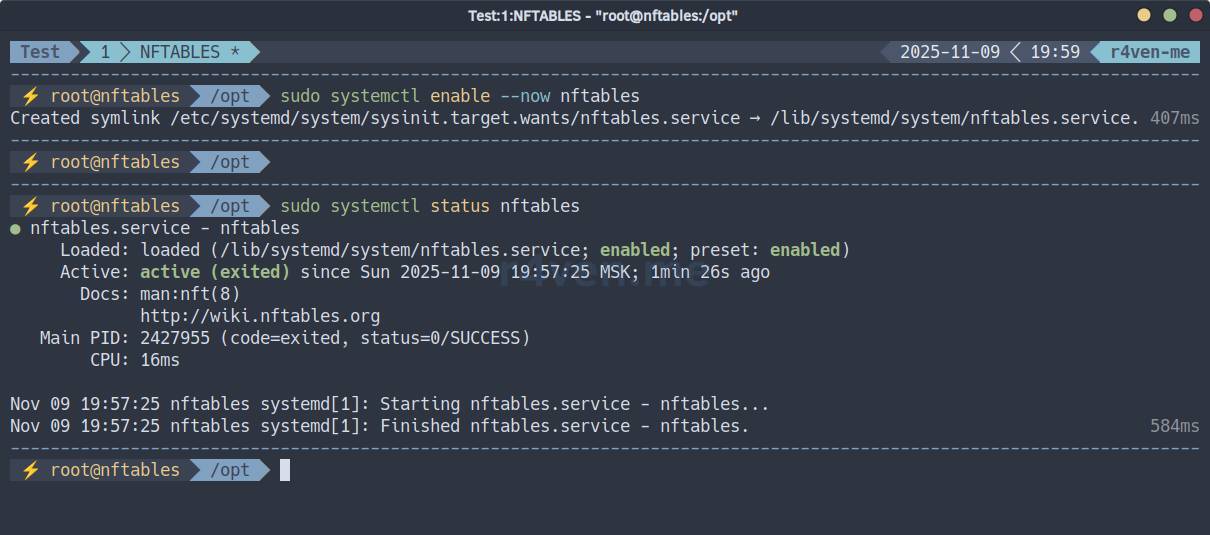
For complete peace of mind and to check firewall operation, it is recommended to perform a preventive server reboot:
⚠️ Do not forget about access from the hypervisor.
sudo rebootUseful nftables commands
# Show the entire ruleset
sudo nft list ruleset

# Show all tables
sudo nft list tables

# Show the contents of the filter table
sudo nft list table inet filter

# Show the input chain of the filter table
sudo nft list chain inet filter input

# Show rules with handle - rule sequence numbers (for replacement/deletion)
sudo nft -a list ruleset

# Flush all rules
sudo nft flush ruleset

# Flush only the filter table (CAUTION! Does not delete default policies)
sudo nft flush table inet filter

# Delete the filter table
sudo nft delete table inet filter

# Add a rule (example)
sudo nft add rule inet filter input tcp dport 22 accept

# Show a chain with handle
sudo nft -a list chain inet filter input

# Delete a rule by handle
sudo nft delete rule inet filter input handle 15

# Replace a rule by handle
sudo nft replace rule inet filter input handle 15 tcp dport 2222 accept

# Load config from a file
sudo nft -f /etc/nftables.conf

# Check syntax without applying
sudo nft -c -f /etc/nftables.conf

# Save current rules to the config
sudo nft -s list ruleset > /etc/nftables.conf

# Track changes in real time
sudo nft monitor

# Trace packet traversal
sudo nft monitor trace

# Detailed debug output on load
sudo nft --debug=netlink -f myrules.nft

# View the nftables journal
sudo journalctl -k -f -g 'NFT-DROP'Afterword
I tested this script on several local and public (with an external IP) servers. So far, the flight is normal, but there may still be shortcomings somewhere (I am not a network engineer😑). Let me remind you once again that you perform all actions at your own risk. If you still have questions on the topic, you can ask them in our Raven chat. In my free time, I will try to answer you👨💻.
Thank you for reading!
Materials Used
- nftables.sh script on my GitHub
- Useful article: Firewall configuration - Nftables
- nftables documentation: hooks
- nftables documentation: protocol families
- A similar script, but for iptables
👨💻And…
Don’t forget about our Telegram channel 📱 and chat
Or maybe you want to become a co-author? Then click here🔗
💬 All the best ✌️
That should be it. If not, check the logs 🙂

Comments