
In the second part I’ll talk about the actual job search and interview process - how I prepared my resume, where the communication happened, what stages there were, and what interviewers paid attention to. This was recent, so it’s unlikely anything has changed drastically.
☝️ Important
Right away: this is my experience, not a universal instruction manual for all of IT.
See also: About IT interviews - part one
🖐️Hey!
Subscribe to our Telegram channel @r4ven_me📱, so you don’t miss new posts on the website 😉. If you have questions or just want to chat about the topic, feel free to join the Raven chat at @r4ven_me_chat🧐.
Short glossary
- Soft skills - how you communicate, negotiate, and work with people. Knowing everything technically and still not fitting the team is a pretty real scenario;
- Hard skills - technical knowledge and abilities. What you know, what you can do, what tasks you can solve;
- Grade - a conditional specialist level: Junior, Middle, Senior, and intermediate variants like Middle+;
- Offer - a job proposal with specific terms.
What job I was looking for
I was looking for a Middle+ grade systems engineer position. Although the job titles varied - DevOps, SysOps, system administrator, techops. In my search, similar tasks were often behind them, but not always. You can’t rely on the title alone here.
Resume preparation
The resume is something a lot of people ignore. That’s a mistake. You need to approach it thoughtfully, understanding the current context.
Tasks, stack, and results
The main rule - there’s no point in just listing skills. What matters is specific tasks and results. What projects did you implement? What problems did you solve? What got better because of your work?
For example, in a resume it might look like this:
- Implemented centralized access control for Linux servers, which reduced the number of permission-related incidents by about 30%;
- Automated configuration changes and information gathering using Bash and Ansible, which cut execution time for some of the current tasks by about 50%;
- Developed and deployed a backup tool that combined file and database dump handling.
People love this stuff, even adore it. But the numbers have to come from somewhere. If you’re claiming a reduction in incidents, it would obviously be good to have statistics, for example from a ticketing system over a specific period. But the general idea is this: your claims should be backed up. And you, of course, should understand what you’re comparing against. Making up a nice percentage is easy, explaining it is a different story…
Not everything has to be measured in percentages. Implemented version control for configs, set up inventory data collection, built a backup process - that’s also a concrete result. The main thing is that the wording makes it clear what changed, rather than just “participated in process improvements.”
AI and formatting
Algorithms and AI may be used for search and initial screening. Which means the resume needs to be understandable not just to a human. First I wrote the resume the way I imagine it myself. Then I threw it into ChatGPT with a request to clean it up - with automated processing in mind. In parallel, I talked to HR people I know and looked at examples of their resumes to understand current trends.
But there’s a nuance here: after a neural network, the text needs to be reread and given back its human look. Long dashes, curly quotes, and tons of bullet lists are AI markers, even to AI itself (that’s the time we live in). A resume is still, for now, about you as a specialist with a certain level of qualification.

In my resume I included not only keywords for the algorithm, but also the skills I could confidently answer questions about.
This is where the modern specifics of screening come in: the overqualified and underqualified story. In the first case, for some positions you look too qualified, in the second - not qualified enough. You need a golden mean: show the relevant experience, don’t hide anything important, and don’t try to look like someone who can do absolutely everything. Both on the technical side and with soft skills.

As far as I know, the “very experienced” aren’t exactly welcomed everywhere right now either. Some places worry about high salary expectations, others worry the person will get bored quickly and leave. So if you’re a dinosaur with 20 years in IT, I don’t see the point in describing every single year of work in detail. What matters isn’t just how many years you’ve worked, but what you’ve been doing recently.
Technology moves fast, so I recommend focusing on relevant experience: the fundamentals plus the stack needed for the specific position. That doesn’t mean old experience should be crossed out or that fundamental knowledge is no longer of interest to anyone. It’s just that administering a server twenty years ago and the tasks you can solve now are not the same thing. The most recent relevant jobs can be described in detail, the earlier ones - more briefly. So to speak, without a guided tour through every version of Windows Server you’ve ever touched.
On the other hand, if you’re a junior of juniors, pet projects or a home lab can serve perfectly well as experience. Set up a Proxmox test bench, configured monitoring, automated deployment through Ansible - there’s already something to discuss.
The main thing is that your own work is behind it and you can meaningfully answer questions: why you did it exactly that way, what problems you ran into, how you verified the result. A project launched purely by following someone else’s instructions doesn’t say much on its own. But if you figured out how it works and why it breaks - that’s a whole different conversation.
Photo, courses, and certifications
A photo is also part of the resume. I’d go with an ordinary one where the face is clearly visible, without unnecessary creativity.
Courses, professional development, and supporting documents are better not forgotten. If you can attach (recent) certificates, especially ones available through government services, you should attach them. If the platform itself has relevant tests (and it does) or courses with a completion mark - I’d recommend using that too. Just don’t confuse proof of completing a course with the actual ability to apply the knowledge.
I included my desired income in the resume. From an algorithmic standpoint, that seemed logical to me. Most likely, HR systems filter in part by the salary “range” they have on file. But that doesn’t mean you should immediately state a final number during the interview. I’ll get back to that separately.
Searching on the platform
I started applying to jobs on one well-known portal. Honestly, in about 99% of cases these were rejections. At first I even started to doubt myself a bit.
But after a while I figured out the reason. The job search platform itself isn’t really built for normal human interaction these days. As sad as that sounds. The resume just sits there, sitting there. I’m sure not everyone knows this, but access to candidate resumes/contacts is paid for companies, and that affects things too. There’s also a scheme where one HR person buys the resume unlock and then passes the contacts to colleagues through other communication channels. That’s how they save on budget. But I wouldn’t blame all the rejections solely on how the platform is built, even though it’s important to keep in mind.
In total, the platform brought literally a few offers. One - with relocation to the middle of nowhere for a salary unreasonably low for that kind of move. Not interested, didn’t consider it. The rest of the communication happened nowhere near there.
Main contact through messengers
The real communication happened through what I put in my resume - messengers. At that time it was Telegram. HR people came there, clarified questions, arranged meetings.
Most often they’d first offer an introductory interview with HR - about half an hour, general Q&A, checking mutual interest. Less often they’d offer to go straight to a technical interview.
Typical pipeline
The statistics for the whole search process looked like this:
- HR interviews - about 15 of them. Standard format: 30 minutes, getting acquainted, basic questions, checking mutual interest;
- Technical interviews - about 7-8 of them. The main stage, which I’d reach after the HR introduction;
- Final stage - literally a few meetings. After the technical interview, before the company’s decision on an offer.
At the technical interview, serious questions start coming about your experience, qualifications, specific tasks you’ve solved. And this is where the story from the resume has to line up with what you can actually tell and show.
Almost right away at the first technical interview, they decided to grill me on the output of the standard Linux process manager - top.
Just like that, the technical specialist whose team was hiring started a screen share, opened a terminal, and ran the top command.
After that, we spent the entire technical interview meticulously going through every single field in that command’s output.
That’s what’s called the basics. So if this is relevant for you, I strongly recommend checking this out to “refresh the fundamentals”: Breaking down the top utility’s output.
About AI
The situation on the IT job market right now is, to put it mildly, ambiguous. From what I can tell, it’s overloaded with low-skilled people, as well as “real” impostors, not just the ones with impostor syndrome. I’m talking about the “IT wolf cubs” and other career-switchers who are learning not so much how to work as how to pass interviews and sell nonexistent experience. And this isn’t about beginners as such - everyone starts somewhere. This is about deliberate deception. Against this backdrop, it becomes harder for specialists who have a genuine interest in technology, a desire to actually understand it, and real experience, to find decent work.
You’ve probably already seen various videos where a “clever candidate” beat the system and faked their way through all the interview stages at a “big company” with the help of AI. It listens to the questions in real time and suggests answers in a semi-transparent overlay window. It all looks great on video. The problem is that passing interviews and then independently solving work tasks are somewhat different skills. I partly understand the employer’s position here: it’s getting harder and harder to soberly evaluate a candidate’s qualifications. Does he actually understand what he’s talking about, or is he just reading out a generated answer well? That, I think, is where the extra checks and the growing number of interview stages come from. And it’s people who didn’t make anything up and came with their own real experience who also have to go through all of it. But that’s our reality, and it has to be dealt with somehow.
From the employer’s side, I think the easiest way to counter this is Live Admining, which I’ll get to shortly. Not just asking the team, but giving a task, watching the candidate’s actions, and asking them to explain what they’re checking and why. It’s not a magic shield against any kind of prompting, but it’s a lot easier to see the difference between understanding and reading out a ready-made answer that way.
In the meantime, my recommendation for all true systems engineers is not to use such assistants during the interviews themselves. If you have real experience and professional skills, that kind of prompter is more likely to get in the way: you need to listen to the question, read the hint, and try to weave it into your own answer at the same time. It’s better to explain your train of thought in your own words, and in some places honestly say “I don’t remember, but I’d check it like this” than to confidently say something you don’t actually understand yourself. Using AI to prepare and review gaps in your knowledge is one thing. A hidden prompter that does the interview instead of you is something else entirely.
Two rejections
During my latest search, I passed almost all the technical interviews, but there were two rejections.
The first rejection - over soft skills. I passed all the technical questions, but the company needed a specialist ready to spend a lot of time communicating with clients alongside the technical work. I wasn’t very interested in that, I was willing to do it for at most 30% of my working time. They needed around 50%. The rejection was logical.
The second rejection - over hard skills. This was the most interesting interview. Three hours long, with hands-on practice. More on that below.

Live Admining - how it works
If programmers have Live Coding during interviews, administrators have Live Admining. The idea is simple - you get browser access to a server’s virtual console and are asked to complete several tasks.
Here are the tasks I was given:
Task 1: Fix the network

On a Linux machine, there was a network interface, but there was no access to the needed subnet. Machines on that network were unreachable.
What helped here was changing the subnet prefix via the ip command: the range of addresses the machine considered its local network needed to be extended. The ipcalc utility, which was installed, helped calculate the right mask.
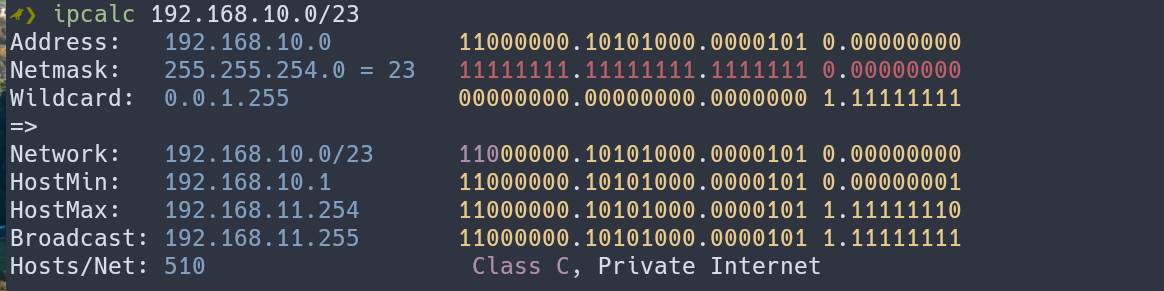
An interesting nuance: it was possible to do this live, without stopping and restarting the network interface. With ip you can add an extra IP address with the needed prefix to an interface without removing the existing one. In the configuration from the task, that turned out to be enough - the needed hosts became reachable immediately.
The solution is far from ideal and not meant to be permanent. For a production infrastructure, you’d need to separately sort out addressing, routes, and persisting the settings. But that’s not really the point here: the interviewer is watching the flow of your thoughts and actions. What you check, what hypothesis you come up with, and whether you understand why things started working after the change.
Example
Say interface ens18 has address 192.168.10.10/24 configured, and you need to reach 192.168.11.20. Both machines are on the same L2 segment, but the current prefix doesn’t let the needed address be considered local.
First we look at the addresses and which route the system picks to the needed host:
ip -br addr show dev ens18
ip route get 192.168.11.20The /23 prefix merges the 192.168.10.x and 192.168.11.x ranges into the 192.168.10.0/23 network. We add an extra free address with this prefix to the interface, keeping the existing one:
sudo ip addr add 192.168.10.11/23 dev ens18There’s no need to bring the interface down. With a regular address addition, Linux will also create a route to the connected 192.168.10.0/23 network. Check the result:
ip -br addr show dev ens18
ip route show dev ens18
ip route get 192.168.11.20
ping -c 3 192.168.11.20Now the system should try to reach the needed host directly through ens18, instead of through the gateway.
After testing, the extra address can be removed:
sudo ip addr del 192.168.10.11/23 dev ens18Once again, I’ll stress: this is a solution for the specific configuration in the task, not a universal way to fix access to another subnet.
Task 2: DNS resolution issue
A hostname wasn’t resolving. Network packets were being sent, but the server name wasn’t being translated into an IP address.
I figured out almost immediately that the problem was in /etc/nsswitch.conf - the name resolution settings in the hosts line needed to be fixed. That’s exactly where it’s defined which sources to use for name resolution and in what order. Just having DNS servers in /etc/resolv.conf isn’t enough if querying DNS servers isn’t included in that chain.
Example
In the example, replace example.org with the name of the problem host.
# Name resolution through system mechanisms, respecting nsswitch.conf
getent ahostsv4 example.org

# Direct query to DNS - ignoring the source order in nsswitch.conf
dig example.org A

# Which sources are used for name resolution and in what order
grep -E '^[[:space:]]*hosts:' /etc/nsswitch.conf

# Configured DNS servers
cat /etc/resolv.confIf dig returns the right address but getent doesn’t, that’s a reason to check the system’s name resolution chain, including the hosts line in /etc/nsswitch.conf.
Task 3: What’s taking up disk space?
This was the most interesting task. At first glance it seemed simple, but it actually had several possible variants. Space ran out, and where it went wasn’t immediately obvious. I can remember at least four reasons for a picture like that:
- Hidden files (dotfiles) - the most obvious case. They’re easy to miss, for example if you measure size with
du -sh *: a regular shell wildcard usually doesn’t match names starting with a dot; - A process holding on to a file descriptor - a common situation where a process is keeping an already-deleted file open. The file is gone from the directory, but the space isn’t freed until the last descriptor is closed;
- Reserved space for the root user - for example, on ext4 a portion of blocks can be reserved and unavailable to regular users. Often it’s 5%, but it depends on settings. These aren’t lost files, it’s a separate reason why not all the free space is available;
- Bind mount - a directory mounted over another directory hides its previous contents. On top it may look empty, while under the mount point there are heavy files that never went anywhere.
There were a few more variants, but I don’t remember the rest. The interviewer gave hints at some points, especially with the bind mount and the reserved space - I didn’t know about that back then.
Example
# Used and available space, filesystem type
df -hT /

# Size of top-level directories, without crossing into other filesystems
sudo du -xhd1 /

# Deleted files that are still open by processes
sudo lsof +L1

# Mount tree
findmntHere du is given the / directory itself, not the /* pattern, so it accounts for hidden files too. findmnt helps you see the mount points, but it doesn’t show the actual contents hidden underneath them.
To check the reservation on ext2/ext3/ext4, you can add one more command. Here /dev/sda2 is a placeholder device, replace it with the right one:
sudo tune2fs -l /dev/sda2 | grep -E 'Block count:|Reserved block count:|Block size:'It only prints the filesystem’s parameters, without changing anything.
On one hand, the task is trivial, and on the other hand it can show up in a specific case like this one, where the solution isn’t obvious.
And then the theory
After the hands-on tasks came a bunch of theoretical questions. All the questions were about Linux - strictly Linux questions.
Here’s the catch: the job title was “DevOps Engineer”, but there wasn’t a word about Kubernetes, Terraform, Ansible, Docker, or Python scripts. Just Linux. I was even a bit surprised.
So much for different job titles. You need to look at the specific team’s tasks and expectations, not just the word DevOps in the title.
In the end I got rejected, but I got good experience out of it. This kind of interview is exactly where you build that experience the fastest.
The main task for this position was managing a huge infrastructure using automation tools, the main one being Puppet (IaC, infrastructure as code, described in the Ruby language). My experience with this system was minimal, but it looked interesting.
Maybe someone even knows which company this is)
The question of desired income
Over the whole search process, I never once had to say the desired number out loud. I always answered evasively: “I’m considering offers starting from the amount stated in my resume.” So there was already a reference point, but I didn’t lock in a final price tag.
There’s an unspoken rule: whoever names the number first, loses. Not a law of nature, of course, but the logic is clear. To define is to limit.
You need to leave yourself room to maneuver. In general, going through IT interviews (I can’t speak for other fields) is all a cat-and-mouse game.
At the stage before the offer, HR might ask whether you’re considering other proposals. It’s worth making it clear that you’re a hot commodity in high demand, not just sitting around waiting for one company’s decision.
The next question is whether you already have other offers. Saying “yes, there are one or two, I’ve been asked to give an answer by the end of this week or next” is a way to signal a timeline. Try not to box the potential employer in too much, but make it clear that you’re a trophy fish someone else might catch.
Even if there are no other offers, you can try to create that impression. But there’s a risk here: made-up offers and deadlines can corner the candidate himself.
They might also ask you to name the amount in a competing offer. At first that might seem out of line, but it’s clearly a plus for you. In fact there may be no other offer at all. But you’re free to answer something like: “the amount in the other offer is roughly 10-15% higher than the amount in my resume” (the main thing here is not to outsmart yourself). That way you can indicate the difference without naming an exact number. But be careful. HR’s interest in other offers by itself isn’t a promise that you’ll get an offer or a higher salary. Either way, I think it’s right to leave the potential employer room to offer a higher price tag.
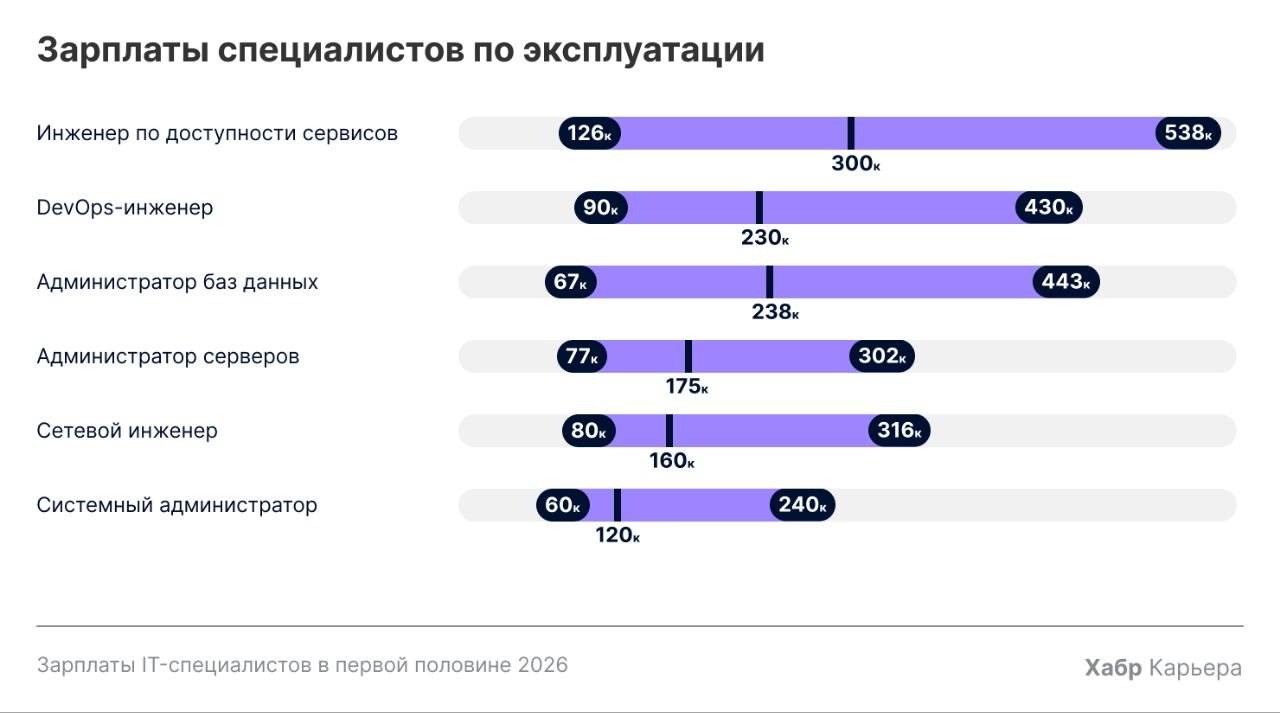
For those interested in numbers, I’ll round out the picture with a link to an analytical article about IT salaries in the first half of 2026:
Blog readers are probably most interested in this picture here:
What else to check out
Videos about interviews that may have useful advice. They no longer account for some of today’s realities like AI usage, but from the point of view of interview stages and soft skills they’re still useful.
- How to write a resume | What to write if you have no experience
- How to pass your first interview | What to say and what NOT to say
- What to say when you DON’T know the answer
- What not to forget to ask | When to send the interviewer packing
- How to improve your job offer | Not just with money
Conclusions
Interviews are not a simple process, especially today, and you by no means always pass, even if you know your craft well. Sometimes the hitch is soft skills, sometimes hard skills, sometimes you just don’t know some specific area well enough. And sometimes you and the company are simply looking for different things, as happened to me with the share of client communication.
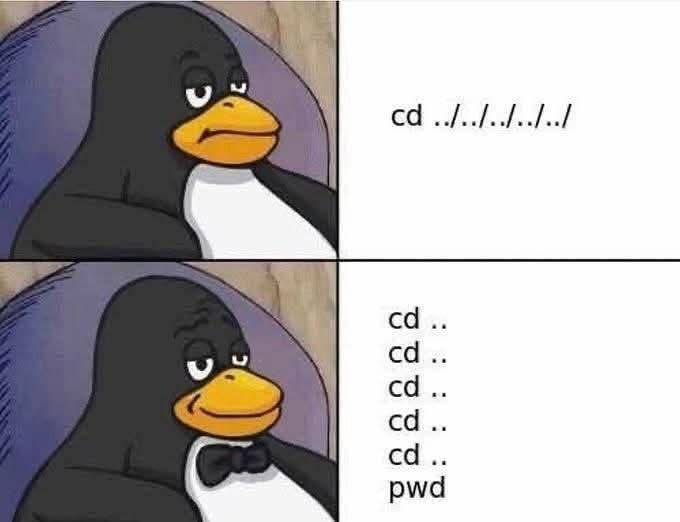
Live Admining turned out to be an interesting format, far more realistic than just answering questions, but also more stressful. It shows your knowledge and ability to navigate a system in real working conditions, and on top of that while your actions are being watched.
If you’re interested, in the next part I’ll talk about the full list of topics and materials I put together and studied/reviewed while preparing for interviews - with links to articles, cheat sheets, videos, and comments on what’s worth studying first 🤔
👨💻And…
Don’t forget about our Telegram channel 📱 and chat
Or maybe you want to become a co-author? Then click here🔗
💬 All the best ✌️
That should be it. If not, check the logs 🙂