
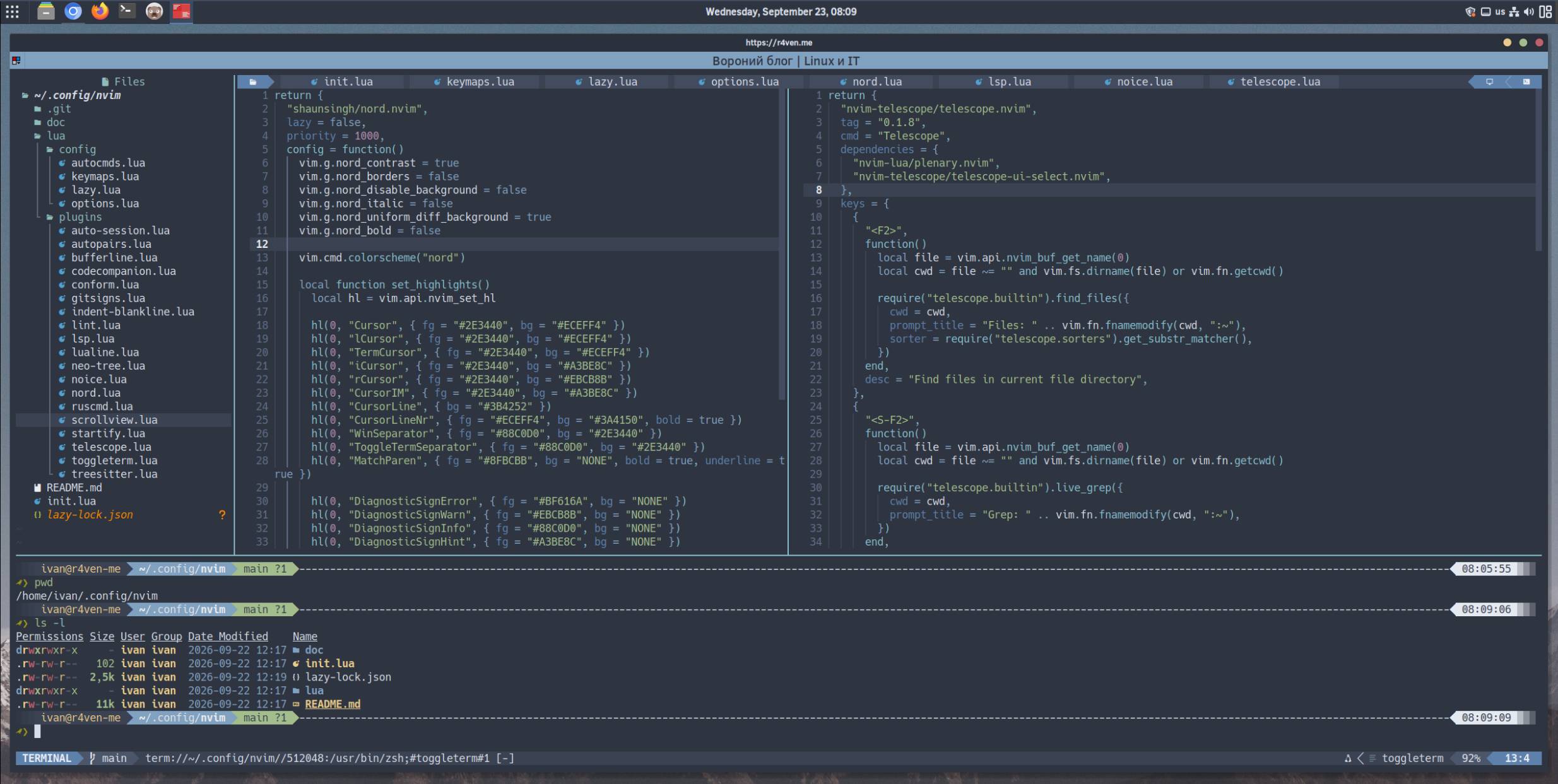
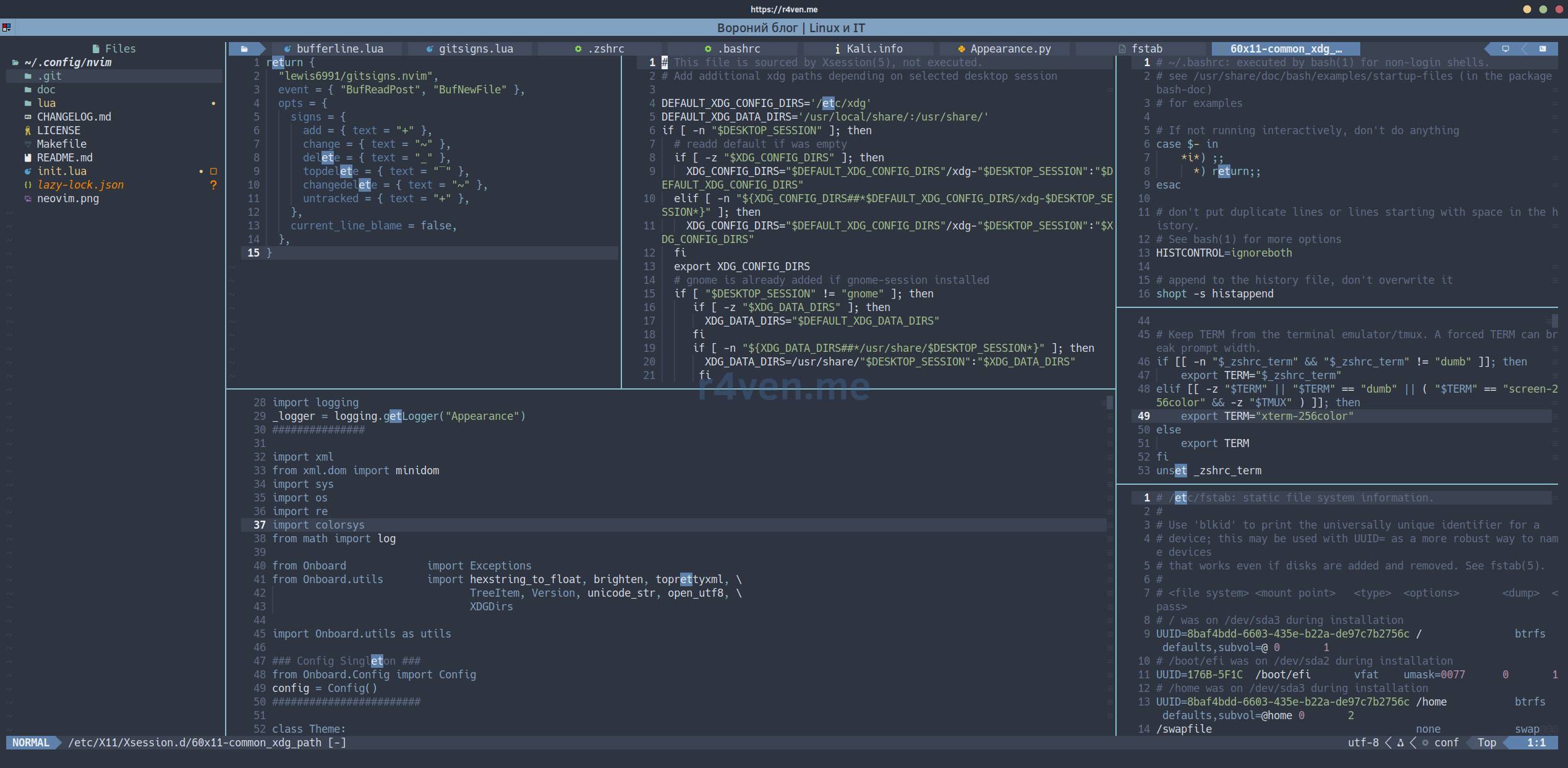
I’ve finalized my Neovim configuration in Lua and lazy.nvim, and in this article I’ll explain: what the config provides out of the box, how to install it with a single command, and for those curious, a detailed breakdown of each file following the project structure.
🖐️Hey!
Subscribe to our Telegram channel @r4ven_me📱, so you don’t miss new posts on the website 😉. If you have questions or just want to chat about the topic, feel free to join the Raven chat at @r4ven_me_chat🧐.
Preamble
I have an entire series of older notes about the previous config on init.vim and vim-plug:
- Neovim - editor configuration: basic setup
- Neovim - editor configuration: swap, backup and undo files
- Neovim - editor configuration: hotkey setup and command autorun
- Neovim - editor configuration: plugin installation and setup
- Neovim - installation and setup of a code editor with IDE elements in just a few commands
That config works fine; after switching from Vim to Neovim, I’ve long wanted to sit down and rewrite everything in Lua instead of vimscript. A modular file structure instead of one massive monolithic file.
It’s worth mentioning LazyVim separately. It’s a ready-made distribution of a Neovim configuration with pre-selected plugins, LSP, autocompletion, search, and hotkeys. LazyVim uses the lazy.nvim plugin manager internally, and additional plugins are added as regular Lua tables - plugin specs.
In my config, LazyVim as a ready-made distribution is not installed, but the same lazy.nvim and the same plugin spec format are used. So each file in lua/plugins returns a standard spec table with fields like event, cmd, keys, dependencies, opts, and config. This is done for configuration unification and format consistency. Looking at the code, you’ll understand what I mean.
So, below is a map of the finished result: what the config can do, how to install it, and what each file contains.
Initial Information
| Software | Version |
|---|---|
| LMDE/Debian/Ubuntu | 7/13/24 |
| Neovim | 0.11+ |
| lazy.nvim | 11.17 |
| Theme | Nord (shaunsingh/nord.nvim) |
💡 For correct icon rendering (bufferline, neo-tree, status line), you need a monospaced Nerd Font.
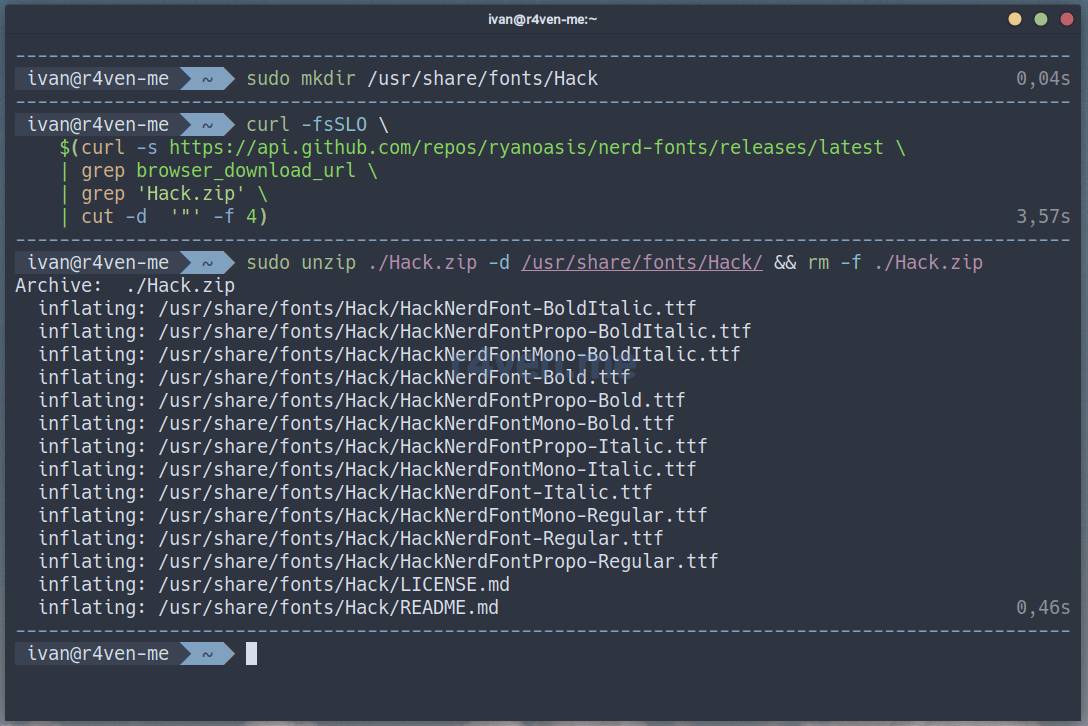
My readers know that I prefer the Hack font ☝️. Here’s a simple example of how to install it:
📝 Note
Please note that sudo rights are required to execute these commands. Alternatively, install fonts only for the current user in the ~/.local/share/fonts directory.
# create font directory
sudo mkdir /usr/share/fonts/Hack

# download font archive
curl -fsSLO \
    $(curl -s https://api.github.com/repos/ryanoasis/nerd-fonts/releases/latest \
    | grep browser_download_url \
    | grep 'Hack.zip' \
    | cut -d  '"' -f 4)

# unpack archive, copy fonts to system
sudo unzip ./Hack.zip -d /usr/share/fonts/Hack/ && rm -f ./Hack.zip📝 Note
The curl command uses a command-line substitution mechanism. That is, the main download command: curl -fsSLO is passed an argument, which is the result of executing another command within the $(command) construct, performed beforehand. As a result, the main command will receive a direct URL to the zip file of the latest Hack font release from GitHub. The command is universal.
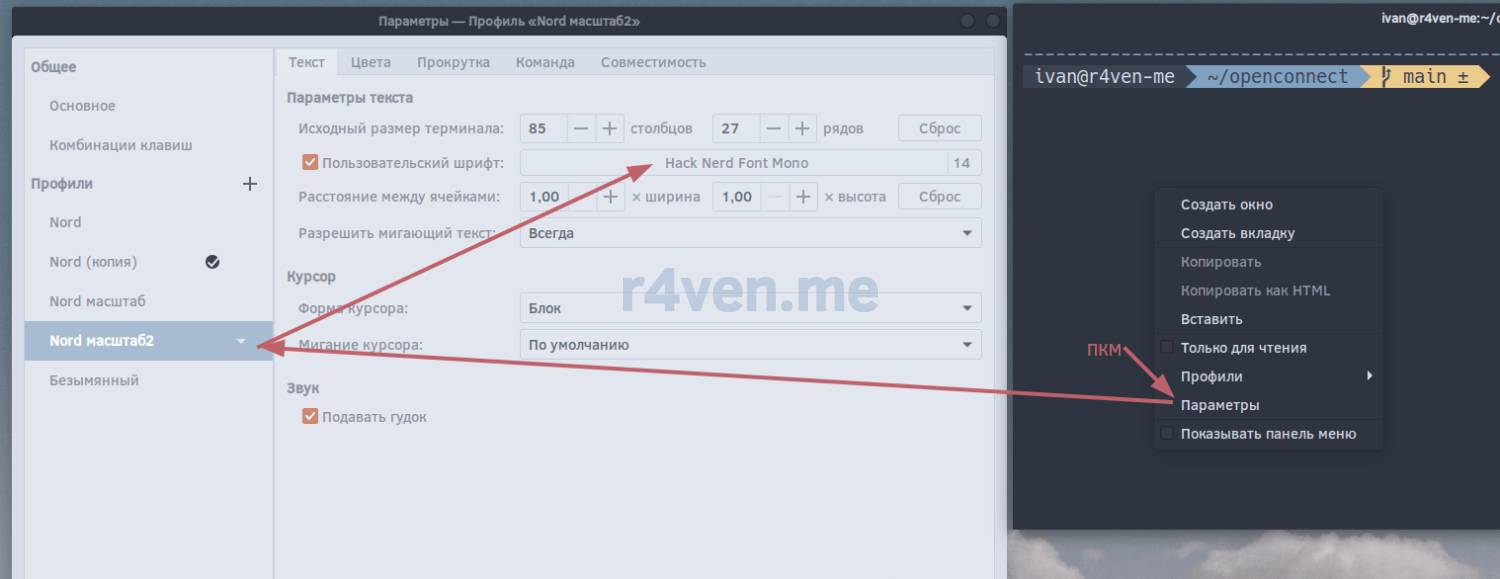
After installing the font, activate it in your terminal settings🛠.
In Gnome-terminal, this is done as follows:
What the Config Provides
The config doesn’t try to be a full-fledged IDE - the focus is on a pleasant Neovim UI, fast startup, syntax highlighting, optional diagnostics through external CLI linters, and formatting on demand. Plus a plugin for working with AI agents. But that will be a separate article.
What comes out of the box:
- Nord theme with manual tweaking of some highlight groups on top of the theme (cursor, window separators, diagnostics);
- lualine status line and bufferline buffer tabs at the top, both in Nord palette;
- side panel with project tree neo-tree (
F3), showing hidden and git-ignored files; - fast telescope search - by files and content, but not across the entire project, only in the current file’s directory (
F2/Shift+F2); interactive selection lists and message history also work through it; - modern syntax highlighting via Treesitter, with automatic parser installation for a dozen languages and formats;
- floating/bottom terminal toggleterm (
F4), stretched to full width, with transparent function key pass-through back to the editor, even when focus is inside the terminal; - git status line by line via gitsigns (
+/~/_in the sign column); - lightweight asynchronous code checking via nvim-lint and formatting on demand via conform.nvim;
- LSP boilerplate, disabled by default - enabled with one line;
- beautiful notifications and command line via noice.nvim/nvim-notify, message history via Telescope (
Shift+F4), auto-save and session restore, startup screen, auto-paired brackets/quotes, indent guides, scrollbar, and support for:commands in Russian keyboard layout; - AI chat CodeCompanion in the right panel (
F5orleader+ai) with beautiful Markdown viarender-markdown.nvim, editor context, and switching between any models, including Codex and Claude Code - both agents are connected via ACP/CLI and can use subscription authorization without separate API keys.
Almost Quick Start
Installing Neovim from Standard Repositories
The current version of the config requires Neovim 0.11 or newer. First, check the installed version:
nvim --versionIf the distribution already provides a suitable version, it’s enough to install basic dependencies through the package manager. For Debian/Ubuntu:
sudo apt update && sudo apt install -y neovim git ripgrepIn stable repositories of some distributions, Neovim 0.10 may still be available. In that case, it’s better to build the editor yourself.
Building Neovim from Source
Install build tools and required libraries:
sudo apt install -y ninja-build gettext cmake unzip curl build-essentialClone the official repository and build the release version:
git clone https://github.com/neovim/neovim /tmp/neovim

cd /tmp/neovim

git checkout stable

make CMAKE_BUILD_TYPE=Release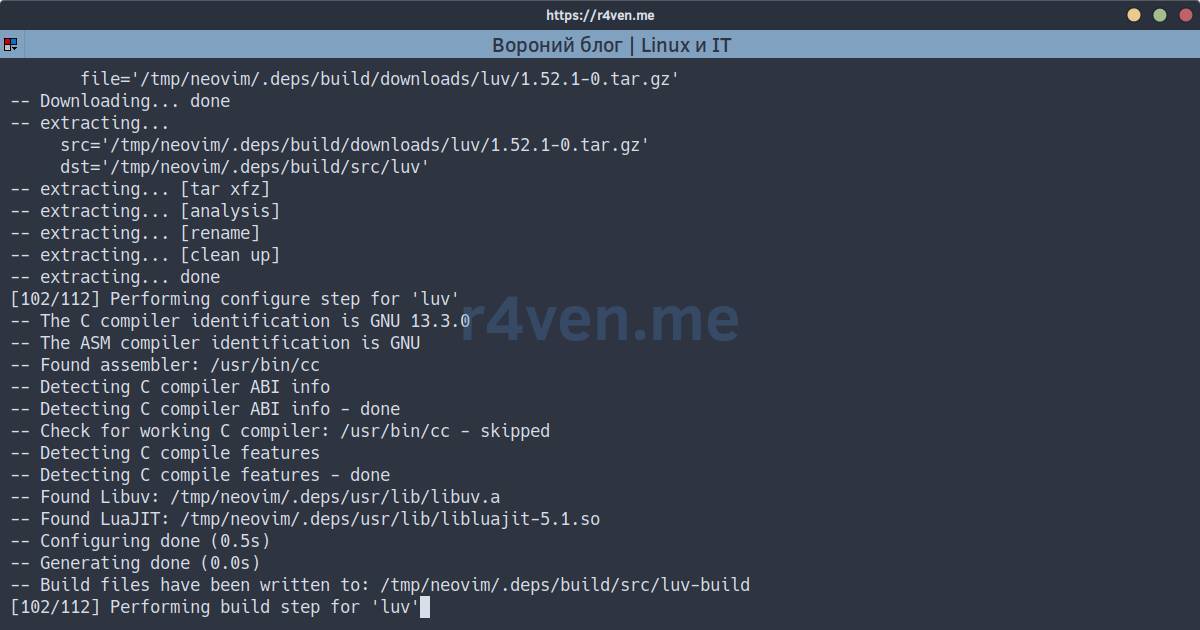
And install it to the system executable directory:
sudo make install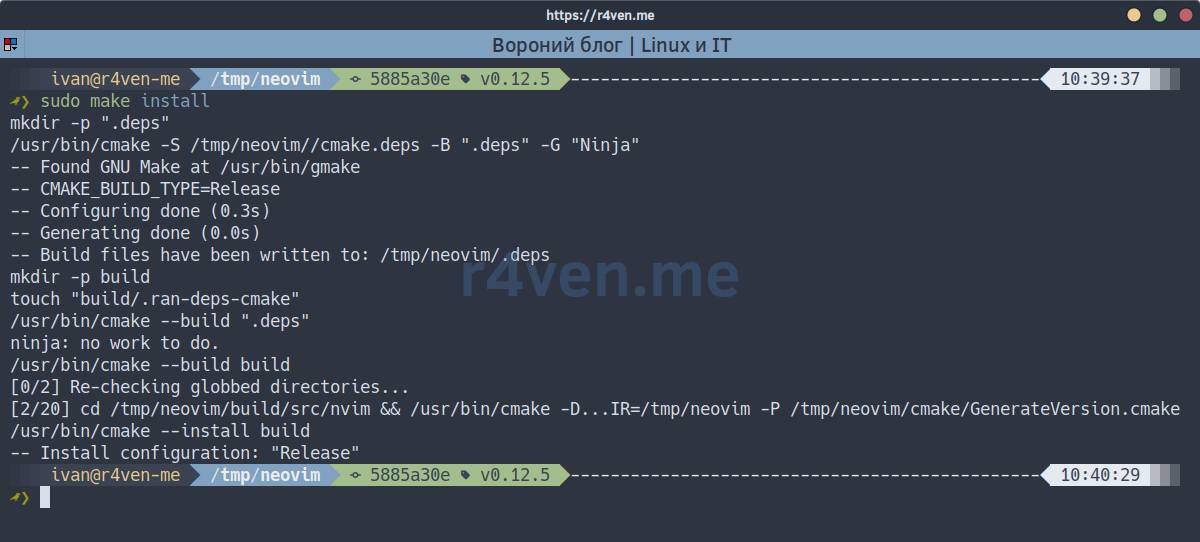
After installation, reinitialize the shell and check that the new version launches:
exec $SHELL

# or

hash -r

command -v nvim

nvim --version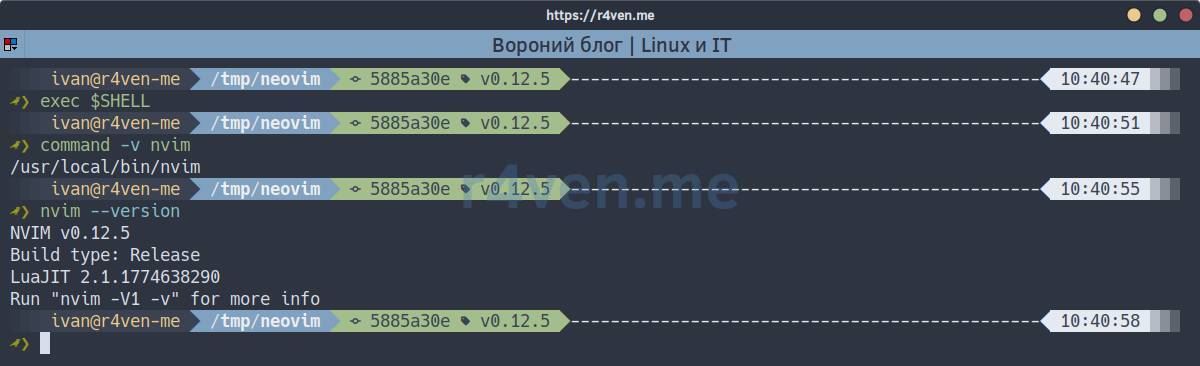
Usually, the compiled editor ends up in /usr/local/bin/nvim.
☝️ If the shell continues to find the old /usr/bin/nvim, you need to check the order of directories in $PATH.
Installing Linters
Linters are preferably installed from standard repositories, i.e. system packages are updated along with the distribution.
All linters for which the config has system fallback options are installed with one command:
sudo apt install -y shellcheck lua-check pylint yamllint jsonlintruff is also supported by the config, but it’s currently not available in the standard LMDE 7 / Debian 13 repository. So for Python, pylint is provided: installing Ruff via pip just for F7 to work is not necessary.
Available formatters from standard repositories are installed separately:
sudo apt install -y shfmt jq blackstylua, yamlfmt, and prettier remain optional: they make sense to install separately if needed. If any tool is not in $PATH, the config simply doesn’t include it and continues to work.
Installing My Config
Backup the current config, if it exists:
test -d ~/.config/nvim && mv -v ~/.config/nvim{,.backup}Now clone the config via git directly to ~/.config/nvim:
git clone --branch raven https://github.com/r4ven-me/neovim ~/.config/nvim📝 Note
For the AI chat, you need Node.js 22+ and ACP adapters for Claude/Codex:
npm install -g node@22

npm install -g @agentclientprotocol/claude-agent-acp @agentclientprotocol/codex-acpAgent authorization is configured separately: Codex can use a ChatGPT account, and Claude Code can use OAuth for Pro/Max subscriptions or Anthropic API.
CLI/ACP installation, secure token storage, and environment verification will be covered in detail in a separate article.
First launch:
cd ~/.config/nvim

nvim ./init.luaOn first startup, the config will automatically clone lazy.nvim, install plugins from lua/plugins, create service directories under ~/.local/state/nvim, and fetch the required Treesitter parsers (will take some time :)
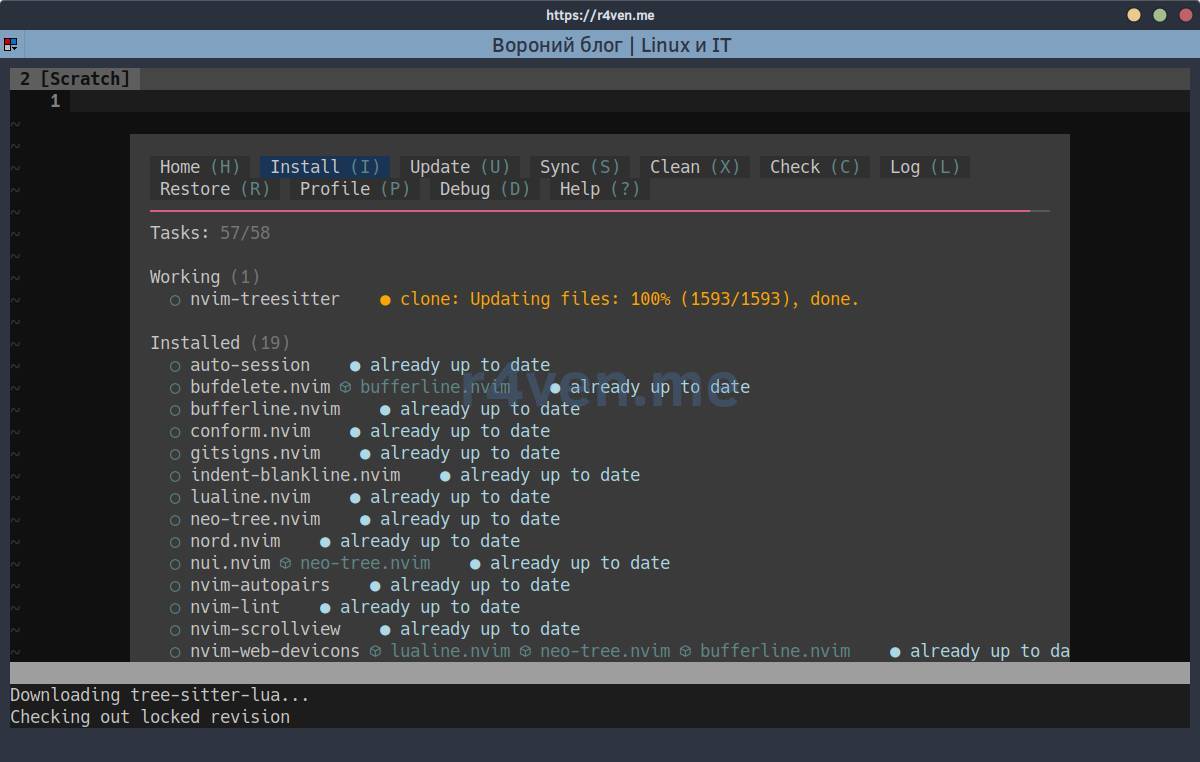
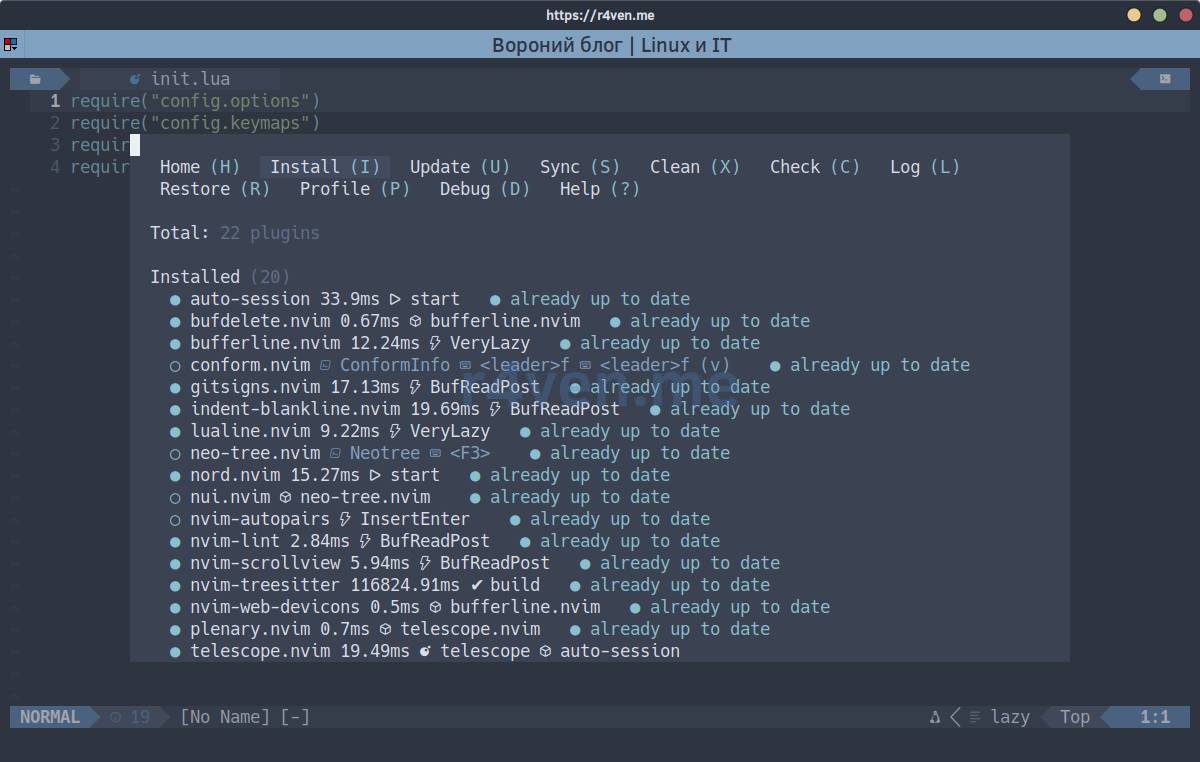
💡 To close the Lazy plugin window, press q.
📝 You can check or update the list of plugins at any time with the :Lazy command inside the editor.
Custom Hotkeys
Below are the additional/modified editor hotkeys:
📝 Space is used as leader.
| Key | Action |
|---|---|
Shift+F1 | Open built-in config help |
F13 | Run git add, commit with message Upd, and git push for the current file directory |
F2 | Find a file in the current file’s directory |
Shift+F2 | Find text in files of the current file’s directory |
F3 | Open or hide Neo-tree |
Shift+F3 / F15 | Format current buffer or visual selection |
F4 | Open or hide bottom terminal |
Shift+F4 | Open or hide Noice message history via Telescope |
F5 | Open or hide AI chat CodeCompanion |
Shift+F5 | Save and run current shell or Python file |
F6 | Show workspace diagnostics in Telescope |
Shift+F6 | Show current buffer diagnostics in Telescope |
F7 | Enable linting and run check immediately |
Shift+F7 / F19 | Disable linting and clear diagnostics |
F8 | Show Git status in Telescope |
Shift+F8 | Show Git history of current file |
F9-F12 | Load one of four numbered sessions |
Shift+F9-Shift+F12 | Save one of four numbered sessions |
Shift+h / Shift+l | Go to previous or next buffer |
Shift+MouseWheel | Move current buffer left or right |
Ctrl+Up / Ctrl+Down | Increase or decrease bottom terminal height |
Space f | Format current buffer or visual selection |
Space d | Show diagnostics for current line |
[d / ]d | Go to previous or next diagnostic |
Space ai | Open or hide CodeCompanion chat |
Space aa | Open CodeCompanion actions palette |
WW | Save current file |
WS | Save current AutoSession session |
WR | Restore last AutoSession session |
jk | Exit insert mode |
Esc Esc | Close messages or clear search highlight |
Config Structure

.
├── init.lua
├── lua
│   ├── config
│   │   ├── autocmds.lua
│   │   ├── keymaps.lua
│   │   ├── lazy.lua
│   │   └── options.lua
│   └── plugins
│       ├── auto-session.lua      # auto-save and restore sessions
│       ├── autopairs.lua         # auto-close brackets and quotes
│       ├── bufferline.lua        # open buffers bar and UI buttons
│       ├── codecompanion.lua     # AI chat with Claude Code and Codex
│       ├── conform.lua           # code formatting on demand
│       ├── gitsigns.lua          # Git changes in sign column
│       ├── indent-blankline.lua  # indent level guides
│       ├── lint.lua              # async external linter execution
│       ├── lsp.lua               # optional LSP boilerplate
│       ├── lualine.lua           # bottom status line
│       ├── neo-tree.lua          # project file tree
│       ├── noice.lua             # command line, notifications and history
│       ├── nord.lua              # Nord theme and additional highlight groups
│       ├── ruscmd.lua            # Neovim commands in Russian keyboard layout
│       ├── scrollview.lua        # current window scrollbar
│       ├── startify.lua          # startup screen and recent files
│       ├── telescope.lua         # search, diagnostics and interactive lists
│       ├── toggleterm.lua        # bottom terminal full width
│ └── treesitter.lua # syntax highlighting and parsersThe principle is simple: lua/config is the “engine” (options, keys, autocommands, plugin loader), and lua/plugins is one file per plugin, in the standard lazy.nvim spec format. Want to add a plugin - create a file that returns a spec table, lazy.nvim will pick it up automatically via { import = "plugins" }. No central plugin list to scroll through to understand where one specific setting came from.
In general, nothing else is needed to work with the config. Below is a detailed breakdown of each file in the structure from top to bottom. This is for the curious :).
init.lua
require("config.options")
require("config.keymaps")
require("config.autocmds")
require("config.lazy")Just loading four config modules. They, in this same order, set options, keys, autocommands, and start lazy.nvim.
lua/config Directory
lua/config/options.lua
vim.g.mapleader = " "
vim.g.maplocalleader = "\\"

local state_path = vim.fn.stdpath("state")
local function state_dir(name)
  return table.concat({ state_path, name }, "/")
end

for _, dir in ipairs({ "swap", "undo", "backup", "sessions", "shada" }) do
  vim.fn.mkdir(state_dir(dir), "p")
end

local function clean_stale_shada_tmp()
  local shada_tmp_files = vim.fn.glob(state_dir("shada") .. "/main.shada.tmp.*", false, true)
  local now = os.time()

  for _, file in ipairs(shada_tmp_files) do
    local mtime = vim.fn.getftime(file)
    if mtime > 0 and now - mtime > 86400 then
      pcall(vim.fn.delete, file)
    end
  end
end

clean_stale_shada_tmp()

vim.opt.mouse = "a"
vim.opt.encoding = "utf-8"
vim.opt.number = true
vim.opt.scrolloff = 7
vim.opt.showmode = false
vim.opt.showcmd = false
vim.opt.more = false
vim.opt.cursorline = true
vim.opt.cursorlineopt = "both"
vim.opt.ignorecase = true
vim.opt.smartcase = true
vim.opt.laststatus = 2
vim.opt.cmdheight = 1
vim.opt.tabstop = 4
vim.opt.softtabstop = 4
vim.opt.shiftwidth = 4
vim.opt.expandtab = true
vim.opt.autoindent = true
vim.opt.smartindent = true
vim.opt.fileformats = { "unix", "dos", "mac" }
vim.opt.showtabline = 2
vim.opt.clipboard = "unnamedplus"
vim.opt.termguicolors = true
vim.opt.splitbelow = true
vim.opt.splitright = true
vim.opt.equalalways = true
vim.opt.updatetime = 250
vim.opt.timeoutlen = 500
vim.opt.ttimeoutlen = 200
vim.opt.completeopt = { "menu", "menuone", "noselect" }
vim.opt.signcolumn = "yes"

vim.opt.sessionoptions = {
  "buffers",
  "curdir",
  "folds",
  "help",
  "tabpages",
  "winsize",
  "winpos",
  "terminal",
  "localoptions",
}

vim.opt.shada = { "!", "'100", "<50", "s10", "h" }
vim.opt.shadafile = state_dir("shada") .. "/main.shada"

vim.opt.swapfile = true
vim.opt.directory = state_dir("swap") .. "//"
vim.opt.writebackup = true
vim.opt.backup = false
vim.opt.backupcopy = "auto"
vim.opt.backupdir = state_dir("backup") .. "//"
vim.opt.undofile = true
vim.opt.undodir = state_dir("undo") .. "//"

vim.opt.foldmethod = "indent"
vim.opt.foldnestmax = 10
vim.opt.foldenable = false
vim.opt.foldlevel = 2

vim.opt.guicursor = table.concat({
  "n-v-c:block-Cursor",
  "i-ci-ve:ver25-iCursor",
  "r-cr:hor20-rCursor",
  "o:hor50",
}, ",")

vim.diagnostic.config({
  virtual_text = {
    spacing = 2,
    prefix = "●",
    source = "if_many",
  },
  signs = true,
  underline = true,
  update_in_insert = false,
  severity_sort = true,
  float = {
    border = "rounded",
    source = "if_many",
    header = "",
  },
})

local diagnostic_signs = {
  Error = "E",
  Warn = "W",
  Hint = "H",
  Info = "I",
}

for type, icon in pairs(diagnostic_signs) do
  local hl = "DiagnosticSign" .. type
  vim.fn.sign_define(hl, { text = icon, texthl = hl, numhl = hl })
endA few places deserve special mention.
State directories (swap, undo, backup, sessions, ShaDa) are moved from ~/.local/share/nvim to ~/.local/state/nvim. A separate clean_stale_shada_tmp function cleans up stale main.shada.tmp.* files older than a day to avoid E138 error after an abnormal session termination.
clipboard = "unnamedplus" - system clipboard and Neovim’s unnamed register are shared, p/P work with what’s copied outside the editor, without extra "+.
more = false disables the built-in pager -- More --. On first startup, Treesitter prints many lines when downloading and compiling parsers; without this setting, installation would pause after each screen waiting for Enter, space, or scrolling down.
sessionoptions includes terminal - when saving a session, open toggleterm terminals are also restored.
At the end of the file, diagnostic signs are replaced with letters E/W/H/I instead of standard icon symbols: they remain readable on any font without icons.
lua/config/keymaps.lua
local map = vim.keymap.set
local opts = { noremap = true, silent = true }

map("n", "<CR>", "o<Esc>", opts)
map("n", "<Space>", "a <Esc>", opts)
map("i", "jk", "<Esc>", opts)
map("n", ",<Space>", "<cmd>nohlsearch<CR>", opts)
map("n", "x", '"_x', opts)
map("x", "x", '"_x', opts)
map("x", "p", "P", opts)
map("x", "P", "p", opts)
map("n", "WW", "<cmd>w<CR>", opts)

local function git_commit_current_dir()
  local file = vim.fn.expand("%:p")
  local dir = vim.fn.fnamemodify(file ~= "" and file or vim.fn.getcwd(), ":h")

  vim.cmd("!" .. table.concat({
    "git add " .. vim.fn.shellescape(dir),
    "git commit -m Upd",
    "git push",
  }, " && "))
end

map("n", "<S-F1>", "<cmd>help nvim-config<CR>", vim.tbl_extend("force", opts, { desc = "Open Neovim config help" }))
map("n", "<F13>", git_commit_current_dir, vim.tbl_extend("force", opts, { desc = "Git add/commit/push current dir" }))

local session_prefix = vim.fn.stdpath("state") .. "/sessions/session"

local function save_session(num)
  vim.cmd("mksession! " .. vim.fn.fnameescape(session_prefix .. num .. ".vim"))
end

local function load_session(num)
  vim.cmd("source " .. vim.fn.fnameescape(session_prefix .. num .. ".vim"))
  vim.schedule(function()
    vim.cmd("Neotree show")
    vim.cmd("wincmd w")
  end)
end

for key, num in pairs({
  ["<S-F9>"] = "1",
  ["<S-F10>"] = "2",
  ["<S-F11>"] = "3",
  ["<S-F12>"] = "4",
  ["<F21>"] = "1",
  ["<F22>"] = "2",
  ["<F23>"] = "3",
  ["<F24>"] = "4",
}) do
  map("n", key, function()
    save_session(num)
  end, { desc = "Save session " .. num })
  map("i", key, function()
    vim.cmd.stopinsert()
    save_session(num)
    vim.cmd.startinsert()
  end, { desc = "Save session " .. num })
end

for key, num in pairs({
  ["<F9>"] = "1",
  ["<F10>"] = "2",
  ["<F11>"] = "3",
  ["<F12>"] = "4",
}) do
  map("n", key, function()
    load_session(num)
  end, { desc = "Load session " .. num })
end

map("", "<S-ScrollWheelUp>", "<cmd>BufferLineMovePrev<CR>", { desc = "Move buffer left" })
map("", "<S-ScrollWheelDown>", "<cmd>BufferLineMoveNext<CR>", { desc = "Move buffer right" })

map("n", "<leader>d", vim.diagnostic.open_float, { desc = "Line diagnostics" })
map("n", "[d", vim.diagnostic.goto_prev, { desc = "Previous diagnostic" })
map("n", "]d", vim.diagnostic.goto_next, { desc = "Next diagnostic" })

map("n", "<Esc><Esc>", function()
  local ok, noice = pcall(require, "noice")
  if ok then
    noice.cmd("dismiss")
  else
    vim.cmd.nohlsearch()
  end
end, { desc = "Dismiss UI messages/search" })Basic remaps at the top: Enter in normal mode inserts a line below, Space inserts a space without entering insert mode, jk exits insert mode, x/X don’t clobber the register ("_x), and pasting in visual mode swaps p/P - handy when pasting over selected text and you want the old selection to stay in the register.
Shift+F1 opens local config help (:help nvim-config), while F13 is reserved for my personal “quick commit” that adds, commits with the message Upd :) and pushes the current file directory. Don’t do this in production repositories, but for personal dotfiles and notes - perfect, saves about ten seconds per save.
Next - four session slots on F9-F12 (save with Shift versions, plus F21-F24 as a duplicate for terminals without Shift+Fn): without plugins, just mksession!/source along fixed paths in the state directory.
At the end - navigation through diagnostics ([d/]d, leader+d) and Esc Esc, which closes Noice popup messages; fallback to nohlsearch remains in case the plugin isn’t loaded.
lua/config/autocmds.lua
local group = vim.api.nvim_create_augroup("UserConfig", { clear = true })

vim.api.nvim_create_autocmd("FileType", {
  group = group,
  pattern = "*",
  callback = function()
    vim.opt_local.formatoptions:remove({ "c", "r", "o" })
  end,
})

vim.api.nvim_create_autocmd("FileType", {
  group = group,
  pattern = { "lua", "json", "yaml", "toml" },
  callback = function()
    vim.opt_local.shiftwidth = 2
    vim.opt_local.tabstop = 2
    vim.opt_local.softtabstop = 2
    vim.opt_local.expandtab = true
  end,
})

vim.api.nvim_create_autocmd("FileType", {
  group = group,
  pattern = { "sh", "bash", "zsh", "python" },
  callback = function(event)
    local function run_current_file()
      local file = vim.api.nvim_buf_get_name(event.buf)
      if file == "" then
        return
      end

      vim.cmd.write()
      vim.fn.system({ "chmod", "ug+x", file })
      vim.cmd("!" .. vim.fn.shellescape(file))
    end

    vim.keymap.set({ "n", "i" }, "<S-F5>", run_current_file, {
      buffer = event.buf,
      desc = "Save and run current file",
    })
  end,
})

vim.api.nvim_create_autocmd("BufReadPost", {
  group = group,
  callback = function(event)
    vim.api.nvim_create_autocmd("BufWinEnter", {
      group = group,
      once = true,
      buffer = event.buf,
      callback = function()
        local ft = vim.bo[event.buf].filetype
        local last_line = vim.api.nvim_buf_get_mark(event.buf, '"')[1]

        if ft:match("commit") or ft:match("rebase") then
          return
        end

        if last_line > 1 and last_line <= vim.api.nvim_buf_line_count(event.buf) then
          pcall(vim.cmd.normal, { args = { 'g`"' }, bang = true })
        end
      end,
    })
  end,
})

vim.api.nvim_create_autocmd("SessionLoadPost", {
  group = group,
  command = "wincmd =",
})

local function is_editor_buffer(buf)
  if not vim.api.nvim_buf_is_valid(buf) or vim.bo[buf].buftype ~= "" or vim.bo[buf].filetype == "neo-tree" then
    return false
  end

  if vim.api.nvim_buf_get_name(buf) ~= "" or vim.bo[buf].modified then
    return true
  end

  local lines = vim.api.nvim_buf_get_lines(buf, 0, 2, false)
  return #lines > 1 or lines[1] ~= ""
end

vim.api.nvim_create_autocmd("QuitPre", {
  group = group,
  callback = function()
    local current_win = vim.api.nvim_get_current_win()
    if not is_editor_buffer(vim.api.nvim_get_current_buf()) then
      return
    end

    local auxiliary_windows = {}
    for _, win in ipairs(vim.api.nvim_tabpage_list_wins(0)) do
      if win ~= current_win then
        local buf = vim.api.nvim_win_get_buf(win)
        if is_editor_buffer(buf) then
          return
        end

        local filetype = vim.bo[buf].filetype
        if
          filetype == "neo-tree"
          or filetype == "codecompanion"
          or filetype == "codecompanion_input"
          or vim.bo[buf].buftype == "terminal"
        then
          table.insert(auxiliary_windows, win)
        end
      end
    end

    for _, win in ipairs(auxiliary_windows) do
      if vim.api.nvim_win_is_valid(win) then
        vim.api.nvim_win_close(win, true)
      end
    end
  end,
})

vim.api.nvim_create_autocmd("VimLeavePre", {
  group = group,
  callback = function()
    vim.fn.mkdir(vim.fn.stdpath("state") .. "/shada", "p")
  end,
})Two things deserve highlighting here.
First - normal cursor position restoration when opening a file (analog of the classic au BufReadPost * if line("'\"") > 1 ...), but rewritten using nvim_create_autocmd, with explicit exclusion of commit/rebase buffers so the cursor doesn’t jump to the end of the commit message.
Second - behavior on :q (QuitPre). If in the current tab only Neo-tree and terminal remain besides the “work” buffer, they close automatically with it.
At the same time, indentation is redefined for lua/json/yaml/toml to 2 spaces (these language ecosystems de facto require it) and Shift+F5 is attached to save-and-run for sh/bash/zsh/python (be careful here!).
lua/config/lazy.lua
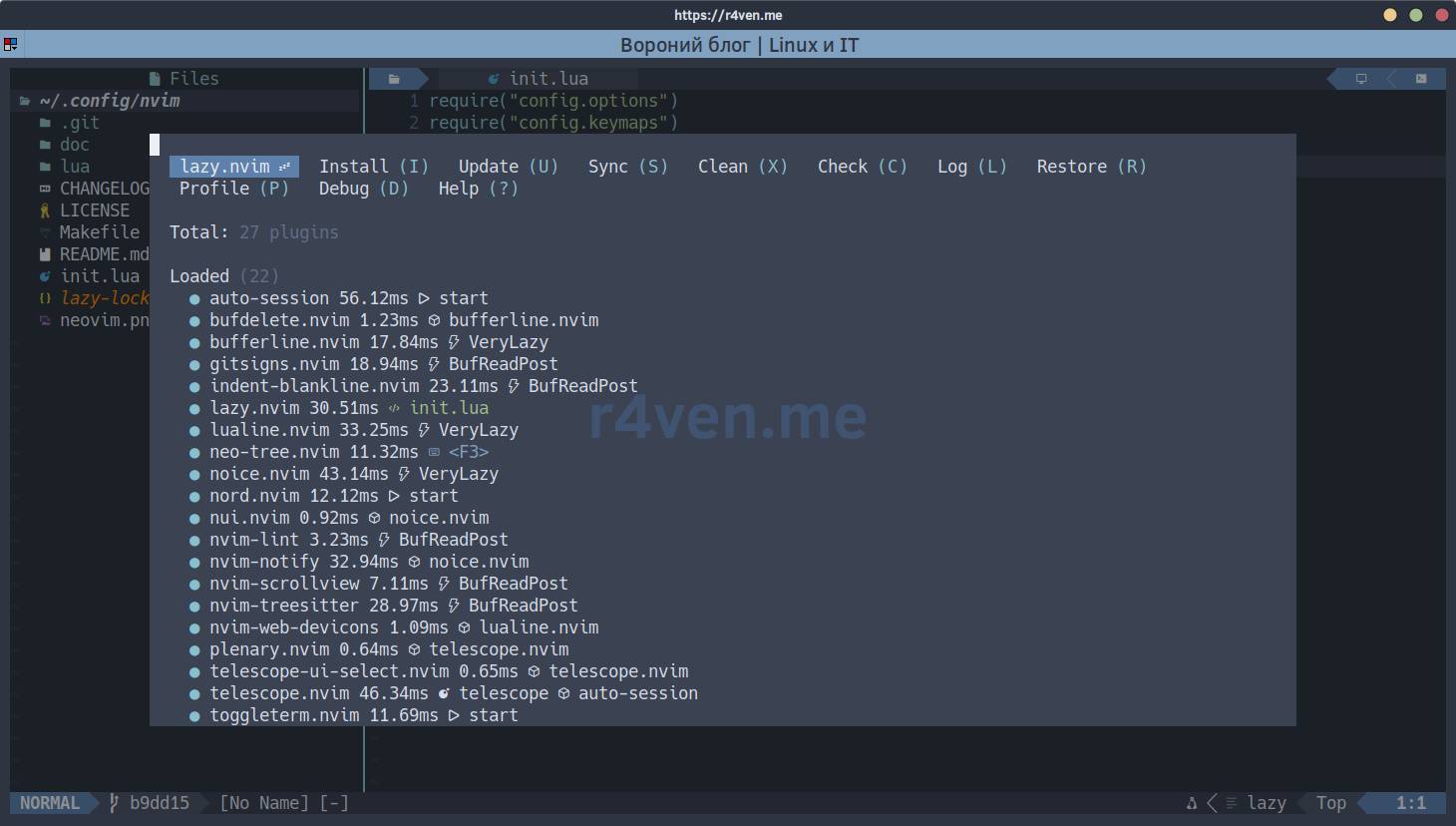
local lazypath = vim.fn.stdpath("data") .. "/lazy/lazy.nvim"

if not (vim.uv or vim.loop).fs_stat(lazypath) then
  local lazyrepo = "https://github.com/folke/lazy.nvim.git"
  local out = vim.fn.system({
    "git",
    "clone",
    "--filter=blob:none",
    "--branch=stable",
    lazyrepo,
    lazypath,
  })

  if vim.v.shell_error ~= 0 then
    vim.api.nvim_echo({
      { "Failed to clone lazy.nvim:\n", "ErrorMsg" },
      { out, "WarningMsg" },
      { "\nPress any key to exit..." },
    }, true, {})
    vim.fn.getchar()
    os.exit(1)
  end
end

vim.opt.rtp:prepend(lazypath)

require("lazy").setup({
  spec = {
    { import = "plugins" },
  },
  install = {
    colorscheme = { "nord" },
  },
  checker = {
    enabled = false,
  },
  change_detection = {
    notify = false,
  },
  rocks = {
    enabled = false,
  },
  performance = {
    rtp = {
      disabled_plugins = {
        "gzip",
        "netrwPlugin",
        "tarPlugin",
        "tohtml",
        "tutor",
        "zipPlugin",
      },
    },
  },
})Classic lazy.nvim bootstrap: if it’s not yet in stdpath("data"), it’s cloned from GitHub with a small --filter=blob:none clone, then added to runtimepath and setup is run. spec = { { import = "plugins" } } is where lazy.nvim picks up files from lua/plugins. install.colorscheme = { "nord" } ensures that even on first install, while plugins are still being installed, the editor doesn’t flash the standard gray theme. checker.enabled = false disables background update checks and notifications about them - I’m used to updating everything manually. rocks.enabled = false turns off hererocks - without it, lazy.nvim silently tries to spin up its own Lua 5.1 and luarocks on every startup, and when it fails, spews warnings in the log; currently no plugin in the config declares rocks-dependencies, so this is just noise. In performance.rtp.disabled_plugins, standard Neovim plugins are disabled that I don’t need (netrw, tutor, archivers, etc.) - slightly faster editor startup.
lua/plugins Directory
lua/plugins/auto-session.lua
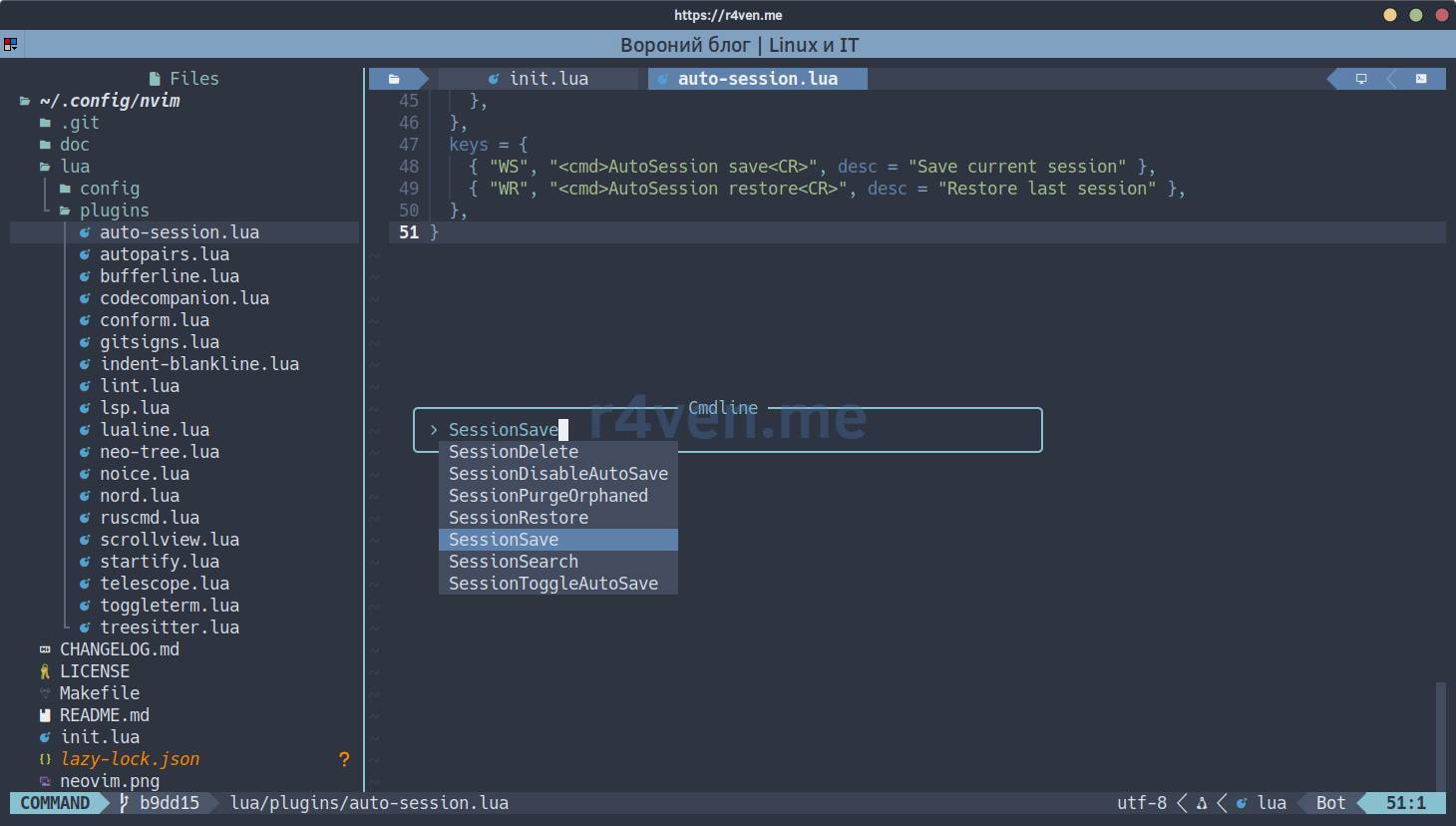
Hotkey - WS saves the current session, WR restores the last:
local neo_tree_was_open = false
local window_before_save

local function close_neo_tree_before_save()
  neo_tree_was_open = false
  window_before_save = vim.api.nvim_get_current_win()

  for _, win in ipairs(vim.api.nvim_list_wins()) do
    if vim.bo[vim.api.nvim_win_get_buf(win)].filetype == "neo-tree" then
      neo_tree_was_open = true
      vim.cmd("Neotree close")
      break
    end
  end
end

local function restore_neo_tree_after_save()
  if not neo_tree_was_open then
    return
  end

  vim.cmd("Neotree show")
  if window_before_save and vim.api.nvim_win_is_valid(window_before_save) then
    vim.api.nvim_set_current_win(window_before_save)
  end
end

return {
  "rmagatti/auto-session",
  lazy = false,
  opts = {
    auto_save = true,
    auto_restore = false,
    auto_session_root_dir = vim.fn.stdpath("state") .. "/sessions/",
    bypass_save_filetypes = { "neo-tree", "toggleterm" },
    pre_save_cmds = {
      close_neo_tree_before_save,
    },
    post_save_cmds = {
      restore_neo_tree_after_save,
    },
    post_restore_cmds = {
      "Neotree show",
      "wincmd w",
    },
  },
  keys = {
    { "WS", "<cmd>AutoSession save<CR>", desc = "Save current session" },
    { "WR", "<cmd>AutoSession restore<CR>", desc = "Restore last session" },
  },
}Auto-save on exit is enabled, but automatic restore on startup is intentionally disabled: an accidental nvim launch in another directory shouldn’t bring up the old set of buffers. Sessions are saved via WS, restored via WR; current AutoSession save and AutoSession restore commands are used.
Before saving the session, Neo-tree is temporarily closed so its utility buffer doesn’t end up in the layout. The tree state and active window are remembered: right after saving, the panel returns only if it was open before WS, and focus stays in the previous editor window. After restoring the session, Neo-tree opens again.
lua/plugins/autopairs.lua
return {
  "windwp/nvim-autopairs",
  event = "InsertEnter",
  opts = {},
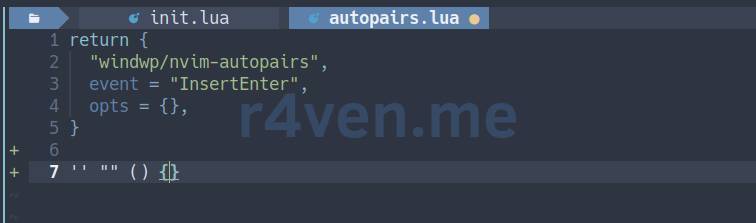
}Auto-closing of brackets and quotes, without a single custom setting - nvim-autopairs defaults are enough. Loads lazily on entering insert mode.
lua/plugins/bufferline.lua
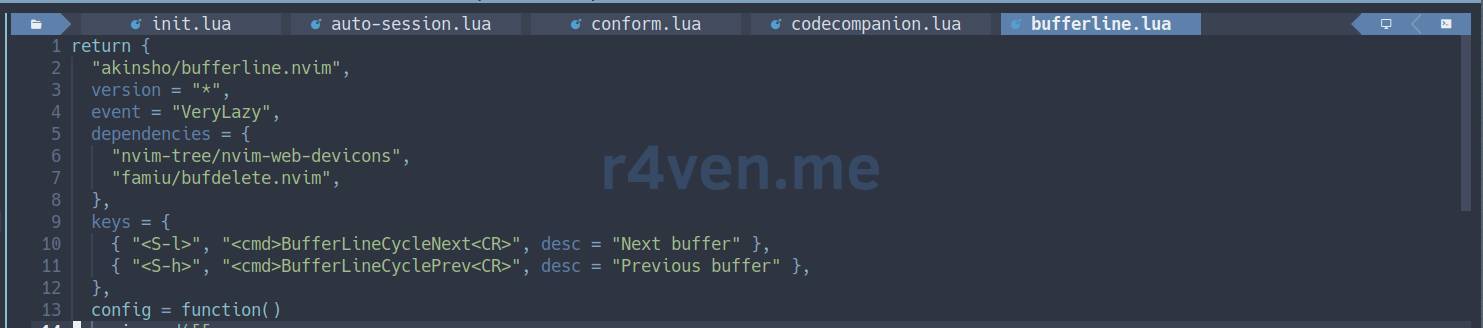
Hotkey - Shift+h and Shift+l switch to previous and next buffer:
return {
"akinsho/bufferline.nvim",
version = "*",
event = "VeryLazy",
dependencies = {
"nvim-tree/nvim-web-devicons",
"famiu/bufdelete.nvim",
},
keys = {
{ "<S-l>", "<cmd>BufferLineCycleNext<CR>", desc = "Next buffer" },
{ "<S-h>", "<cmd>BufferLineCyclePrev<CR>", desc = "Previous buffer" },
},
config = function()
vim.cmd([[
function! OpenFileExplorer(_1, _2, _3, _4)
Neotree toggle
endfunction
]])
vim.cmd([[
function! OpenAIChat(_1, _2, _3, _4)
if exists(':CodeCompanionChat') == 2
CodeCompanionChat Toggle
else
echohl ErrorMsg
echom 'CodeCompanion requires Neovim 0.11+. Run ~/bin/install-neovim first.'
echohl None
endif
endfunction
function! OpenBottomTerminal(_1, _2, _3, _4)
lua toggle_bottom_terminal()
endfunction
]])
local function open_buffer(bufnr)
local current_buf = vim.api.nvim_get_current_buf()
if vim.bo[current_buf].filetype == "neo-tree" then
local editor_win = require("neo-tree").get_prior_window({
"codecompanion",
"codecompanion_input",
"terminal",
"toggleterm",
}, true)
if editor_win < 0 or not vim.api.nvim_win_is_valid(editor_win) then
vim.notify("No editor window available", vim.log.levels.WARN)
return
end
vim.api.nvim_set_current_win(editor_win)
end
vim.api.nvim_set_current_buf(bufnr)
end
require("bufferline").setup({
options = {
mode = "buffers",
themable = true,
numbers = "none",
close_command = "Bdelete! %d",
left_mouse_command = open_buffer,
right_mouse_command = "Bdelete! %d",
middle_mouse_command = "Bdelete! %d",
diagnostics = "nvim_lsp",
show_buffer_icons = true,
show_buffer_close_icons = false,
show_close_icon = false,
show_tab_indicators = true,
persist_buffer_sort = true,
separator_style = "thick",
always_show_bufferline = true,
indicator = {
icon = "",
style = "icon",
},
offsets = {
{
filetype = "neo-tree",
text = " Files",
highlight = "Directory",
separator = true,
},
},
custom_areas = {
left = function()
return {
{ text = " %@OpenFileExplorer@ %X ", bg = "#5E81AC", fg = "#ECEFF4", gui = "bold" },
{ text = " ", fg = "#5E81AC" },
}
end,
right = function()
return {
{ text = " ", fg = "#5E81AC" },
{ text = " %@OpenAIChat@ %X ", bg = "#5E81AC", fg = "#ECEFF4", gui = "bold" },
{ text = "", bg = "#5E81AC", fg = "#81A1C1" },
{ text = " %@OpenBottomTerminal@ %X ", bg = "#5E81AC", fg = "#ECEFF4", gui = "bold" },
}
end,
},
},
highlights = {
fill = { fg = "#3B4252", bg = "#3B4252" },
background = { fg = "#D8DEE9", bg = "#434C5E" },
tab = { fg = "#D8DEE9", bg = "#434C5E" },
tab_selected = { fg = "#ECEFF4", bg = "#5E81AC", bold = true, italic = false },
tab_separator = { fg = "#3B4252", bg = "#4C566A" },
tab_separator_selected = { fg = "#3B4252", bg = "#5E81AC" },
buffer_selected = { fg = "#ECEFF4", bg = "#5E81AC", bold = true, italic = false },
buffer_visible = { fg = "#D8DEE9", bg = "#434C5E" },
separator = { fg = "#3B4252", bg = "#3B4252" },
indicator_visible = { fg = "#D8DEE9", bg = "#434C5E" },
modified = { fg = "#EBCB8B", bg = "#434C5E" },
modified_visible = { fg = "#EBCB8B", bg = "#434C5E" },
modified_selected = { fg = "#EBCB8B", bg = "#5E81AC" },
duplicate_selected = { fg = "#E5E9F0", bg = "#5E81AC", italic = true },
duplicate_visible = { bg = "#434C5E", italic = true },
duplicate = { fg = "#D8DEE9", bg = "#434C5E", italic = true },
error = { fg = "#BF616A", bg = "#434C5E" },
error_visible = { fg = "#BF616A", bg = "#434C5E" },
error_selected = { fg = "#ECEFF4", bg = "#5E81AC", bold = true, italic = false },
warning = { fg = "#EBCB8B", bg = "#434C5E" },
warning_visible = { fg = "#EBCB8B", bg = "#434C5E" },
warning_selected = { fg = "#ECEFF4", bg = "#5E81AC", bold = true, italic = false },
trunc_marker = { fg = "#81A1C1", bg = "#434C5E" },
offset_separator = { bg = "#2E3440" },
},
})
end,
}Besides the tabs themselves (Shift+h/Shift+l for switching, closing via Bdelete! to not break window layout) there’s a trick with custom_areas: clickable zones are drawn at the edges of the tab bar, which via %@FuncName@...%X call vimscript wrappers. On the left, Neo-tree opens; on the right are buttons for the AI chat and bottom terminal. Buttons are separated by the symbol; a computer `` calls `CodeCompanionChat Toggle`, a terminal calls toggleterm.
Bufferline with multiple open buffers and clickable areas at the edges
lua/plugins/codecompanion.lua
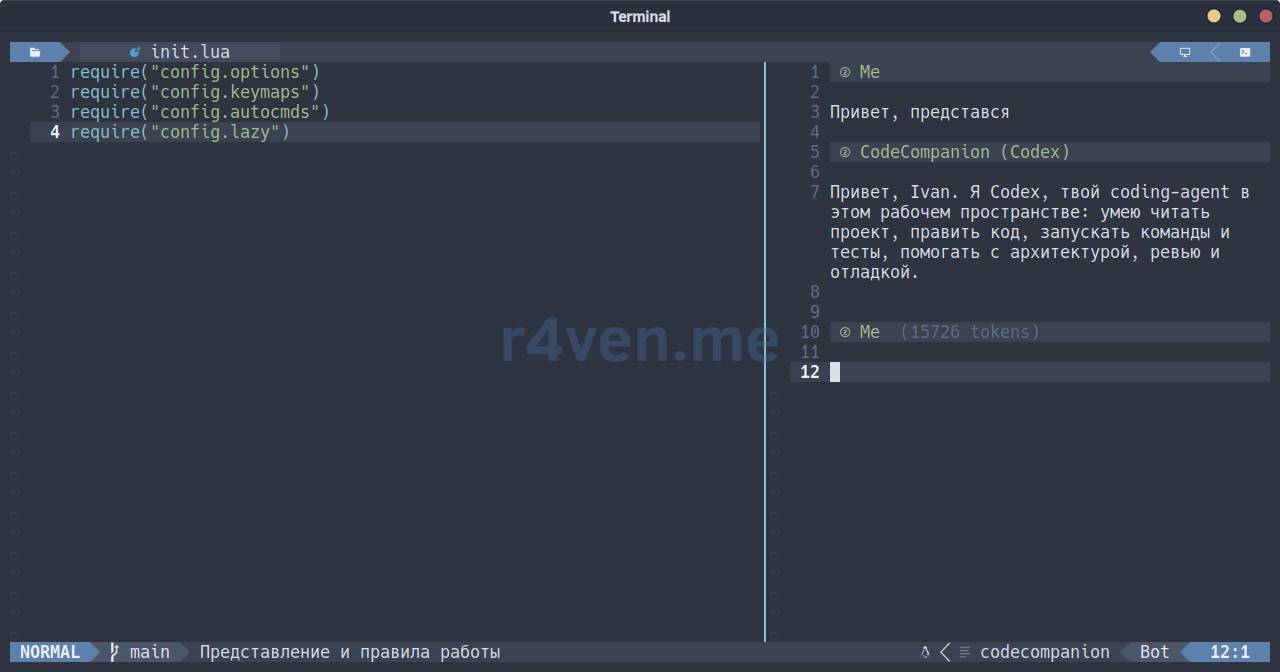
Hotkey - F5 or Space ai opens and closes the AI chat, Space aa opens the actions palette:
return {
  "olimorris/codecompanion.nvim",
  version = "*",
  enabled = vim.fn.has("nvim-0.11") == 1,
  cmd = {
    "CodeCompanion",
    "CodeCompanionActions",
    "CodeCompanionChat",
    "CodeCompanionCLI",
    "CodeCompanionCodeReview",
  },
  dependencies = {
    "nvim-lua/plenary.nvim",
    "nvim-treesitter/nvim-treesitter",
    {
      "MeanderingProgrammer/render-markdown.nvim",
      ft = { "markdown", "codecompanion" },
      opts = {
        file_types = { "markdown", "codecompanion" },
      },
    },
  },
  init = function()
    vim.api.nvim_create_autocmd("FileType", {
      pattern = { "codecompanion", "codecompanion_input" },
      callback = function()
        vim.schedule(function()
          if _G.keep_bottom_terminal_full_width then
            _G.keep_bottom_terminal_full_width(true)
          end
        end)
      end,
    })
  end,
  keys = {
    { "<F5>", "<cmd>CodeCompanionChat Toggle<CR>", mode = { "n", "i" }, desc = "Toggle AI chat" },
    { "<leader>ai", "<cmd>CodeCompanionChat Toggle<CR>", desc = "Toggle AI chat" },
    { "<leader>aa", "<cmd>CodeCompanionActions<CR>", mode = { "n", "v" }, desc = "AI actions" },
  },
  opts = {
    adapters = {
      acp = {
        extend = {
          codex = {
            defaults = {
              auth_method = "chat-gpt",
            },
          },
        },
      },
    },
    interactions = {
      chat = {
        adapter = "codex",
      },
      cli = {
        agent = "claude_code",
        agents = {
          claude_code = {
            cmd = "claude",
            args = {},
            description = "Claude Code CLI",
            provider = "terminal",
          },
          codex = {
            cmd = "codex",
            args = {},
            description = "OpenAI Codex CLI",
            provider = "terminal",
          },
        },
      },
    },
    display = {
      action_palette = {
        provider = "telescope",
      },
      chat = {
        show_context = false,
        show_header_separator = false,
        window = {
          layout = "vertical",
          position = "right",
          width = 0.4,
        },
        start_in_insert_mode = true,
      },
    },
    opts = {
      language = "Russian",
    },
  },
}CodeCompanion.nvim gives an AI chat in the right vertical panel. Open or close it via F5, leader+ai, the :CodeCompanionChat Toggle command, or the button in Bufferline; leader+aa opens an actions palette for the current buffer or visual selection. Responses are formatted by render-markdown.nvim.
The main chat adapter is Codex ACP with ChatGPT account authorization. If needed, inside the chat via ga select a different adapter and model, including Claude Code; telescope-ui-select.nvim turns this selection into a normal Telescope dropdown. A separate CodeCompanionCLI runs already-authorized claude and codex commands in a terminal window.
The FileType autocommand after opening the chat returns the bottom ToggleTerm to the very bottom, so the right panel doesn’t shrink the terminal width. The vim.fn.has("nvim-0.11") check prevents an incompatible plugin from loading on old Neovim.
📝 Claude Code, Codex and ACP-agent setup, subscription and API authorization, model selection, Chat/CLI modes, Telescope, context handling, layout fixing and error diagnostics are covered in detail in a separate article: Neovim - CodeCompanion: AI-chat setup with Claude Code and Codex.
lua/plugins/conform.lua
local function format_buffer()
  require("conform").format({ async = true, lsp_fallback = true })
end

return {
  "stevearc/conform.nvim",
  cmd = "ConformInfo",
  keys = {
    { "<leader>f", format_buffer, mode = { "n", "v" }, desc = "Format buffer" },
    { "<S-F3>", format_buffer, mode = { "n", "v" }, desc = "Format buffer" },
    { "<F15>", format_buffer, mode = { "n", "v" }, desc = "Format buffer" },
  },
  opts = {
    notify_on_error = false,
    formatters_by_ft = {
      lua = { "stylua" },
      sh = { "shfmt" },
      bash = { "shfmt" },
      zsh = { "shfmt" },
      python = { "ruff_format", "black" },
      json = { "jq" },
      yaml = { "yamlfmt", "prettier" },
    },
  },
}Formatting only on demand - leader+f or Shift+F3/F15 (duplicate in case the terminal sends this code), no format-on-save. For each language, a primary formatter and a fallback are defined (e.g., for Python first ruff_format, if it’s missing - black). notify_on_error = false - if the needed formatter isn’t installed, conform.nvim simply silently skips the step rather than spewing error notifications.
lua/plugins/gitsigns.lua
return {
  "lewis6991/gitsigns.nvim",
  event = { "BufReadPost", "BufNewFile" },
  opts = {
    signs = {
      add = { text = "+" },
      change = { text = "~" },
      delete = { text = "_" },
      topdelete = { text = "‾" },
      changedelete = { text = "~" },
      untracked = { text = "+" },
    },
    current_line_blame = false,
  },
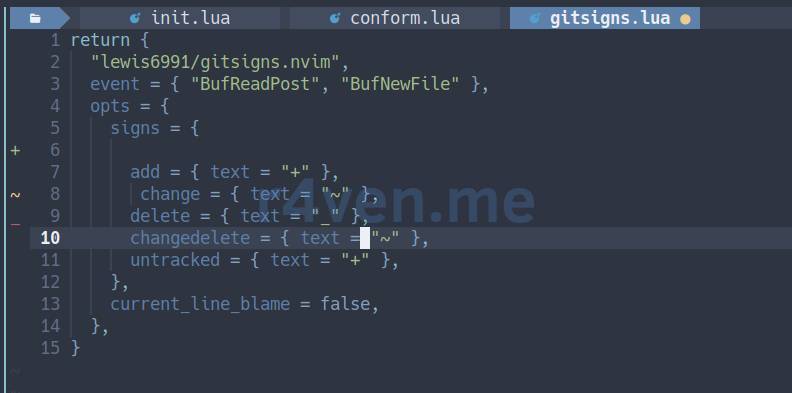
}Git change signs in the column to the left of line numbers. current_line_blame is intentionally disabled - icons in the gutter are enough, blame for each line just distracts.
Gitsigns marks in the column to the left of line numbers
lua/plugins/indent-blankline.lua
return {
  "lukas-reineke/indent-blankline.nvim",
  main = "ibl",
  event = { "BufReadPost", "BufNewFile" },
  opts = {
    scope = {
      show_start = false,
      show_end = true,
    },
  },
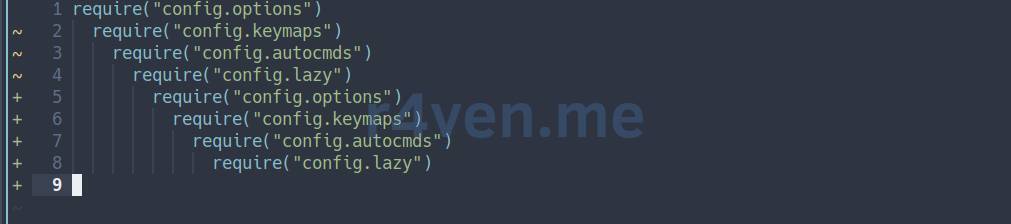
}Vertical indent guides. show_start = false removes highlighting of the first line of the current block (it’s already visible by the cursor), show_end = true keeps highlighting the last one - convenient to see where a block closes, especially in deeply nested code.
lua/plugins/lint.lua
Hotkey - F7 enables linting and runs it immediately, Shift+F7/F19 disables and clears diagnostics:
return {
  "mfussenegger/nvim-lint",
  event = { "BufReadPost", "BufNewFile" },
  config = function()
    local lint = require("lint")
    local enabled = false

    lint.linters.shellcheck.args = {
      "--format",
      "json1",
      "-",
    }

    local function executable(name)
      return vim.fn.executable(name) == 1
    end

    local function add_linters(target, ft, linters)
      local available = {}

      for _, name in ipairs(linters) do
        if executable(name) then
          table.insert(available, name)
        end
      end

      if #available > 0 then
        target[ft] = available
      end
    end

    local linters_by_ft = {}
    add_linters(linters_by_ft, "lua", { "luacheck" })
    add_linters(linters_by_ft, "sh", { "shellcheck" })
    add_linters(linters_by_ft, "bash", { "shellcheck" })
    add_linters(linters_by_ft, "zsh", { "zsh" })
    add_linters(linters_by_ft, "python", { "ruff", "pylint" })
    add_linters(linters_by_ft, "json", { "jsonlint" })
    add_linters(linters_by_ft, "yaml", { "yamllint" })

    lint.linters_by_ft = linters_by_ft

    local group = vim.api.nvim_create_augroup("UserLint", { clear = true })

    local timers = {}

    local function run_lint(notify_status, bufnr)
      bufnr = bufnr or vim.api.nvim_get_current_buf()
      if not vim.api.nvim_buf_is_valid(bufnr) then
        return
      end

      vim.api.nvim_buf_call(bufnr, function()
        local filetype = vim.bo.filetype
        local linters = lint.linters_by_ft[filetype]

        if not linters or #linters == 0 then
          if notify_status then
            vim.notify(
              "No installed linter configured for filetype: " .. (filetype ~= "" and filetype or "unknown"),
              vim.log.levels.WARN
            )
          end
          return
        end

        lint.try_lint()
        if notify_status then
          vim.notify("Lint started: " .. table.concat(linters, ", "))
        end
      end)
    end

    local function try_lint(bufnr)
      if enabled then
        run_lint(false, bufnr)
      end
    end

    local function try_lint_debounced(bufnr)
      local timer = timers[bufnr]
      if timer then
        timer:stop()
        timer:close()
      end

      timers[bufnr] = vim.defer_fn(function()
        timers[bufnr] = nil
        try_lint(bufnr)
      end, 500)
    end

    vim.api.nvim_create_autocmd({ "BufEnter", "BufWritePost", "InsertLeave", "TextChanged", "TextChangedI" }, {
      group = group,
      callback = function(event)
        try_lint_debounced(event.buf)
      end,
    })

    local initial_buf = vim.api.nvim_get_current_buf()
    vim.schedule(function()
      try_lint(initial_buf)
    end)

    vim.api.nvim_create_user_command("Lint", function()
      run_lint(true)
    end, {})

    local function toggle_linter()
      enabled = not enabled
      if enabled then
        run_lint(false)
      else
        vim.diagnostic.reset(nil, 0)
      end
      vim.notify("Lint " .. (enabled and "enabled" or "disabled"))
    end

    vim.api.nvim_create_user_command("LinterToggle", toggle_linter, {})
    vim.api.nvim_create_user_command("LintToggle", toggle_linter, {})

    vim.keymap.set({ "n", "i" }, "<F7>", function()
      if vim.api.nvim_get_mode().mode:match("^i") then
        vim.cmd.stopinsert()
      end
      enabled = true
      run_lint(true)
    end, { desc = "Enable and run lint" })

    vim.keymap.set({ "n", "i" }, "<S-F7>", function()
      enabled = false
      vim.diagnostic.reset(nil, 0)
      vim.notify("Lint disabled")
    end, { desc = "Disable lint" })

    vim.keymap.set({ "n", "i" }, "<F19>", function()
      enabled = false
      vim.diagnostic.reset(nil, 0)
      vim.notify("Lint disabled")
    end, { desc = "Disable lint" })
  end,
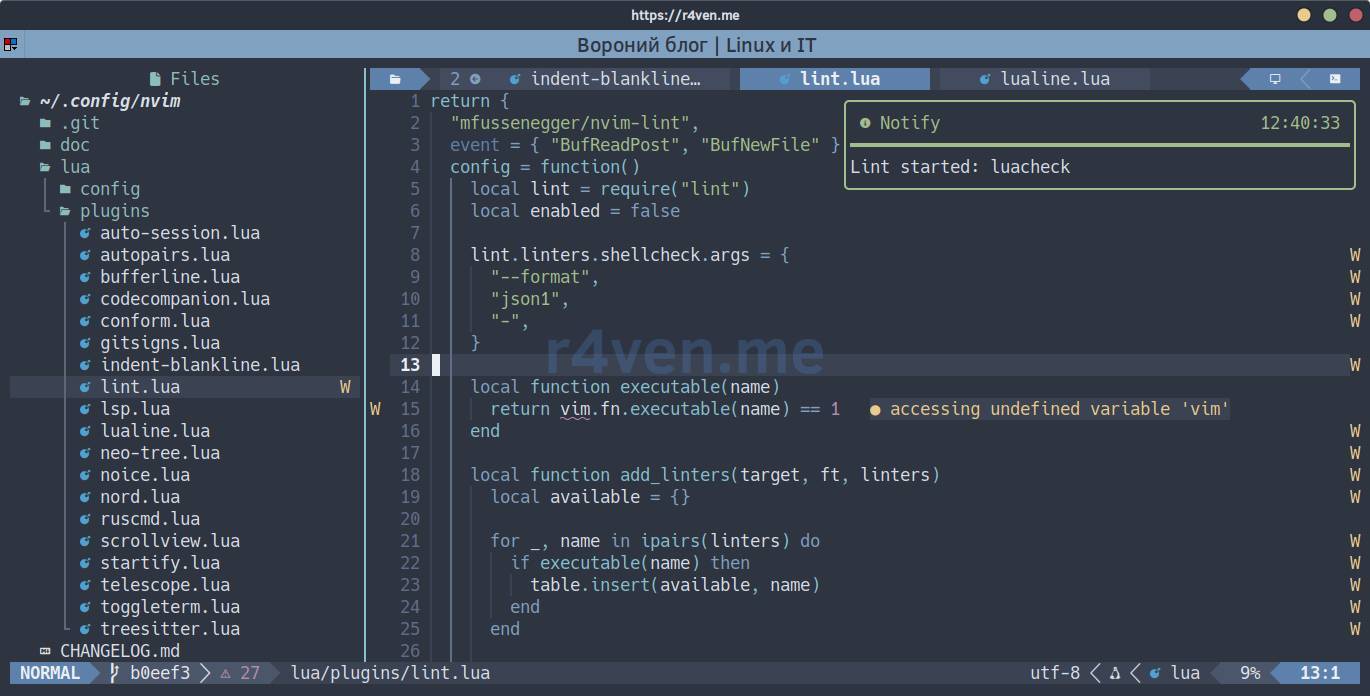
}Linting is disabled by default. F7 enables it and runs the first check immediately; while the mode is active, subsequent checks start 500 ms after BufEnter, save, exiting insert mode, or text change. Debounce doesn’t launch a new external process on every keystroke, but diagnostics remain nearly live.
A timer is stored separately for each buffer. This is important when quickly switching files: a deferred check always runs in the buffer where the change happened and can’t accidentally apply to an already-open neighboring file.
F7 explicitly enables linting and runs the check immediately; Shift+F7 or F19 disables automatic checks and clears diagnostics. Commands :LinterToggle and :LintToggle toggle the same mode. On manual run, the linter name is shown, and if no installed tool is found for the current filetype - a clear warning instead of a silent no-op.
The linter list is built dynamically via vim.fn.executable: only commands really available in $PATH are used. For shell files, shellcheck reads the current buffer from stdin in json1 format, so it sees unsaved changes.
Shellcheck diagnostics from automatically updated nvim-lint
lua/plugins/lsp.lua
return {
  "neovim/nvim-lspconfig",
  enabled = false,
  event = { "BufReadPre", "BufNewFile" },
  config = function()
    local lspconfig = require("lspconfig")
    local capabilities = vim.lsp.protocol.make_client_capabilities()

    -- Flip enabled=true above and add servers here when full LSP is needed.
    lspconfig.lua_ls.setup({ capabilities = capabilities })
    lspconfig.pyright.setup({ capabilities = capabilities })
  end,
}LSP boilerplate, disabled via enabled = false. For 90% of tasks, lightweight linters and formatters above are enough without running heavy language servers. When full LSP is needed - I install the needed servers, flip enabled to true, and customize the config block: examples for lua_ls and pyright are already inside.
lua/plugins/lualine.lua

return {
  "nvim-lualine/lualine.nvim",
  event = "VeryLazy",
  dependencies = { "nvim-tree/nvim-web-devicons" },
  opts = {
    options = {
      theme = {
        normal = {
          a = { fg = "#ECEFF4", bg = "#5E81AC", gui = "bold" },
          b = { fg = "#E5E9F0", bg = "#4C566A" },
          c = { fg = "#D8DEE9", bg = "#3B4252" },
        },
        insert = {
          a = { fg = "#2E3440", bg = "#A3BE8C", gui = "bold" },
          b = { fg = "#E5E9F0", bg = "#4C566A" },
          c = { fg = "#D8DEE9", bg = "#3B4252" },
        },
        visual = {
          a = { fg = "#2E3440", bg = "#B48EAD", gui = "bold" },
          b = { fg = "#E5E9F0", bg = "#4C566A" },
          c = { fg = "#D8DEE9", bg = "#3B4252" },
        },
        replace = {
          a = { fg = "#2E3440", bg = "#EBCB8B", gui = "bold" },
          b = { fg = "#E5E9F0", bg = "#4C566A" },
          c = { fg = "#D8DEE9", bg = "#3B4252" },
        },
        command = {
          a = { fg = "#2E3440", bg = "#88C0D0", gui = "bold" },
          b = { fg = "#E5E9F0", bg = "#4C566A" },
          c = { fg = "#D8DEE9", bg = "#3B4252" },
        },
        inactive = {
          a = { fg = "#D8DEE9", bg = "#3B4252" },
          b = { fg = "#D8DEE9", bg = "#3B4252" },
          c = { fg = "#81A1C1", bg = "#2E3440" },
        },
      },
      component_separators = { left = "", right = "" },
      section_separators = { left = "", right = "" },
      globalstatus = true,
    },
    sections = {
      lualine_a = { "mode" },
      lualine_b = { "branch", "diagnostics" },
      lualine_c = {
        { "filename", path = 1 },
      },
      lualine_x = { "encoding", "fileformat", "filetype" },
      lualine_y = { "progress" },
      lualine_z = { "location" },
    },
    inactive_sections = {
      lualine_a = {},
      lualine_b = {},
      lualine_c = { "filename" },
      lualine_x = { "location" },
      lualine_y = {},
      lualine_z = {},
    },
    extensions = { "neo-tree", "quickfix" },
  },
}The theme is manually written for the Nord palette, not taken from lualine presets - different a-section colors per mode (normal/insert/visual/replace/command) immediately show what mode the editor is in, even peripherally. globalstatus = true - one status line for all windows, not one per each. path = 1 in filename - show the path relative to the current directory, not just the filename.
lua/plugins/neo-tree.lua
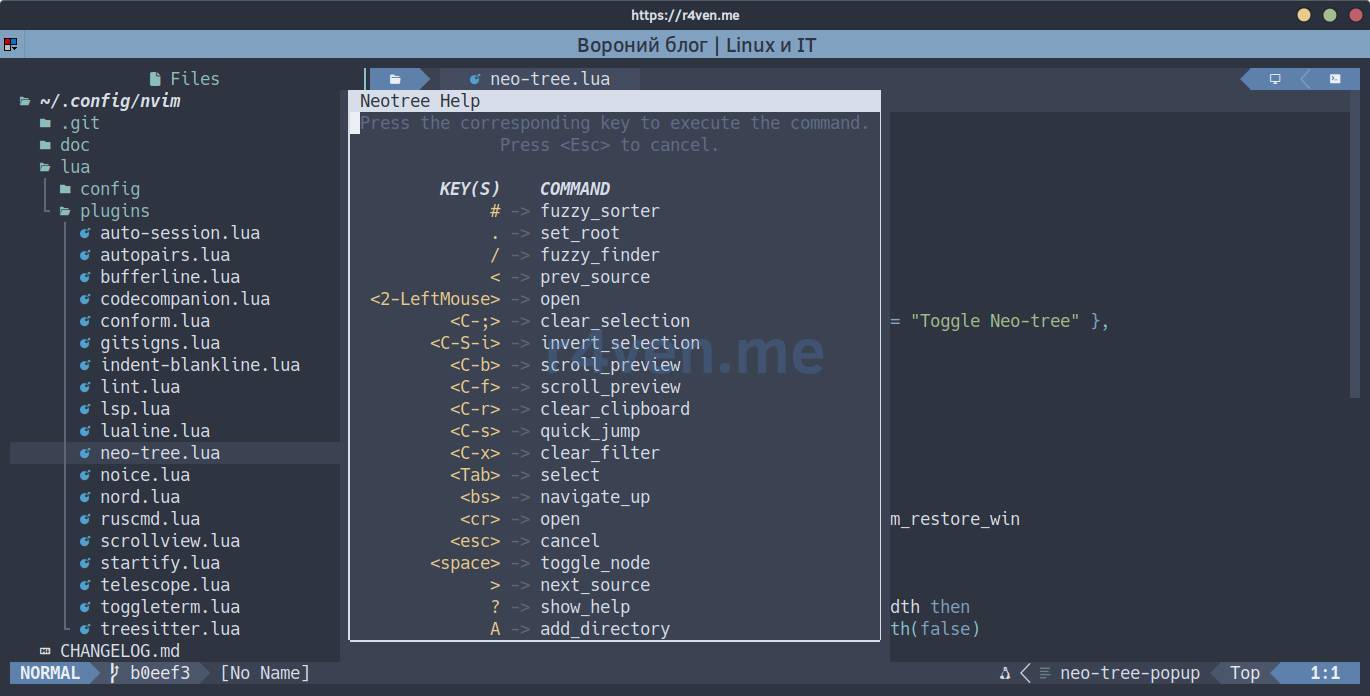
Hotkey - F3 opens and closes Neo-tree:
return {
  "nvim-neo-tree/neo-tree.nvim",
  branch = "v3.x",
  cmd = "Neotree",
  dependencies = {
    "nvim-lua/plenary.nvim",
    "nvim-tree/nvim-web-devicons",
    "MunifTanjim/nui.nvim",
  },
  keys = {
    { "<F3>", "<cmd>Neotree toggle<CR>", desc = "Toggle Neo-tree" },
  },
  opts = {
    close_if_last_window = true,
    enable_git_status = true,
    event_handlers = {
      {
        event = "neo_tree_window_after_open",
        handler = function()
          local terminal_win = vim.t.toggleterm_restore_win
          vim.t.toggleterm_restore_win = nil

          vim.schedule(function()
            if _G.keep_bottom_terminal_full_width then
              _G.keep_bottom_terminal_full_width(false)
            end

            if type(terminal_win) == "number" and vim.api.nvim_win_is_valid(terminal_win) then
              vim.api.nvim_set_current_win(terminal_win)
              vim.cmd.startinsert()
            end
          end)
        end,
      },
    },
    window = {
      width = 35,
    },
    filesystem = {
      bind_to_cwd = true,
      cwd_target = "window",
      filtered_items = {
        hide_dotfiles = false,
        hide_gitignored = false,
      },
    },
  },
}Side panel on F3, close_if_last_window = true - closes itself if it becomes the only window (the missing piece that together with QuitPre from autocmds.lua eliminates E444). Hidden and git-ignored files aren’t hidden - hide_dotfiles/hide_gitignored are both false.
A separate event_handlers - this is the junction with toggleterm: if Neo-tree is opened from the terminal (it has its own F3 binding, see below), after opening the panel the focus and width of the bottom terminal are restored so it doesn’t “shrink” to the new window width.
lua/plugins/noice.lua
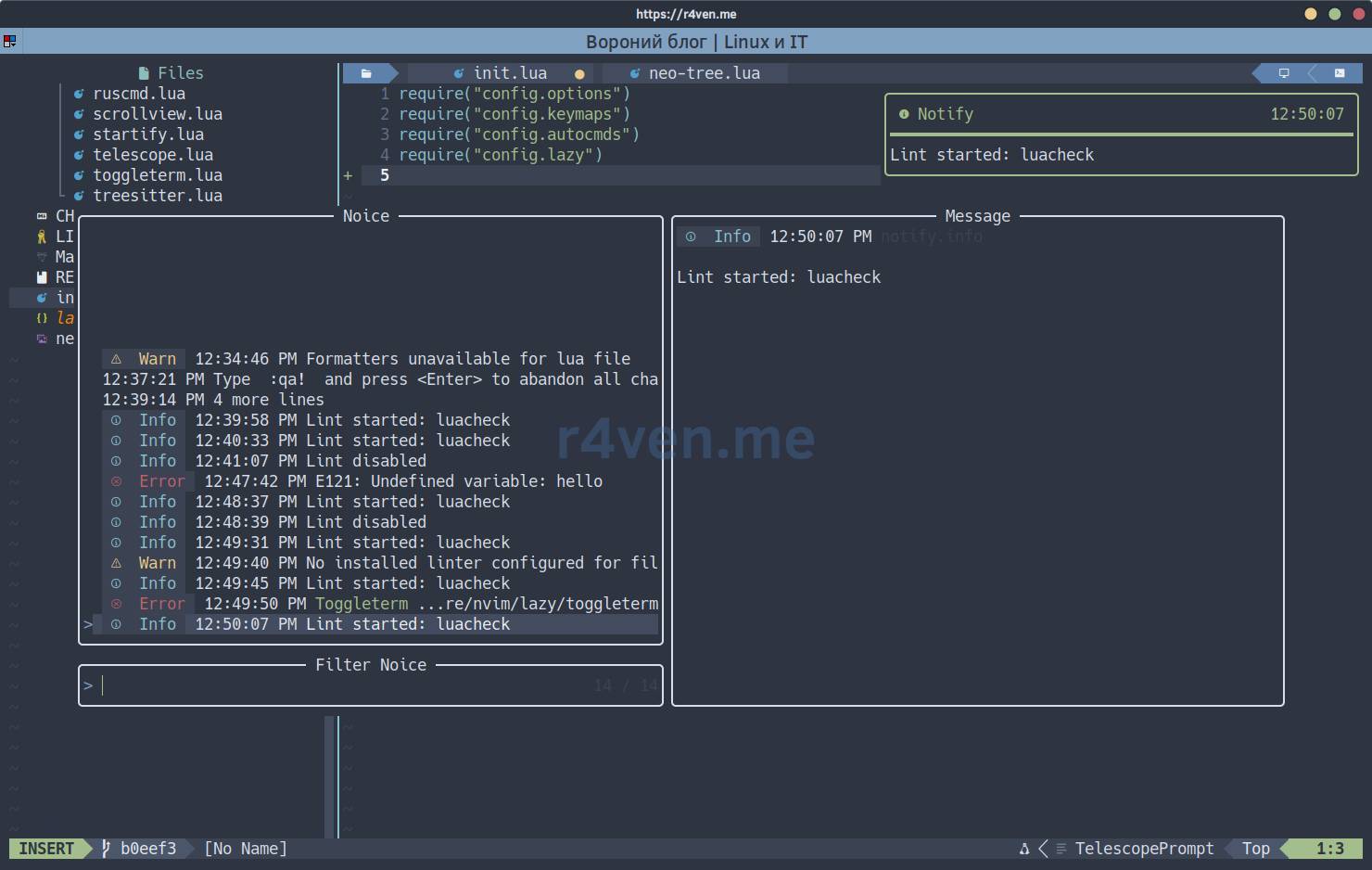
Hotkey - Shift+F4/F16 opens and closes message history via Telescope:
local function toggle_history()
  if vim.bo.filetype == "TelescopePrompt" then
    require("telescope.actions").close(vim.api.nvim_get_current_buf())
    return
  end

  require("noice").cmd("telescope")
end

return {
  "folke/noice.nvim",
  event = "VeryLazy",
  keys = {
    { "<S-F4>", toggle_history, mode = { "n", "i", "t" }, desc = "Toggle Noice history" },
    { "<F16>", toggle_history, mode = { "n", "i", "t" }, desc = "Toggle Noice history" },
  },
  dependencies = {
    "MunifTanjim/nui.nvim",
    {
      "rcarriga/nvim-notify",
      opts = {
        stages = "fade_in_slide_out",
        timeout = 4000,
        top_down = true,
      },
    },
  },
  opts = {
    lsp = {
      override = {
        ["vim.lsp.util.convert_input_to_markdown_lines"] = true,
        ["vim.lsp.util.stylize_markdown"] = true,
        ["cmp.entry.get_documentation"] = true,
      },
    },
    presets = {
      bottom_search = true,
      command_palette = false,
      long_message_to_split = true,
      inc_rename = false,
      lsp_doc_border = true,
    },
  },
}noice.nvim replaces standard message output and command line with neat popup windows, and nvim-notify shows notifications in the top right corner. The : command line opens in the center; search / and ? thanks to bottom_search = true remain at the bottom. Double Esc closes current messages.
Shift+F4 (and terminal duplicate F16) opens Noice message history via Telescope. Inside the list, filtering by typing works, arrows or Ctrl+n/Ctrl+p, Enter and Esc; repeated Shift+F4 also closes the picker. The same history can be called with :Noice telescope.
lua/plugins/nord.lua
return {
  "shaunsingh/nord.nvim",
  lazy = false,
  priority = 1000,
  config = function()
    vim.g.nord_contrast = true
    vim.g.nord_borders = false
    vim.g.nord_disable_background = false
    vim.g.nord_italic = false
    vim.g.nord_uniform_diff_background = true
    vim.g.nord_bold = false

    vim.cmd.colorscheme("nord")

    local function set_highlights()
      local hl = vim.api.nvim_set_hl

      hl(0, "Cursor", { fg = "#2E3440", bg = "#ECEFF4" })
      hl(0, "lCursor", { fg = "#2E3440", bg = "#ECEFF4" })
      hl(0, "TermCursor", { fg = "#2E3440", bg = "#ECEFF4" })
      hl(0, "iCursor", { fg = "#2E3440", bg = "#A3BE8C" })
      hl(0, "rCursor", { fg = "#2E3440", bg = "#EBCB8B" })
      hl(0, "CursorIM", { fg = "#2E3440", bg = "#A3BE8C" })
      hl(0, "CursorLine", { bg = "#3B4252" })
      hl(0, "CursorLineNr", { fg = "#ECEFF4", bg = "#3A4150", bold = true })
      hl(0, "WinSeparator", { fg = "#88C0D0", bg = "#2E3440" })
      hl(0, "ToggleTermSeparator", { fg = "#88C0D0", bg = "#2E3440" })
      hl(0, "MatchParen", { fg = "#8FBCBB", bg = "NONE", bold = true, underline = true })

      hl(0, "DiagnosticSignError", { fg = "#BF616A", bg = "NONE" })
      hl(0, "DiagnosticSignWarn", { fg = "#EBCB8B", bg = "NONE" })
      hl(0, "DiagnosticSignInfo", { fg = "#88C0D0", bg = "NONE" })
      hl(0, "DiagnosticSignHint", { fg = "#A3BE8C", bg = "NONE" })
      hl(0, "DiagnosticVirtualTextError", { fg = "#BF616A", bg = "#3B4252" })
      hl(0, "DiagnosticVirtualTextWarn", { fg = "#EBCB8B", bg = "#3B4252" })
      hl(0, "DiagnosticVirtualTextInfo", { fg = "#88C0D0", bg = "#3B4252" })
      hl(0, "DiagnosticVirtualTextHint", { fg = "#A3BE8C", bg = "#3B4252" })
      hl(0, "DiagnosticFloatingError", { fg = "#BF616A" })
      hl(0, "DiagnosticFloatingWarn", { fg = "#EBCB8B" })
      hl(0, "DiagnosticFloatingInfo", { fg = "#88C0D0" })
      hl(0, "DiagnosticFloatingHint", { fg = "#A3BE8C" })
    end

    set_highlights()
    vim.api.nvim_create_autocmd("ColorScheme", {
      pattern = "nord",
      callback = set_highlights,
    })
  end,
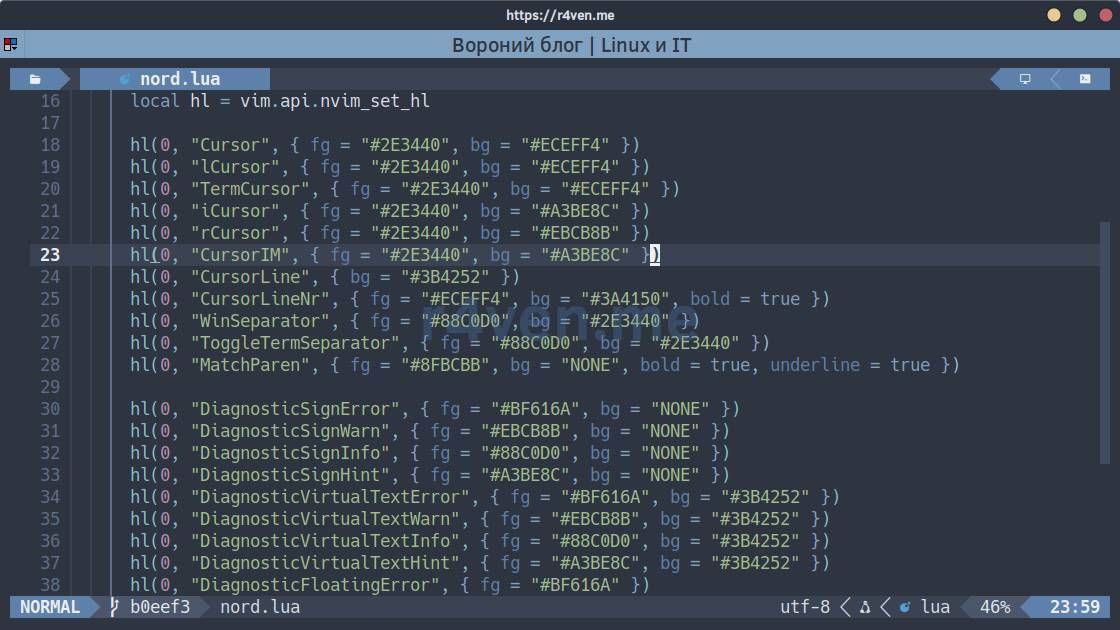
}priority = 1000 and lazy = false - the theme must load before all other plugins to avoid “flashing” standard colors on startup. On top of the standard Nord palette, a set of manual tweaks is applied: the cursor is recolored per mode (Cursor/iCursor/rCursor/CursorIM) so it’s visible on any background, not lost like it sometimes is with some colorschemes “out of the box”, plus explicit colors for window separators and diagnostics. set_highlights is called not only immediately but also repeatedly on the ColorScheme autocommand - if the scheme is reloaded, manual adjustments won’t be lost.
lua/plugins/ruscmd.lua
return {
  "powerman/vim-plugin-ruscmd",
  event = "VimEnter",
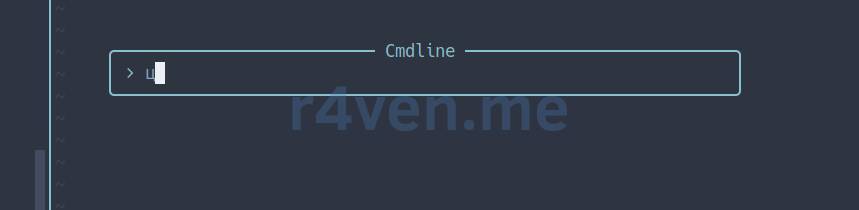
}Allows executing : commands even if you forgot to switch the keyboard layout from Russian to English. A small thing, but useful.
lua/plugins/scrollview.lua
return {
  "dstein64/nvim-scrollview",
  event = { "BufReadPost", "BufNewFile" },
  opts = {
    scrollview_current_only = true,
    scrollview_excluded_filetypes = { "neo-tree" },
    hide_on_cursor_intersect = true,
    hide_on_text_intersect = true,
  },
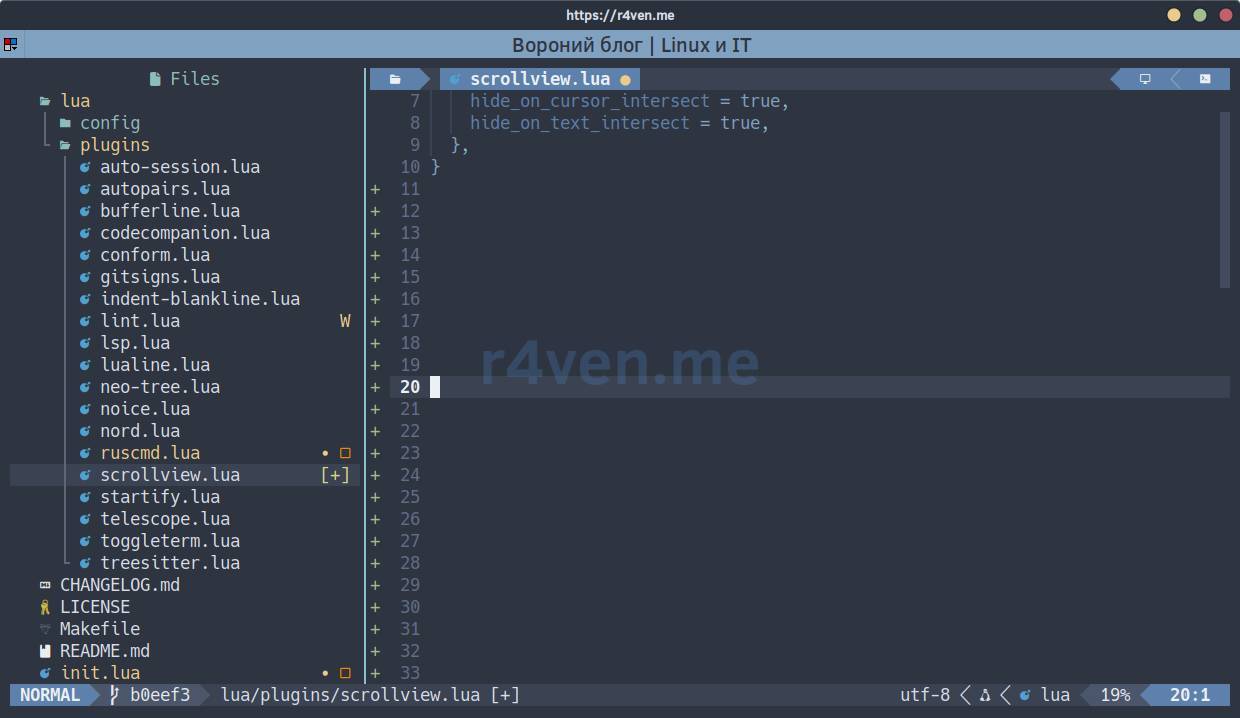
}Scrollbar on the right - only for the current window (scrollview_current_only), hides when it intersects the cursor or text on screen (hide_on_cursor_intersect/hide_on_text_intersect), and isn’t shown in Neo-tree.
lua/plugins/startify.lua
return {
  "mhinz/vim-startify",
  event = "VimEnter",
  init = function()
    vim.g.startify_session_dir = vim.fn.stdpath("state") .. "/sessions"
  end,
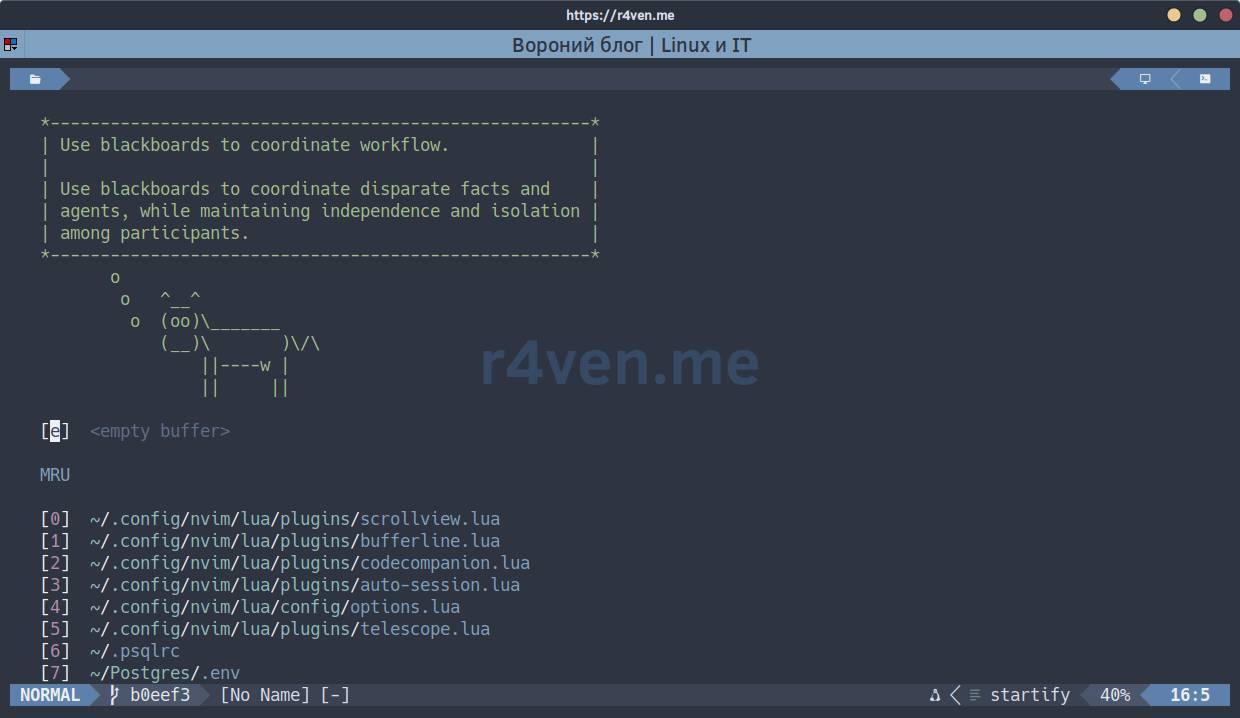
}Startup screen with a list of recent files and sessions when launching without arguments. The only customization - the sessions directory points to the same place as keymaps.lua (slots F9-F12) and auto-session.lua.
lua/plugins/telescope.lua
Hotkeys - F2/Shift+F2 search files and text in the current file’s directory, F6/Shift+F6 show workspace and buffer diagnostics, F8/Shift+F8 show git status and current file history:
return {
  "nvim-telescope/telescope.nvim",
  tag = "0.1.8",
  cmd = "Telescope",
  dependencies = {
    "nvim-lua/plenary.nvim",
    "nvim-telescope/telescope-ui-select.nvim",
  },
  keys = {
    {
      "<F2>",
      function()
        local file = vim.api.nvim_buf_get_name(0)
        local cwd = file ~= "" and vim.fs.dirname(file) or vim.fn.getcwd()

        require("telescope.builtin").find_files({
          cwd = cwd,
          prompt_title = "Files: " .. vim.fn.fnamemodify(cwd, ":~"),
          sorter = require("telescope.sorters").get_substr_matcher(),
        })
      end,
      desc = "Find files in current file directory",
    },
    {
      "<S-F2>",
      function()
        local file = vim.api.nvim_buf_get_name(0)
        local cwd = file ~= "" and vim.fs.dirname(file) or vim.fn.getcwd()

        require("telescope.builtin").live_grep({
          cwd = cwd,
          prompt_title = "Grep: " .. vim.fn.fnamemodify(cwd, ":~"),
        })
      end,
      desc = "Search file contents in current file directory",
    },

    {
      "<F6>",
      function()
        require("telescope.builtin").diagnostics()
      end,
      desc = "Workspace diagnostics",
    },
    {
      "<S-F6>",
      function()
        require("telescope.builtin").diagnostics({ bufnr = 0 })
      end,
      desc = "Buffer diagnostics",
    },
    {
      "<F8>",
      function()
        require("telescope.builtin").git_status()
      end,
      desc = "Git status",
    },
    {
      "<S-F8>",
      function()
        require("telescope.builtin").git_bcommits()
      end,
      desc = "Current file Git history",
    },
  },
  config = function()
    local actions = require("telescope.actions")

    require("telescope").setup({
      extensions = {
        ["ui-select"] = {
          require("telescope.themes").get_dropdown({}),
        },
      },
      defaults = {
        mappings = {
          i = {
            ["<Esc>"] = actions.close,
          },
          n = {
            ["<Esc>"] = actions.close,
          },
        },
        layout_config = {
          horizontal = {
            width = 0.9,
            height = 0.7,
            preview_width = 0.5,
          },
          vertical = {
            width = 0.9,
            height = 0.9,
            preview_height = 0.5,
          },
        },
        layout_strategy = "horizontal",
      },

    })

    require("telescope").load_extension("ui-select")
  end,
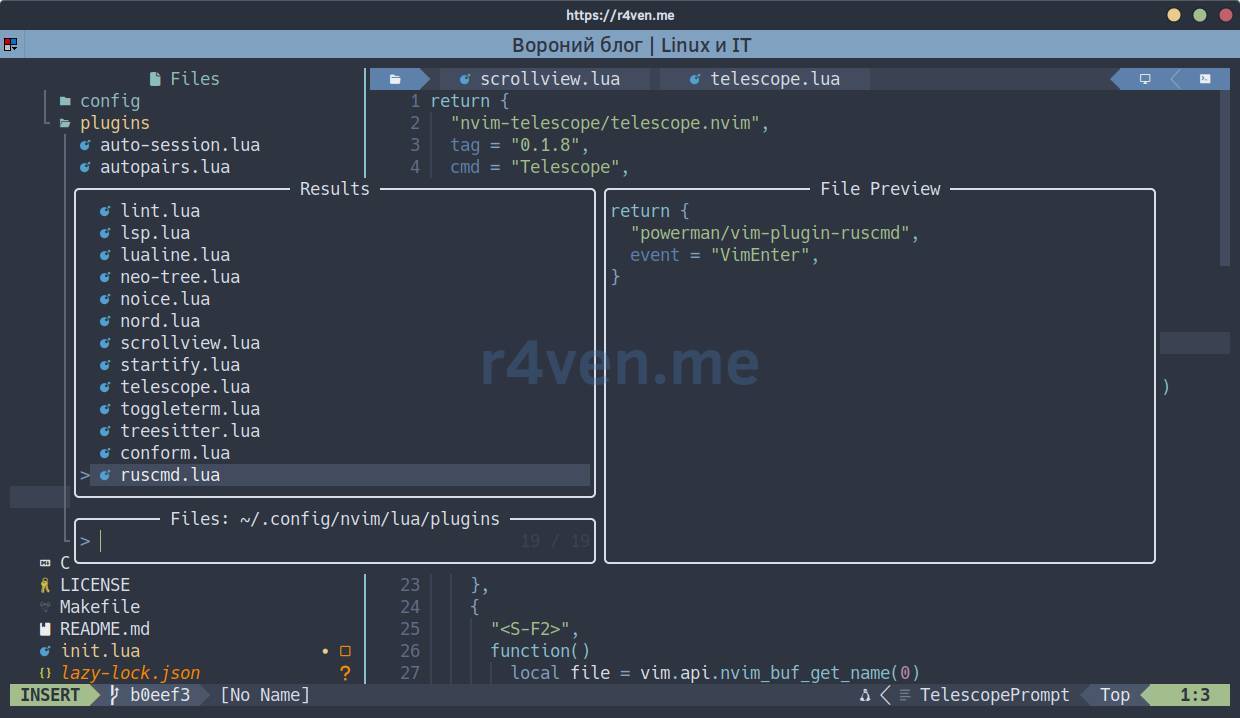
}File search in the current file directory on F2 and content search on Shift+F2.
The key decision here - cwd for find_files/live_grep is taken not from the project root and not from the global cwd, but from the directory of the currently open file (vim.fs.dirname). On monorepos with dozens of services, global search across the entire tree is too noisy - usually you’re interested in searching near what you’re working on right now. <Esc> closes Telescope in both insert and normal modes of the prompt.
telescope-ui-select.nvim redefines the standard vim.ui.select, so CodeCompanion adapter and model selection, along with other system lists, get search and normal arrow navigation. Besides search, Telescope is used as a unified interface for diagnostics and Git: F6 shows workspace diagnostics, Shift+F6 - only current buffer diagnostics, F8 - changed files, Shift+F8 - current file history. The old buffer list on F5 has been removed: now this key switches the CodeCompanion AI chat.
lua/plugins/toggleterm.lua
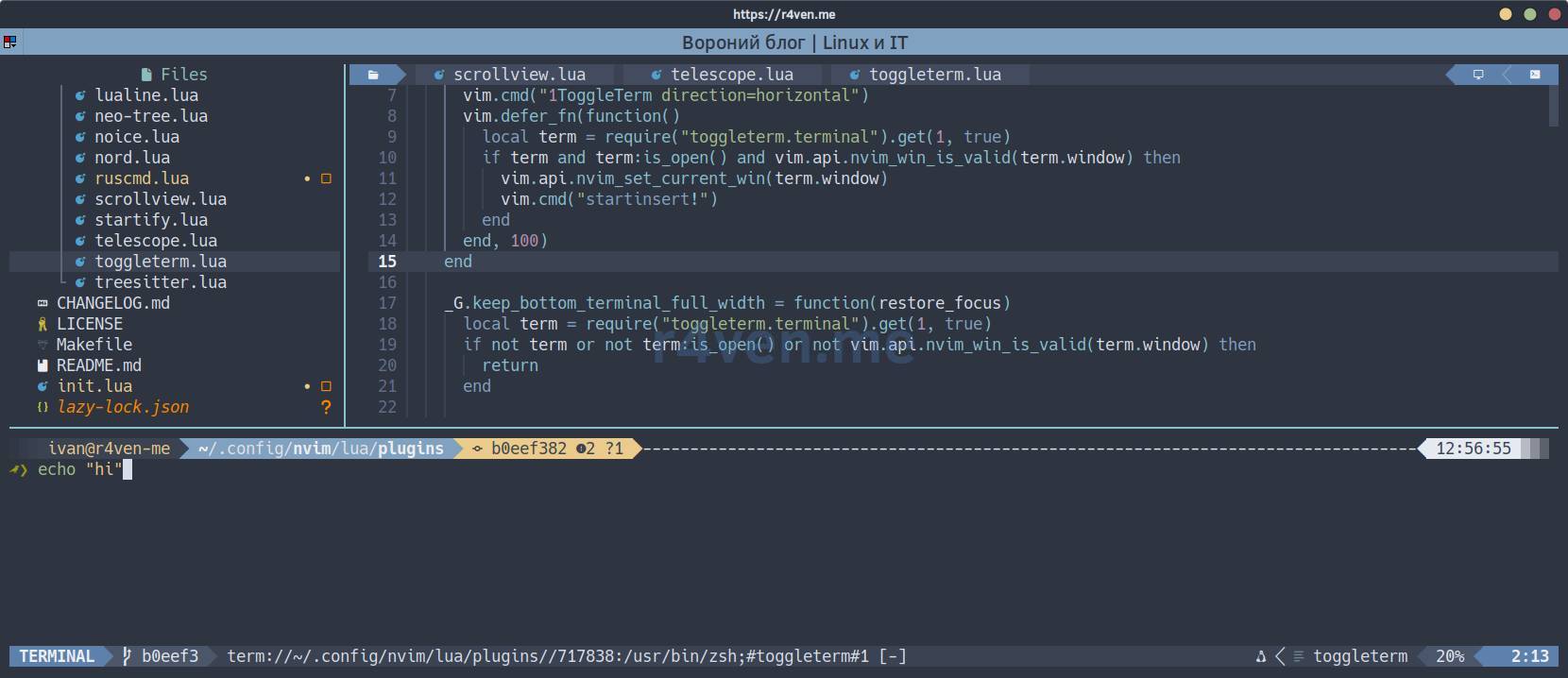
Hotkey - F4 opens and closes the bottom terminal (or visual button at top-right), stretched to full width; Ctrl+Up/Ctrl+Down change its height.
return {
  "akinsho/toggleterm.nvim",
  version = "*",
  lazy = false,
  init = function()
    _G.toggle_bottom_terminal = function()
      vim.cmd("1ToggleTerm direction=horizontal")
      vim.defer_fn(function()
        local term = require("toggleterm.terminal").get(1, true)
        if term and term:is_open() and vim.api.nvim_win_is_valid(term.window) then
          vim.api.nvim_set_current_win(term.window)
          vim.cmd("startinsert!")
        end
      end, 100)
    end

    _G.keep_bottom_terminal_full_width = function(restore_focus)
      local term = require("toggleterm.terminal").get(1, true)
      if not term or not term:is_open() or not vim.api.nvim_win_is_valid(term.window) then
        return
      end

      local current_win = vim.api.nvim_get_current_win()
      vim.api.nvim_set_current_win(term.window)
      vim.cmd("wincmd J")

      if restore_focus and vim.api.nvim_win_is_valid(current_win) then
        vim.api.nvim_set_current_win(current_win)
      end
    end
  end,
  opts = {
    size = 15,
    open_mapping = nil,
    direction = "horizontal",
    persist_size = true,
    persist_mode = false,
    start_in_insert = true,
    shade_terminals = false,
    shell = vim.o.shell,
    on_open = function(term)
      local previous_win = vim.fn.win_getid(vim.fn.winnr("#"))
      if previous_win ~= 0 and vim.api.nvim_win_is_valid(previous_win) then
        vim.t.toggleterm_last_editor_win = previous_win
      end

      _G.keep_bottom_terminal_full_width(false)

      vim.api.nvim_set_hl(0, "ToggleTermSeparator", { fg = "#88C0D0", bg = "#2E3440" })

      local winhighlight = vim.wo[term.window].winhighlight
      if not winhighlight:find("WinSeparator:", 1, true) then
        vim.wo[term.window].winhighlight = table.concat({
          winhighlight,
          "WinSeparator:ToggleTermSeparator",
        }, ","):gsub("^,", "")
      end

      local function resize(delta)
        vim.cmd(("resize %s%d"):format(delta > 0 and "+" or "", delta))
      end

      local opts = { buffer = term.bufnr, silent = true }
      local function enter_terminal_mode()
        if term:is_open() and vim.api.nvim_get_current_win() == term.window then
          vim.cmd("startinsert!")
        end
      end

      vim.keymap.set({ "n", "t" }, "<C-Up>", function()
        resize(2)
      end, vim.tbl_extend("force", opts, { desc = "Increase terminal height" }))
      vim.keymap.set({ "n", "t" }, "<C-Down>", function()
        resize(-2)
      end, vim.tbl_extend("force", opts, { desc = "Decrease terminal height" }))

      vim.defer_fn(enter_terminal_mode, 50)
    end,
  },
  config = function(_, opts)
    require("toggleterm").setup(opts)

    local toggle = "<cmd>1ToggleTerm direction=horizontal<CR>"
    local toggle_keys = { "<F4>" }

    for _, key in ipairs(toggle_keys) do
      vim.keymap.set("n", key, toggle, {
        noremap = true,
        silent = true,
        nowait = true,
        desc = "Toggle bottom terminal",
      })
      vim.keymap.set("i", key, "<Esc>" .. toggle, {
        noremap = true,
        silent = true,
        nowait = true,
        desc = "Toggle bottom terminal",
      })
      vim.keymap.set("t", key, [[<C-\><C-n>]] .. toggle, {
        noremap = true,
        silent = true,
        nowait = true,
        desc = "Toggle bottom terminal",
      })
    end

    local function forward_to_editor(key)
      vim.cmd.stopinsert()

      local previous_win = vim.t.toggleterm_last_editor_win
      if type(previous_win) == "number" and previous_win ~= 0 and vim.api.nvim_win_is_valid(previous_win) then
        local previous_buf = vim.api.nvim_win_get_buf(previous_win)
        if vim.bo[previous_buf].buftype ~= "terminal" then
          vim.api.nvim_set_current_win(previous_win)
        end
      end

      vim.schedule(function()
        local mapping = vim.fn.maparg(key, "n", false, true)

        if type(mapping.callback) == "function" then
          local ok, err = pcall(mapping.callback)
          if not ok then
            vim.notify(err, vim.log.levels.ERROR)
          end
          return
        end

        if type(mapping.rhs) == "string" and mapping.rhs ~= "" then
          local rhs = vim.api.nvim_replace_termcodes(mapping.rhs, true, false, true)
          vim.api.nvim_feedkeys(rhs, "nx", false)
          return
        end

        vim.notify("No editor mapping for " .. key, vim.log.levels.WARN)
      end)
    end

    vim.keymap.set("t", "<F3>", function()
      local terminal_win = vim.api.nvim_get_current_win()
      vim.t.toggleterm_restore_win = terminal_win

      require("neo-tree.command").execute({
        action = "show",
        source = "filesystem",
        position = "left",
        toggle = true,
      })

      if vim.api.nvim_win_is_valid(terminal_win) then
        vim.api.nvim_set_current_win(terminal_win)
        vim.cmd.startinsert()
      end
    end, {
      noremap = true,
      silent = true,
      nowait = true,
      desc = "Toggle Neo-tree without leaving terminal",
    })

    local editor_function_keys = {
      "<S-F1>",
      "<F13>",
      "<F2>",
      "<S-F2>",
      "<F5>",
      "<S-F5>",
      "<F6>",
      "<S-F6>",
      "<F7>",
      "<S-F7>",
      "<F8>",
      "<S-F8>",
      "<F19>",
      "<F9>",
      "<F10>",
      "<F11>",
      "<F12>",
      "<S-F9>",
      "<S-F10>",
      "<S-F11>",
      "<S-F12>",
      "<F21>",
      "<F22>",
      "<F23>",
      "<F24>",
    }

    for _, key in ipairs(editor_function_keys) do
      local editor_key = key
      vim.keymap.set("t", editor_key, function()
        forward_to_editor(editor_key)
      end, {
        noremap = true,
        silent = true,
        nowait = true,
        desc = "Run " .. editor_key .. " in the editor",
      })
    end
  end,
}The longest config file. The idea: while focus is inside the terminal, all familiar function keys (sessions, search, git commit, linting, etc.) should continue to work as if the focus were in a regular buffer. For this, forward_to_editor before executing the key switches to the last “editor” window (toggleterm_last_editor_win, remembered in on_open), finds its actual mapping (callback or rhs), and executes it there already - and this entire list of keys (editor_function_keys) is rebind in terminal mode to this function.
The terminal switches only via regular F4: Shift+F4/F16 are now given to Noice history via Telescope. Separately - keep_bottom_terminal_full_width: the terminal is always stretched to full width (wincmd J moves it down across all columns), even if a vertical split or Neo-tree is open.
lua/plugins/treesitter.lua
return {
  "nvim-treesitter/nvim-treesitter",
  branch = "master",
  build = ":TSUpdate",
  event = { "BufReadPost", "BufNewFile" },
  opts = {
    auto_install = true,
    ensure_installed = {
      "lua",
      "vim",
      "vimdoc",
      "bash",
      "python",
      "json",
      "sql",
      "yaml",
      "toml",
      "markdown",
      "tmux",
      "ssh_config",
      "terraform",
      "nginx",
      "groovy",
      "pem",
      "dockerfile",
      "javascript",
      "css",
      "html",
    },
    -- Avoid concurrent installers racing over tree-sitter-<parser>-tmp
    -- while bootstrapping Neovim on a clean host.
    sync_install = true,
    highlight = {
      enable = true,
      additional_vim_regex_highlighting = false,
    },
    indent = {
      enable = true,
    },
  },
  config = function(_, opts)
    local ok, configs = pcall(require, "nvim-treesitter.configs")
    if not ok then
      vim.notify("nvim-treesitter legacy config module is unavailable", vim.log.levels.WARN)
      return
    end

    local function first_node(match, capture)
      local nodes = match[capture]
      return type(nodes) == "table" and nodes[1] or nodes
    end

    vim.treesitter.query.add_directive("set-lang-from-info-string!", function(match, _, bufnr, pred, metadata)
      local node = first_node(match, pred[2])
      if not node then
        return
      end

      local alias = vim.treesitter.get_node_text(node, bufnr):lower()
      local language_aliases = {
        ex = "elixir",
        pl = "perl",
        sh = "bash",
        ts = "typescript",
        uxn = "uxntal",
      }
      metadata["injection.language"] = vim.filetype.match({ filename = "a." .. alias })
        or language_aliases[alias]
        or alias
    end, { force = true })

    vim.treesitter.query.add_directive("set-lang-from-mimetype!", function(match, _, bufnr, pred, metadata)
      local node = first_node(match, pred[2])
      if not node then
        return
      end

      local mime = vim.treesitter.get_node_text(node, bufnr)
      local mime_languages = {
        importmap = "json",
        module = "javascript",
        ["application/ecmascript"] = "javascript",
        ["text/ecmascript"] = "javascript",
      }
      local parts = vim.split(mime, "/", { plain = true })
      metadata["injection.language"] = mime_languages[mime] or parts[#parts]
    end, { force = true })

    vim.treesitter.query.add_directive("downcase!", function(match, _, bufnr, pred, metadata)
      local capture = pred[2]
      local node = first_node(match, capture)
      if not node then
        return
      end

      metadata[capture] = metadata[capture] or {}
      local text = vim.treesitter.get_node_text(node, bufnr, { metadata = metadata[capture] }) or ""
      metadata[capture].text = text:lower()
    end, { force = true })

    -- GitHub's codeload archive endpoint sometimes 404s for pinned parser
    -- revisions that aren't a branch tip (e.g. tree-sitter-html), which
    -- surfaces as "gzip: stdin: not in gzip format". `git clone` of the
    -- same commit works fine, so prefer it over tarball downloads.
    require("nvim-treesitter.install").prefer_git = true

    configs.setup(opts)
  end,
}The ensure_installed list covers languages and formats I work with regularly - from lua/bash/python to terraform/nginx/dockerfile. auto_install = true automatically installs a missing parser when opening a file of a supported type; if there’s no ready parser for a language, Neovim just continues to work without Treesitter highlighting. sync_install = true installs parsers sequentially, not in parallel - without this, on a clean machine several installers running in parallel would race over the temporary tree-sitter-<parser>-tmp directory.
Three redefined directives (set-lang-from-info-string!, set-lang-from-mimetype!, downcase!) - a compatibility layer for the capture arrays of the new Treesitter API in Neovim 0.13-dev. Without it, re-parsing Markdown in render-markdown.nvim could crash with attempt to call method range (a nil value).
prefer_git = true - a separate story: codeload.github.com sometimes returns 404 on the archive for a pinned commit of a parser that isn’t a branch tip (I caught this on tree-sitter-html), while git clone of the same commit works normally. By default, prefer_git is only enabled on Windows; here it’s explicitly enabled on Linux/Mac as well.
Afterword

The move from init.vim to Lua took longer, but with the rise of AI development accelerated significantly. I intentionally left LSP disabled: for most tasks, lightweight linters and formatters are enough without running heavy language servers. But when needed, everything can be enabled with one line.
At first, I wanted to keep the configuration just as “minimalist” - stored in one or two files. But as the config grew, the modular file structure completely justified itself: need to disable or change something - go to a specific file, fix what’s needed. Of course, this is a matter of taste, but personally I find such a config simply pleasant to maintain 🐧.
Thanks for reading. Good luck exiting Neovim!
References
- Config from this article on GitHub
- lazy.nvim
- nvim-treesitter
- Neovim - editor configuration: basic setup
- Neovim - editor configuration: plugin installation and setup
👨💻And…
Don’t forget about our Telegram channel 📱 and chat
Or maybe you want to become a co-author? Then click here🔗
💬 All the best ✌️
That should be it. If not, check the logs 🙂

Comments