

In this guide, we’ll write a universal backup script in Bash that uses the tar utility to create archives with files from local or remote hosts, perform rotation of old backups, encrypt them on the fly, and monitor disk space 😌.
🖐️Hey!
Subscribe to our Telegram channel @r4ven_me📱, so you don’t miss new posts on the website 😉. If you have questions or just want to chat about the topic, feel free to join the Raven chat at @r4ven_me_chat🧐.
Prerequisites
Before running the script, make sure your system has the following required utilities installed:
- tar - almost always installed;
- flock - for blocking concurrent runs (usually part of util-linux);
- Compression utility (optional): zstd, gzip/pigz, bzip2/pbzip2, xz - your choice;
- gpg (optional) - if we want to encrypt archives;
- ssh (optional) - if we want to backup files from remote machines.
If needed, install them (example for Debian/Ubuntu):
sudo apt update

sudo apt install -y tar util-linux gpg openssh-clientExamples in this article were run on Linux Mint 22 (Ubuntu 24.04), but the script is fully portable.
How the script works under the hood
The script logic boils down to forming an appropriate pipeline command: tar locally or tar via SSH on a remote machine → compression utility → encryption utility gpg → file to disk.
Key points:
- Configuration variables at the top - everything that needs to be changed is in the first lines, the rest is just logic;
- Locking via flock - if you run the script twice on the same data, the second run won’t start until the first completes;
- SSH backup works “locally” -
tarruns on the remote machine and redirects the stream to a local pipe, which avoids overloading the remote host’s CPU, but may impact the network (depending on data size); - Automatic rotation - old backups are deleted by age (older than
REMOVE_OLDdays), or kept by count (last N weekly/monthly); - Labels in filenames - you can add suffixes like
_keep,_weekly,_monthlyfor different rotation policies; - Hash file - if needed, you can save its hash
.sha256next to the archive for future integrity checks.
Let’s move directly to the script.
Script

Create a file in any convenient location, for example, using vim:
vim ~/.local/bin/tar.shAnd fill it with the following content:
#!/usr/bin/env bash

set -Eeuo pipefail

# ==== EDIT THESE ====
SOURCE_DIR="/etc"
SOURCE_FILE=()            # specific file(s)/dir(s) inside SOURCE_DIR; empty = everything
                           # e.g. SOURCE_FILE=("passwd" "My Documents")
OUTPUT_DIR="/var/backups/etc"
EXTRA_PARAMS=()           # extra tar flags, e.g. EXTRA_PARAMS=("--exclude=*.tmp")
COMPRESS_FORMAT="zstd"    # gzip|pigz|bzip2|pbzip2|xz|zstd|"" (empty = no compression)
COMPRESS_LEVEL="15"
ENCRYPT_PASSWORD=""       # empty = no encryption
FILENAME=""               # empty = auto-name from OUTPUT_DIR
LABEL_KEEP="0"            # mutually exclusive with LABEL_WEEKLY/LABEL_MONTHLY
LABEL_WEEKLY="0"
LABEL_MONTHLY="0"
REMOVE_OLD=""             # days; empty = no retention
KEEP="0"                  # 1 = when removing old backups, keep ones with 'keep' in the name
KEEP_WEEKLY=""            # keep the N most recent 'weekly'-labeled backups
KEEP_MONTHLY=""           # keep the N most recent 'monthly'-labeled backups
HASH_FILE="1"             # 1 = also write a .sha256 next to the archive
# SSH: leave SSH_HOST empty for a local backup. When set, tar runs on the
# remote host and streams the archive back (pull, not push).
SSH_HOST=""
SSH_USER="$(id -un)"
SSH_PORT="22"
SSH_KEY="$HOME/.ssh/id_ed25519"
SSH_EXTRA_PARAMS=()       # e.g. SSH_EXTRA_PARAMS=("-o" "ProxyJump=bastion")
# =====================

SCRIPT_DIR="$(cd "$(dirname "${BASH_SOURCE[0]}")" &> /dev/null && pwd -P)"
SCRIPT_PID="$$"

if [[ -t 2 && -z "${NO_COLOR:-}" && "${TERM:-}" != "dumb" ]]; then
    LOG_GREEN=$'\033[32m'; LOG_RED=$'\033[31m'; LOG_RESET=$'\033[0m'
else
    LOG_GREEN=""; LOG_RED=""; LOG_RESET=""
fi

log() {
    local msg="$*" color=""
    [[ "$msg" == ERROR:* ]] && color="$LOG_RED"
    printf '%s[%s]%s %s%s%s\n' "$LOG_GREEN" "$(date '+%Y-%m-%d %H:%M:%S')" "$LOG_RESET" "$color" "$msg" "$LOG_RESET" >&2
}

# --- preflight (mirrors lib/checks.sh's check_utils/check_disk_space) ---
check_utils() {
    local util
    for util in "$@"; do
        command -v "$util" &> /dev/null || { log "ERROR: required utility not found: $util"; exit 1; }
    done
}

check_disk_space() {
    local dir="$1" pct
    pct=$(df "$dir" --output=pcent | tail -n 1 | tr -d ' %')
    if (( pct > 95 )); then
        log "ERROR: more than 95% of disk space used in $dir (${pct}%)"
        exit 1
    fi
    return 0
}

# --- SSH (mirrors lib/ssh.sh: accept-new against a local known_hosts, and
# ssh_remote_exec's per-token %q quoting -- not a string built for eval) ---
ssh_build_argv() {
    SSH_ARGV=("ssh" "-q" "-o" "StrictHostKeyChecking=accept-new" \
        "-o" "UserKnownHostsFile=${SCRIPT_DIR}/.known_hosts_standalone")
    SSH_ARGV+=("${SSH_EXTRA_PARAMS[@]}")
    SSH_ARGV+=("-l" "$SSH_USER" "-p" "$SSH_PORT" "-i" "$SSH_KEY" "$SSH_HOST")
}

ssh_remote_exec() {
    local -n remote_argv="$1"
    ssh_build_argv
    local quoted=() tok
    for tok in "${remote_argv[@]}"; do
        quoted+=("$(printf '%q' "$tok")")
    done
    "${SSH_ARGV[@]}" "${quoted[@]}"
}

# --- retention (mirrors lib/retention.sh's remove_old_backup) ---
remove_old_backups() {
    local output_dir="$1" remove_old="$2" keep="$3" keep_weekly="$4" keep_monthly="$5" kind="${6:-file}"
    local valid_extensions=(".tar" ".sql" ".gz" ".bz2" ".xz" ".zst" ".gpg")
    local now weekly_entries=() monthly_entries=()
    now=$(date +%s)

    local entry_path
    for entry_path in "$output_dir"/*; do
        local entry_name
        entry_name=$(basename "$entry_path")

        if [[ "$kind" == "dir" ]]; then
            [[ -d "$entry_path" && ! -L "$entry_path" ]] || continue
        else
            [[ -f "$entry_path" ]] || continue
            local matched=0 ext
            for ext in "${valid_extensions[@]}"; do
                [[ "$entry_name" == *"$ext" ]] && matched=1
            done
            (( matched )) || continue
        fi

        (( keep )) && [[ "$entry_name" == *keep* ]] && continue

        if (( keep_weekly > 0 )) && [[ "$entry_name" == *weekly* ]]; then
            weekly_entries+=("$entry_path")
            continue
        fi
        if (( keep_monthly > 0 )) && [[ "$entry_name" == *monthly* ]]; then
            monthly_entries+=("$entry_path")
            continue
        fi

        local entry_last_mod
        entry_last_mod=$(stat -c %Y "$entry_path")
        if (( now - entry_last_mod > remove_old * 86400 )); then
            log "Deleting old backup: $entry_path"
            rm -rf "$entry_path" "${entry_path}.sha256"
        fi
    done

    clean_old_generations() {
        local n="$1" label="$2"
        shift 2
        local entries=("$@")
        (( ${#entries[@]} <= n )) && return 0
        local sorted=() e
        mapfile -t sorted < <(
            for e in "${entries[@]}"; do
                printf '%s\t%s\n' "$(stat -c %Y "$e")" "$e"
            done | sort -nr -k1,1 | cut -f2-
        )
        local old
        for old in "${sorted[@]:$n}"; do
            log "Deleting old $label backup: $old"
            rm -rf "$old" "${old}.sha256"
        done
        return 0
    }

    (( keep_weekly > 0 ))  && clean_old_generations "$keep_weekly" "weekly" "${weekly_entries[@]}"
    (( keep_monthly > 0 )) && clean_old_generations "$keep_monthly" "monthly" "${monthly_entries[@]}"
    return 0
}

[[ -n "$SSH_HOST" || -d "$SOURCE_DIR" ]] || { log "ERROR: source dir not found: $SOURCE_DIR"; exit 1; }

required_utils=("tar" "flock")
[[ -n "$COMPRESS_FORMAT" ]] && required_utils+=("$COMPRESS_FORMAT")
[[ -n "$ENCRYPT_PASSWORD" ]] && required_utils+=("gpg")
[[ -n "$SSH_HOST" ]] && required_utils+=("ssh")
check_utils "${required_utils[@]}"

labels=0
[[ "$LABEL_KEEP" == "1" ]]    && labels=$((labels + 1))
[[ "$LABEL_WEEKLY" == "1" ]]  && labels=$((labels + 1))
[[ "$LABEL_MONTHLY" == "1" ]] && labels=$((labels + 1))
(( labels > 1 )) && { log "ERROR: only one label allowed"; exit 1; }

mkdir -p "$OUTPUT_DIR"

[[ -z "$FILENAME" ]] && FILENAME="backup_tar_$(basename "$(realpath -m "$OUTPUT_DIR")")"

LOCK_FILE="${SCRIPT_DIR}/.${FILENAME}.lock"
exec {lock_fd}>> "$LOCK_FILE"
flock -n "$lock_fd" || { log "ERROR: another backup for this item is already running"; exit 1; }
echo "$SCRIPT_PID" > "$LOCK_FILE"

release_lock() {
    if [[ -f "$LOCK_FILE" ]] && [[ "$(< "$LOCK_FILE")" == "$SCRIPT_PID" ]]; then
        rm -f "$LOCK_FILE"
    fi
}
trap release_lock EXIT

[[ "$LABEL_KEEP" == "1" ]]    && FILENAME="${FILENAME}_keep"
[[ "$LABEL_WEEKLY" == "1" ]]  && FILENAME="${FILENAME}_weekly"
[[ "$LABEL_MONTHLY" == "1" ]] && FILENAME="${FILENAME}_monthly"
FILENAME="${FILENAME}_$(date '+%F_%H-%M-%S').tar"

if [[ -n "$REMOVE_OLD" ]]; then
    remove_old_backups "$OUTPUT_DIR" "$REMOVE_OLD" "$KEEP" "${KEEP_WEEKLY:-0}" "${KEEP_MONTHLY:-0}" file
fi

check_disk_space "$OUTPUT_DIR"

case "$COMPRESS_FORMAT" in
    gzip|pigz)    FILENAME="${FILENAME}.gz"  ;;
    bzip2|pbzip2) FILENAME="${FILENAME}.bz2" ;;
    xz)           FILENAME="${FILENAME}.xz"  ;;
    zstd)         FILENAME="${FILENAME}.zst" ;;
    "")           ;;
    *) log "ERROR: unsupported COMPRESS_FORMAT: $COMPRESS_FORMAT"; exit 1 ;;
esac
[[ -n "$ENCRYPT_PASSWORD" ]] && FILENAME="${FILENAME}.gpg"

RESULT_FILE="${OUTPUT_DIR}/${FILENAME}"

producer=("tar" "--create")
producer+=("${EXTRA_PARAMS[@]}")
producer+=("--file=-" "--directory=${SOURCE_DIR}")
if [[ ${#SOURCE_FILE[@]} -eq 0 ]]; then
    producer+=("./")
else
    producer+=("${SOURCE_FILE[@]}")
fi

run_producer() {
    if [[ -n "$SSH_HOST" ]]; then
        ssh_remote_exec producer
    else
        "${producer[@]}"
    fi
}

run_compress() {
    case "$COMPRESS_FORMAT" in
        gzip|pigz)    "$COMPRESS_FORMAT" "-$COMPRESS_LEVEL" ;;
        bzip2|pbzip2) "$COMPRESS_FORMAT" "-$COMPRESS_LEVEL" ;;
        xz)           xz "-$COMPRESS_LEVEL" --stdout ;;
        zstd)         zstd "-$COMPRESS_LEVEL" -c ;;
        *)            cat ;;
    esac
}

run_encrypt() {
    if [[ -z "$ENCRYPT_PASSWORD" ]]; then
        cat
        return
    fi
    local tmpdir passfile
    tmpdir="$(mktemp -d /dev/shm/.encrypt.XXXXXX)"
    passfile="$tmpdir/passfile"
    trap 'rm -rf "$tmpdir"' RETURN
    printf "%s" "$ENCRYPT_PASSWORD" > "$passfile"
    chmod 600 "$passfile"
    gpg --quiet --batch --yes --symmetric --cipher-algo AES256 --homedir "$tmpdir" --passphrase-file "$passfile"
}

log "Running: ${producer[*]}$([[ -n "$SSH_HOST" ]] && echo " (on $SSH_HOST)") > $RESULT_FILE"

if run_producer | run_compress | run_encrypt > "$RESULT_FILE"; then
    log "Backup created: $RESULT_FILE"
else
    rm -f "$RESULT_FILE"
    log "ERROR: backup failed"
    exit 1
fi

if [[ "$HASH_FILE" == "1" ]]; then
    sha256sum "$RESULT_FILE" > "${RESULT_FILE}.sha256"
    log "Hash: ${RESULT_FILE}.sha256"
fiYou only need to edit the variables between the lines # ==== EDIT THESE ==== and # =====================. And even then, not all of them.
I won’t describe every block of the script here - if needed, ask language models for clarification. They’re pretty good at this these days 😉.
Usage Examples

Below I’ll show several scenarios for using our script. All examples are working and safe - they use test directories in /tmp/, not real data.
Preparing the test environment
First, let’s create a test environment with data:
# Create directories
mkdir -vp /tmp/backup-demo/{data,config}

# Generate test files of different sizes
dd if=/dev/zero of=/tmp/backup-demo/data/file1.bin bs=1M count=10
dd if=/dev/zero of=/tmp/backup-demo/data/file2.bin bs=1M count=5
echo "app_version=1.0" > /tmp/backup-demo/config/app.conf
echo "db_host=localhost" > /tmp/backup-demo/config/db.conf
echo "secret_token=abc123" > /tmp/backup-demo/config/.env

# Output directories for backups
mkdir -vp /tmp/backups/{local,remote,weekly,monthly,encrypted}

# Check that everything is ready
ls -lh /tmp/backup-demo/
du -sh /tmp/backup-demo/*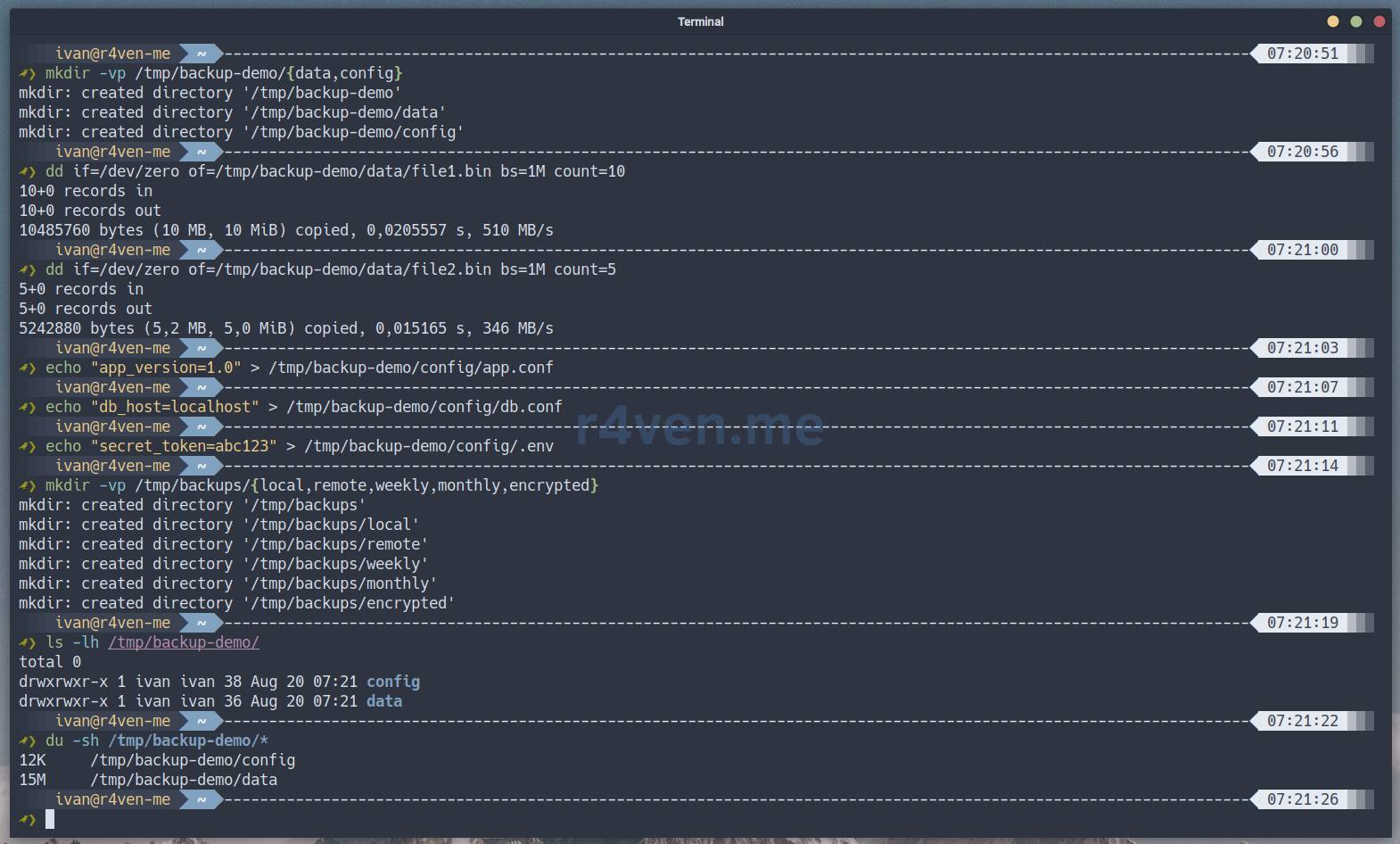
Example 1: Simple backup with zstd compression
A simple case - copy a directory with data, compress the archive with the modern zstd algorithm (good balance of speed and compression ratio). Get an archive with a hash for integrity verification. This is suitable for daily backups without special requirements.
In our script, adjust the following variables:
#!/usr/bin/env bash

SOURCE_DIR="/tmp/backup-demo"
OUTPUT_DIR="/tmp/backups/local"
COMPRESS_FORMAT="zstd"
COMPRESS_LEVEL="15"
HASH_FILE="1"
SSH_HOST=""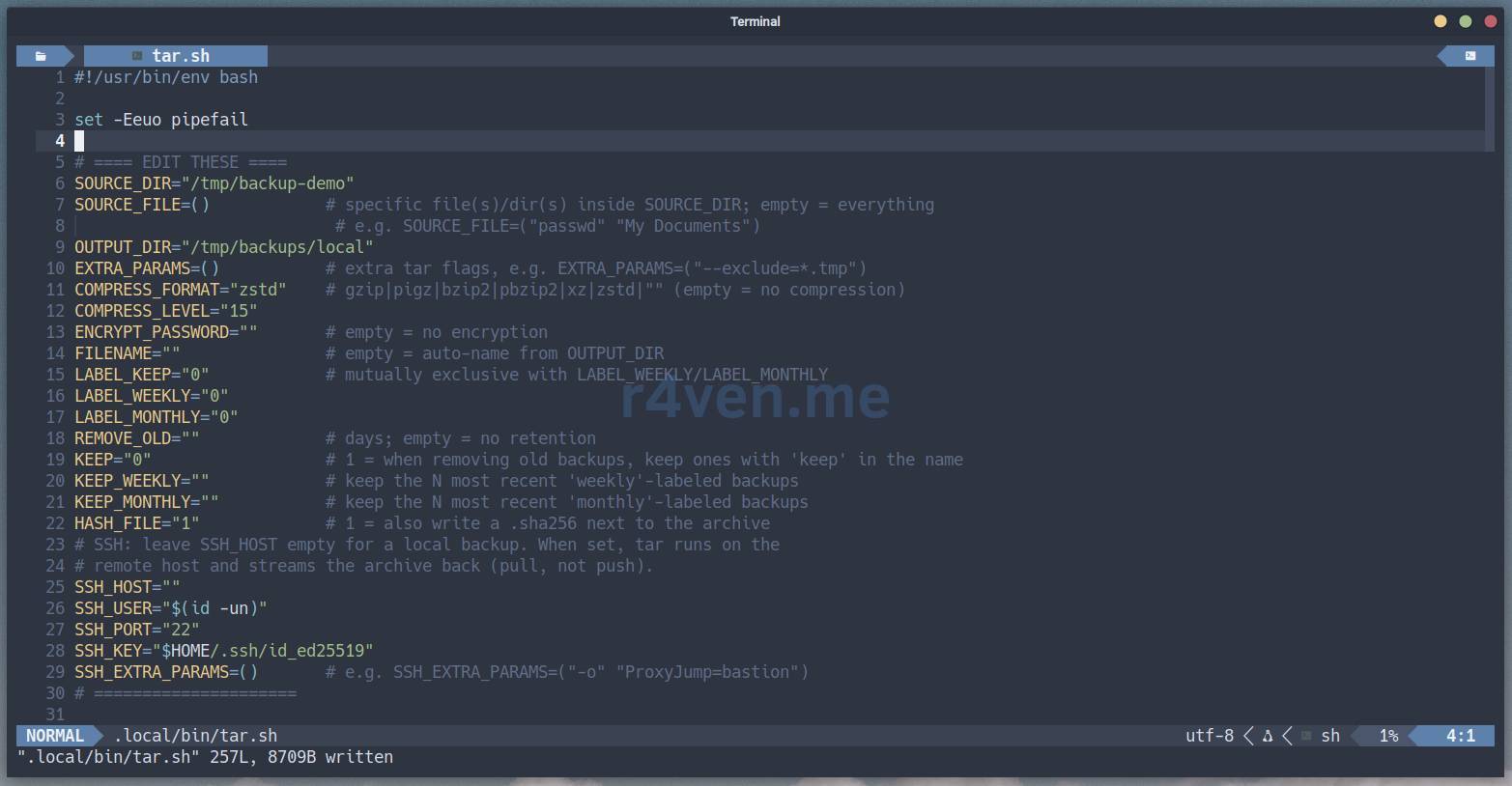
Add execute permission to the script and run it:
chmod +x ~/.local/bin/tar.sh

~/.local/bin/tar.shAfter execution, we’ll see output like this in the terminal:

Check the integrity of the archive:
bash -c 'cd /tmp/backups/local/; sha256sum -c *.sha256'The hashes should match:

View archive contents using the same tar with the -t flag:
tar -tvf /tmp/backups/local/backup_tar_local_2026-08-20_07-38-39.tar.zst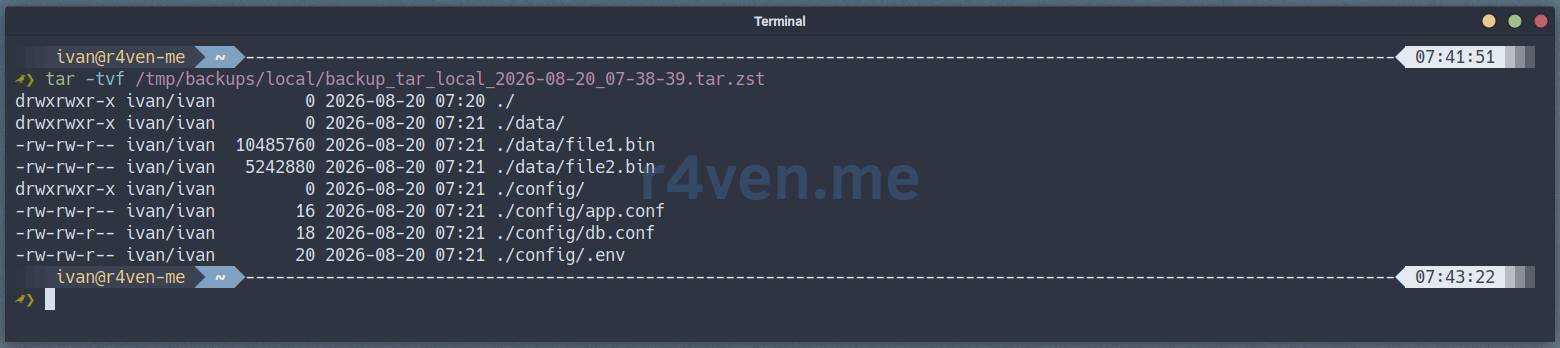
Example 2: Backup of specific files with GPG encryption
We don’t always need the entire directory. Our script can copy individual files, for example, configs, and add AES256 encryption using the gpg utility.
Edit the variables:
#!/usr/bin/env bash

SOURCE_DIR="/tmp/backup-demo"
SOURCE_FILE=("config")           # only config folder, without data/
OUTPUT_DIR="/tmp/backups/encrypted"
COMPRESS_FORMAT="zstd"
COMPRESS_LEVEL="15"
ENCRYPT_PASSWORD="i-like-r4ven-me"  # in production code, better read from environment variable
HASH_FILE="1"
SSH_HOST=""Start:
~/.local/bin/tar.sh
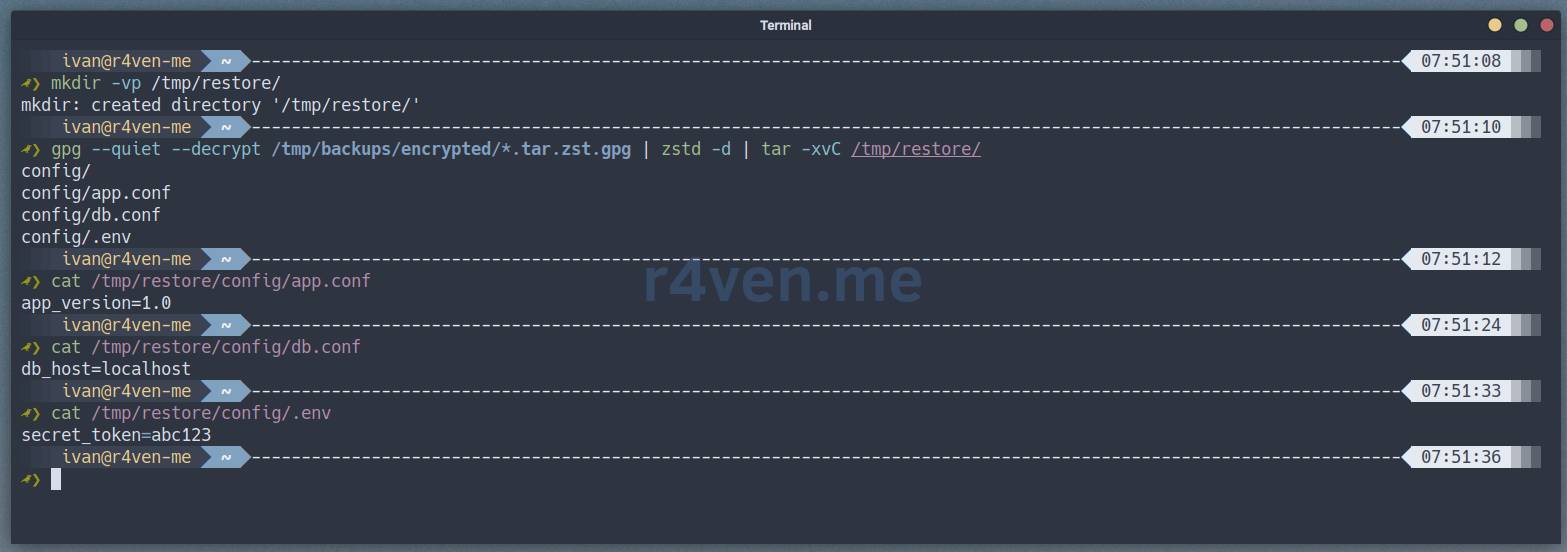
Create the /tmp/restore directory and try to extract and decrypt (password will be prompted) our archive into it:
mkdir -vp /tmp/restore/

gpg --quiet --decrypt /tmp/backups/encrypted/*.tar.zst.gpg | zstd -d | tar -xvC /tmp/restore/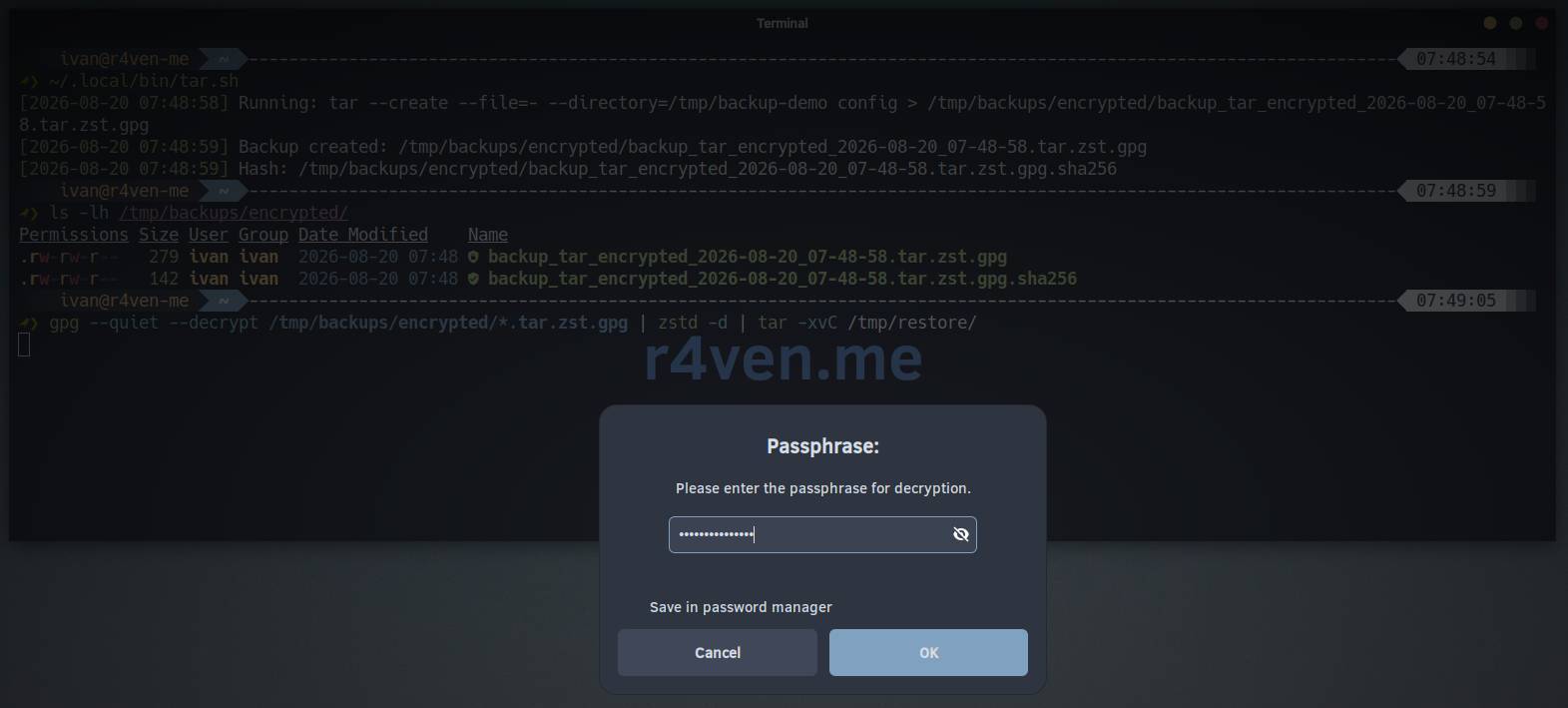
Example 3: Backup with rotation and retention policy
Backups have a tendency to accumulate, so they need to be rotated properly. Set up the following storage policy: archives older than 7 days - delete, if the name contains “keep” - keep always, the rest by date. Run the script several times to see the deletion.
Edit the script variables:
#!/usr/bin/env bash

SOURCE_DIR="/tmp/backup-demo"
OUTPUT_DIR="/tmp/backups/weekly"
COMPRESS_FORMAT="zstd"
COMPRESS_LEVEL="12"
HASH_FILE="1"
REMOVE_OLD="7"              # delete backups older than 7 days
KEEP="1"                    # if the filename contains "keep" - don't delete
KEEP_WEEKLY="3"             # keep 3 most recent weekly backups
LABEL_WEEKLY="1"            # add "_weekly" suffix
SSH_HOST=""Run several times to create multiple archives:
for i in {1..5}; do ~/.local/bin/tar.sh; sleep 1; echo '---'; done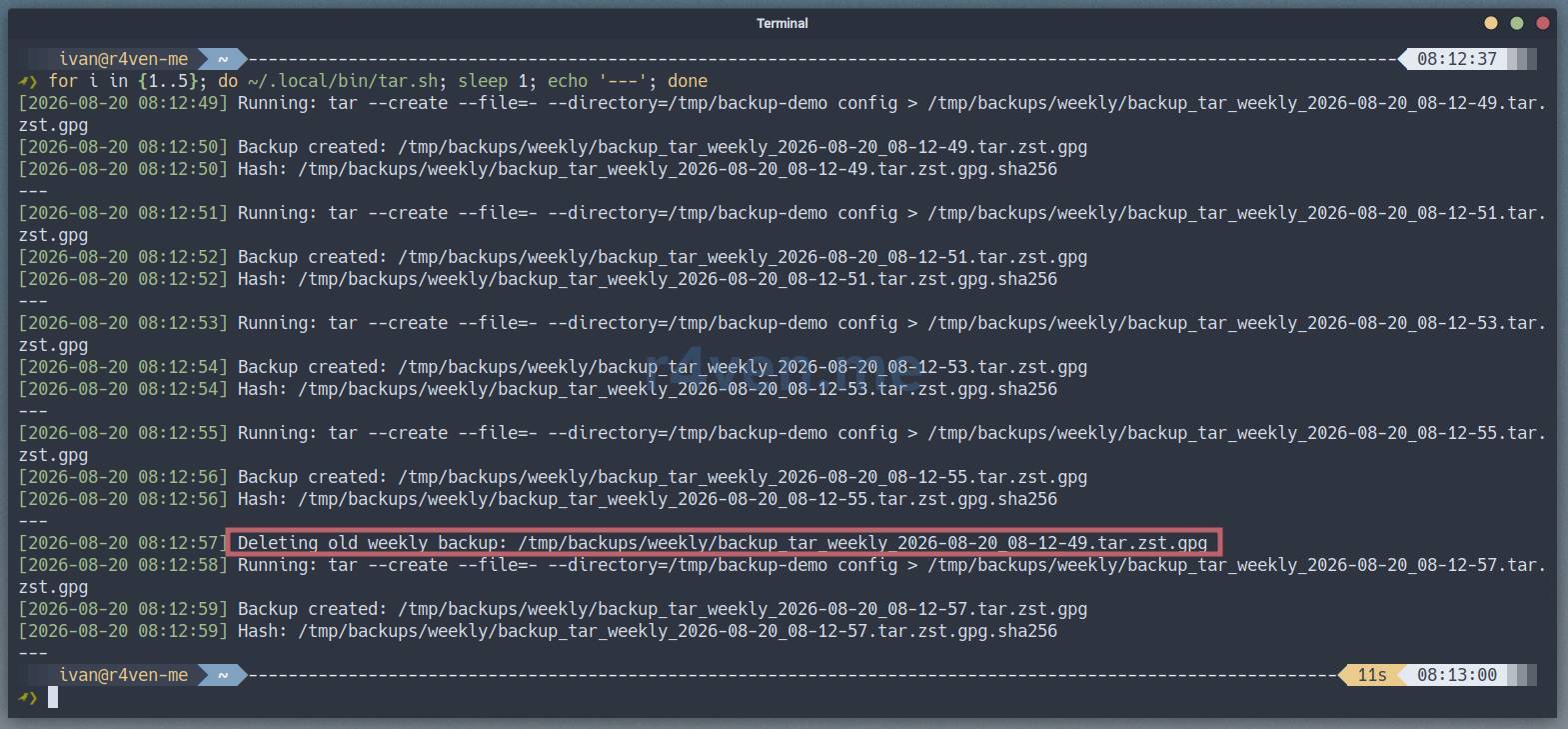
We see that when creating the 5th archive, the script sees 4 weekly archives (but should keep 3 - KEEP_WEEKLY="3") and deletes the oldest one. As a result, there will be 4 backups: 3 kept + the latest.
Now let’s disable weekly backup retention (KEEP_WEEKLY="0") and artificially reduce the modification date of one of the archives by 8 days:
sed -i 's/KEEP_WEEKLY="3"/KEEP_WEEKLY="0"/' ~/.local/bin/tar.sh

touch -d '-8 days' /tmp/backups/weekly/backup_tar_weekly_2026-08-20_08-22-37.tar.zst.gpg
Run the script again:
~/.local/bin/tar.sh
We see that a backup older than 7 days was deleted.
Now let’s make another file older than 7 days, but add the word keep to the filename:
touch -d '-8 days' /tmp/backups/weekly/backup_tar_weekly_2026-08-20_08-45-21.tar.zst.gpg

mv -v /tmp/backups/weekly/backup_tar_weekly_{,keep_}2026-08-20_08-45-21.tar.zst.gpgTry to run a backup:
~/.local/bin/tar.sh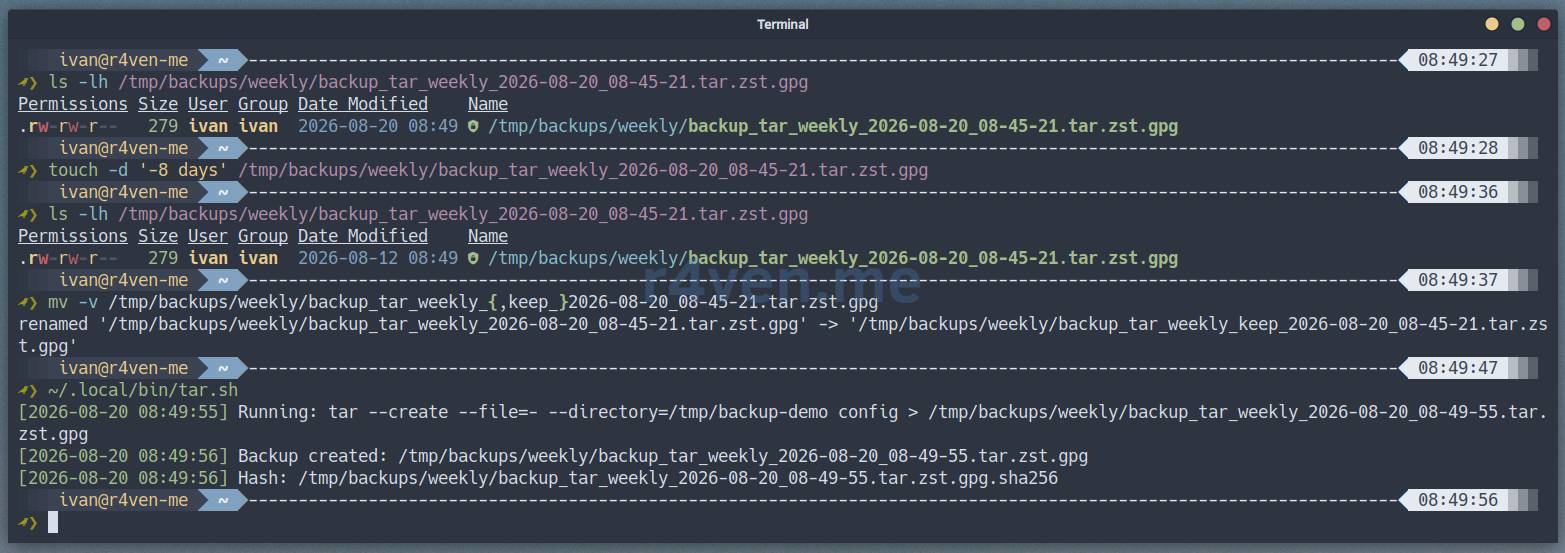
Nothing was deleted.
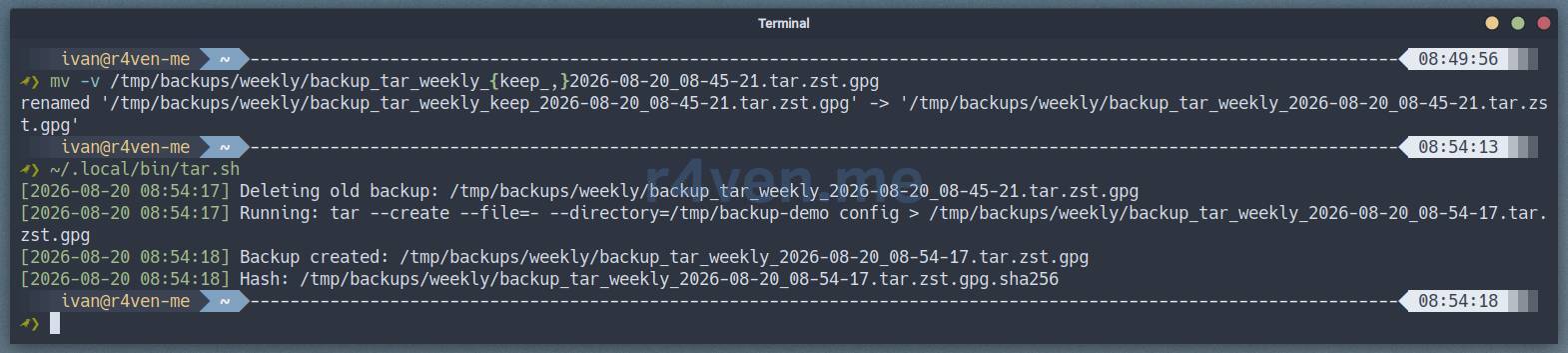
But if we rename it back without keep and run again:
mv -v /tmp/backups/weekly/backup_tar_weekly_{keep_,}2026-08-20_08-45-21.tar.zst.gpg

~/.local/bin/tar.shWe’ll see the expected result:
Example 4: SSH backup from a Docker container
Sometimes you need to copy data from a remote host via SSH. To avoid cluttering and overloading our machines, we use a Docker container with an sshd daemon inside. The script will connect to the container and copy its files.
First, prepare the Docker environment using cat and here doc:
# Create a simple Dockerfile with sshd
mkdir -vp /tmp/ssh-demo

cat > /tmp/ssh-demo/Dockerfile << 'EOF'
FROM ubuntu:22.04

RUN apt-get update && apt-get install -y openssh-server tar zstd && \
    mkdir -p /run/sshd && \
    mkdir -p /root/.ssh && \
    ssh-keygen -A

# Allow root login (demo only!)
RUN echo "PermitRootLogin yes" >> /etc/ssh/sshd_config && \
    mkdir -p /root/.ssh/authorized_keys && \
    chmod 700 /root/.ssh/authorized_keys

CMD ["/usr/sbin/sshd", "-D"]
EOF

# Build the image
docker build -t backup-demo-sshd /tmp/ssh-demo/

# Run the container
docker run -d --name backup-demo-ssh -p 2222:22 -v /tmp/backup-demo:/data:ro backup-demo-sshd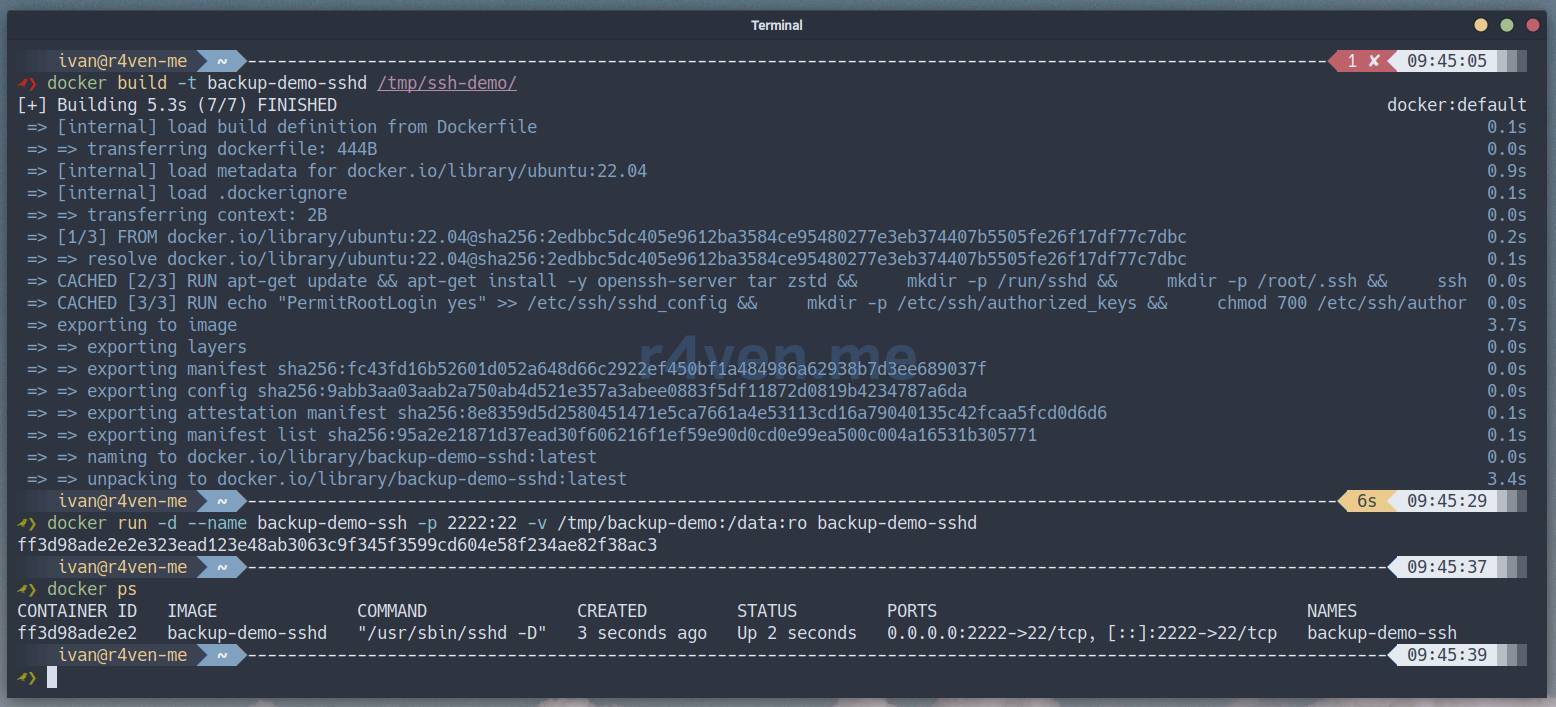
Import our public key for the root user in the container:
docker exec backup-demo-ssh sh -c "echo $(cat ~/.ssh/id_ed25519.pub) > /root/.ssh/authorized_keys"

docker exec backup-demo-ssh chmod 600 /root/.ssh/authorized_keys💡 Tip
If you don’t have a client SSH key yet, generate one with:
ssh-keygen -q -N "" -t ed25519 -f ~/.ssh/id_ed25519Now edit our backup script:
#!/usr/bin/env bash

SOURCE_DIR="/data"               # path on remote machine
SOURCE_FILE=()
OUTPUT_DIR="/tmp/backups/remote"
COMPRESS_FORMAT="zstd"
COMPRESS_LEVEL="15"
ENCRYPT_PASSWORD=""
HASH_FILE="1"
SSH_HOST="127.0.0.1"             # or container IP
SSH_USER="root"
SSH_PORT="2222"                  # port we opened
SSH_KEY="$HOME/.ssh/id_ed25519"  # or any other key
SSH_EXTRA_PARAMS=("-C")Run the backup:
~/.local/bin/tar.sh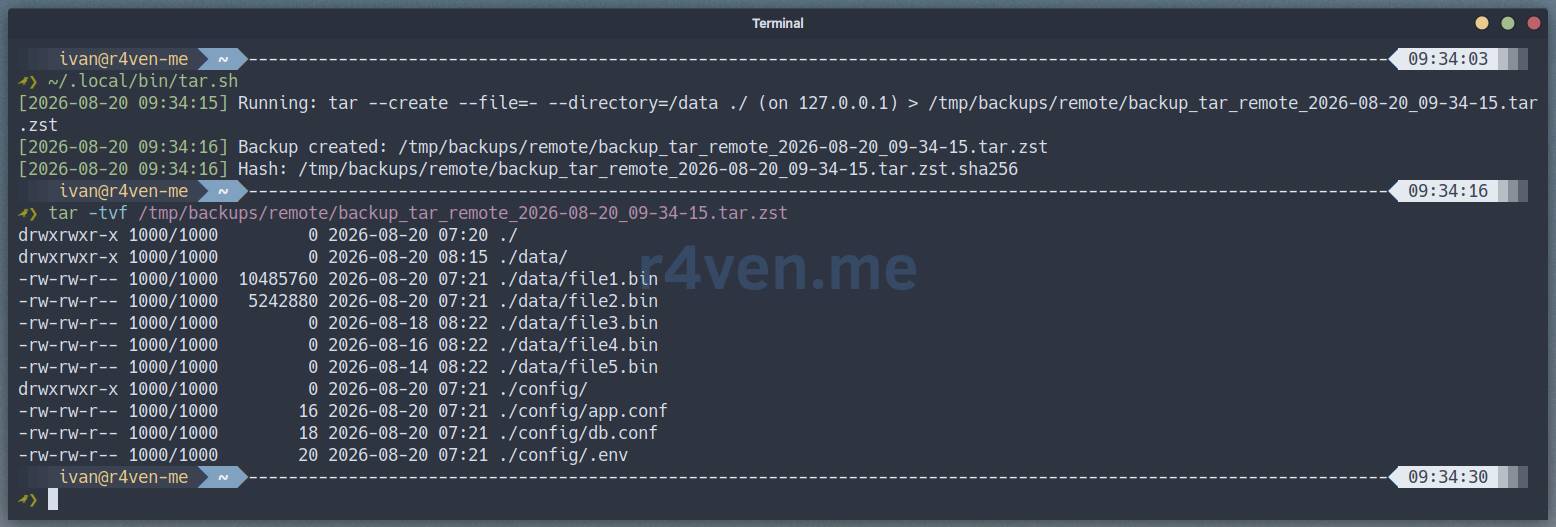
Check the result:
ls -lh /tmp/backups/remote/

# Extract and verify
mkdir -vp /tmp/restore-ssh

tar -xf /tmp/backups/remote/backup_tar_remote_2026-08-20_09-34-15.tar.zst -C /tmp/restore-ssh/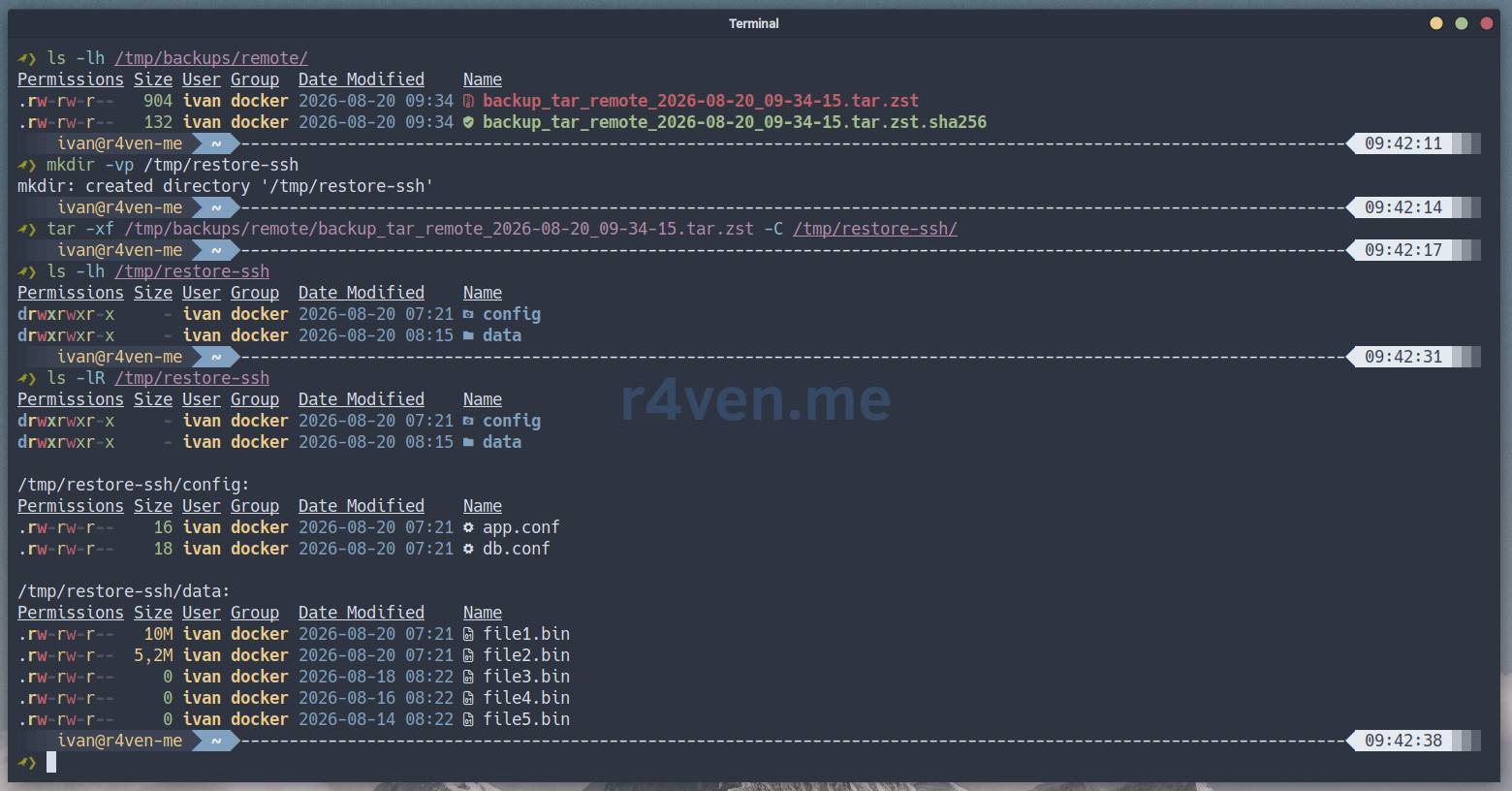
Don’t forget to clean up Docker:
docker stop backup-demo-ssh

docker rm backup-demo-ssh

docker rmi backup-demo-sshdExample 5: Monthly and weekly labels with different rotation
In production systems, you often need a strategy like “keep all daily backups for a week, all weekly backups for 3 months, all monthly backups for a year”. Set up the script with labels and different retention policies.
#!/usr/bin/env bash

SOURCE_DIR="/tmp/backup-demo"
OUTPUT_DIR="/tmp/backups/monthly"
COMPRESS_FORMAT="zstd"
COMPRESS_LEVEL="12"
HASH_FILE="1"
REMOVE_OLD="1"              # delete older than 1 day (for demo)
KEEP_MONTHLY="3"            # keep 3 most recent monthly backups
LABEL_MONTHLY="1"           # add "_monthly" suffix
SSH_HOST=""Run the backup:
~/.local/bin/tar.shNow simulate several monthly backups:
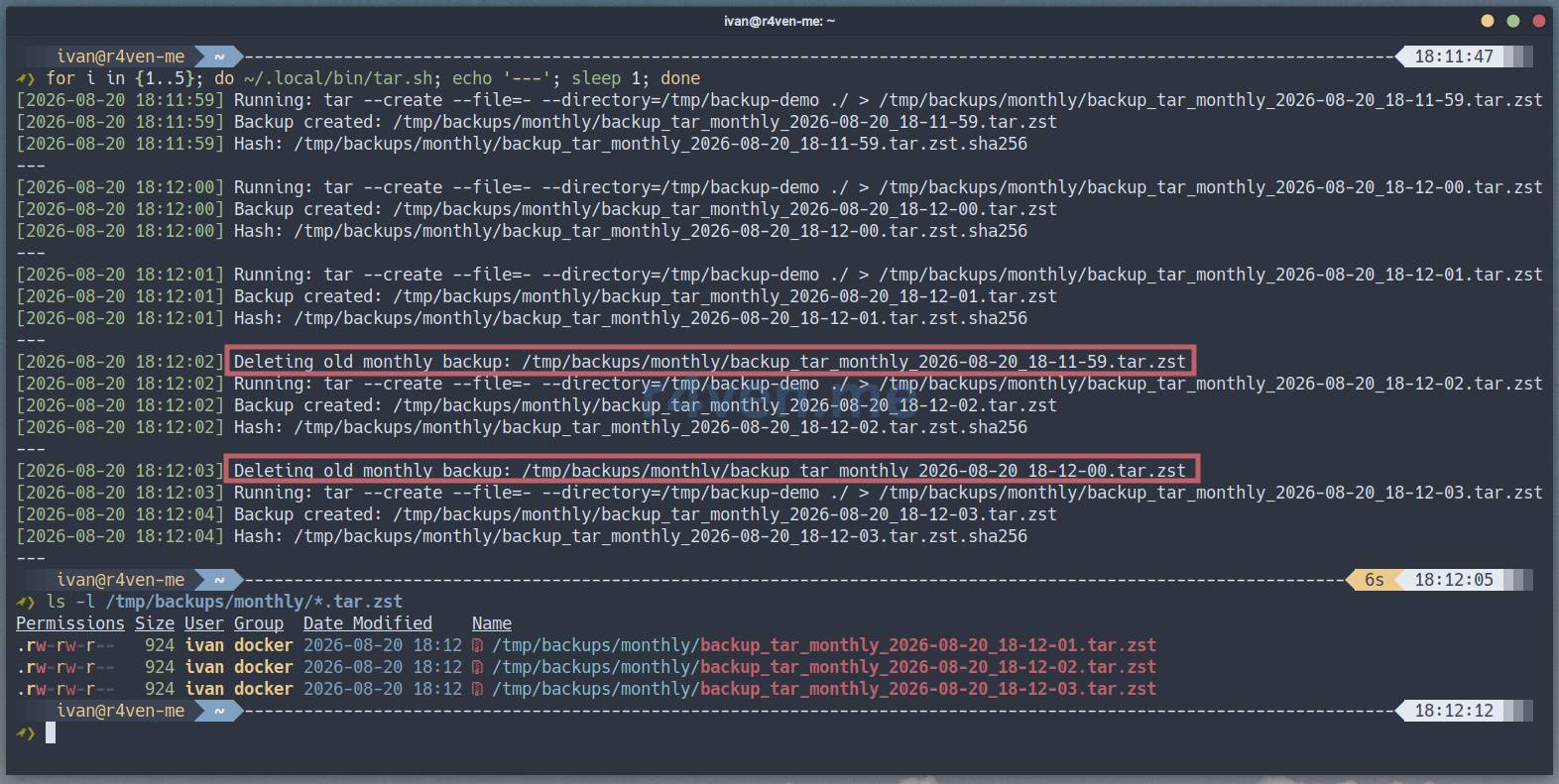
for i in {1..5}; do ~/.local/bin/tar.sh; echo '---'; sleep 1; done

ls -l /tmp/backups/monthly/*.tar.zstThe directory will keep only 3 monthly backups, old ones will be deleted.
Example 6: Backup with file exclusion
When copying large directories, you often need to exclude temporary files, logs, caches, etc. Add tar flags for filtering:
#!/usr/bin/env bash

SOURCE_DIR="/tmp/backup-demo"
OUTPUT_DIR="/tmp/backups/local"
COMPRESS_FORMAT="zstd"
COMPRESS_LEVEL="15"
HASH_FILE="1"
EXTRA_PARAMS=(
    "--exclude=*.tmp"
    "--exclude=.cache"
    "--exclude=.env"
    "--exclude=__pycache__"
)
SSH_HOST=""Run backup:
~/.local/bin/tar.shCheck that the existing .env file didn’t get into the archive:
tar -tvf /tmp/backups/local/backup_tar_local_2026-08-20_17-54-30.tar.zst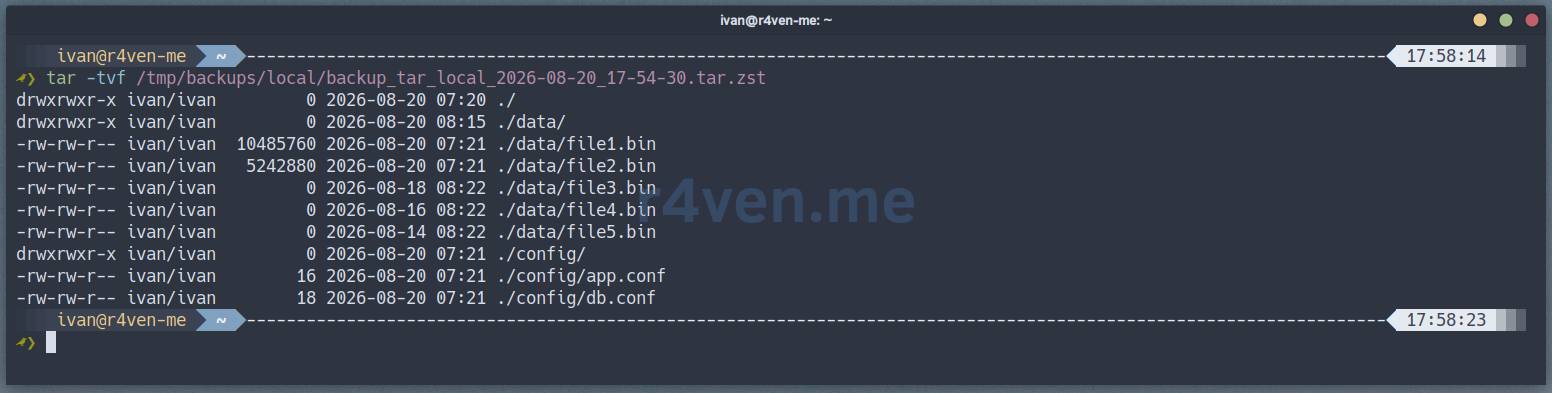
Example 7: Backup without compression for maximum speed
If maximum speed is needed, you can disable compression and get a pure TAR archive:
#!/usr/bin/env bash

SOURCE_DIR="/tmp/backup-demo"
OUTPUT_DIR="/tmp/backups/local"
COMPRESS_FORMAT=""          # empty - no compression
COMPRESS_LEVEL=""
HASH_FILE="1"
EXTRA_PARAMS=("--verbose")  # see the process
SSH_HOST=""Run the script:
~/.local/bin/tar.sh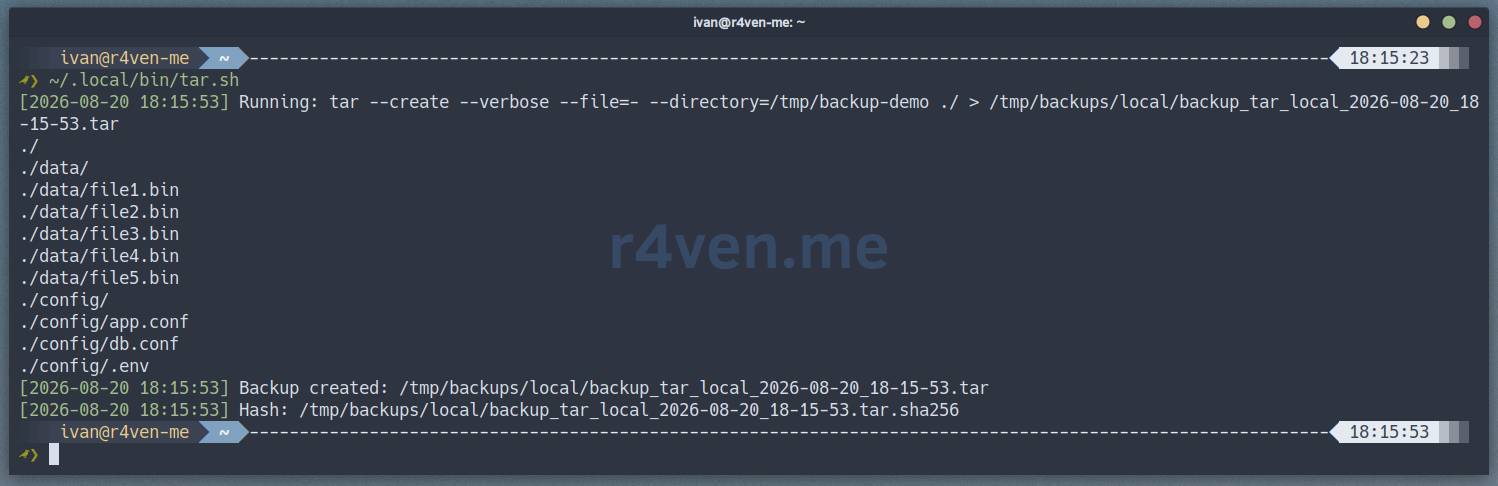
The final archive file will be almost the same size as the source data, but will be created significantly faster. Can be useful if the storage already compresses data at the filesystem level.
Cleanup of test environment
After experiments, delete the test data:
rm -vrf /tmp/backup-demo /tmp/backups /tmp/ssh-demo /tmp/restore*Afterword
The script turned out quite universal. It covers most tasks for simple file/folder backups.
It also has some protection mechanisms, for example, checking available disk space (must be less than 95% used), otherwise an error:
~/.local/bin/tar.sh
[2026-08-20 18:50:54] ERROR: more than 95% of disk space used in /tmp/backups/local (97%)Or preventing race conditions: if one instance of the script hasn’t completed yet, running another with the same parameters won’t proceed:
~/.local/bin/tar.sh
[2026-08-20 18:53:18] ERROR: another backup for this item is already runningIn the next article, we’ll look at a similar script, but using rsync. Subscribe to the telegram channel so you don’t miss it.
If you’re looking for a comprehensive solution for your self-hosted infrastructure, I recommend considering such a great tool as Arkeep - a server with a GUI panel, based on the wonderful restic and rclone.
Thanks for reading! Take care of your backups.
Useful Materials
- SSH - Secure connection to remote hosts: introduction
- Command Line Linux, archiving and compression: tar, gzip, bzip2, xz, zstd and zip, 7z, rar commands
- Arkeep - Centralized Backup server with agents based on Restic and Rclone
👨💻And…
Don’t forget about our Telegram channel 📱 and chat
Or maybe you want to become a co-author? Then click here🔗
💬 All the best ✌️
That should be it. If not, check the logs 🙂
