

Today about automating the initial configuration of a Linux server using Ansible🎺. From setting up locales, timezone, SSH server parameters… to creating and configuring a new user’s environment👨💻: Oh-My-Zsh, Neovim, and Tmux. It’ll be interesting😉.
🖐️Hey!
Subscribe to our Telegram channel @r4ven_me📱, so you don’t miss new posts on the website 😉. If you have questions or just want to chat about the topic, feel free to join the Raven chat at @r4ven_me_chat🧐.
For the examples in this article, a system with Linux Mint 22 was used as the control host. The Ansible playbook is designed for Deb-based distributions and tested on Debian 12 and Ubuntu 24.
❗️ Caution
Dear readers, please note that the materials on my site are for informational/recommendation purposes only. You perform all actions at your own risk. Always back up important files, take snapshots before configuring virtual machines, and always test changes in a test environment before applying them to production servers. Thank you for your understanding.
Ivan Cherniy
Preface: what’s the point?
It’s simple — this playbook is an automation of my previous articles:
- Initial configuration of a Linux server using Debian as an example
- Neovim – Installing and configuring a code editor with IDE features in just a few commands
- ZSH – Interactive command shell for Linux + Oh-My-Zsh
- bat, exa – syntax highlighting for standard output in the Linux terminal (cat, less, tail and ls)
- Tmux – installation and customization + Nord theme
Each of these articles has quite a lot of detail and routine actions. So the idea to automate the process came naturally. In this article I’ll talk about my Ansible role, which reduces the number of actions performed from the articles above to a single command. Provided, of course, that the necessary conditions are met😉.
Let me briefly list what the playbook does:
1) Server configuration:
- Changing the
rootuser’s password - Setting the timezone
- Setting the
hostname - Adding hosts to the
hostsfile - Configuring localization
- Updating and installing packages
- Configuring SWAP (if it doesn’t exist) in a file
- Limiting the amount of stored
journaldsystem logs - Configuring the SSH server
- Disabling IPv6 usage in the system and in the UFW firewall
- Opening a specified list of network ports in UFW

damn, and here I am using ufw..😳
2) Configuring the user environment:
- Creating a new user with a specified password, shell, and group list
- Adding a public SSH authorization key to
~/.ssh - Installing user packages (a separate list)
- Downloading and applying configuration for Zsh, Neovim, Tmux
If you don’t need to perform all the listed actions, the playbook supports selective configuration by specifying flags (see below) or via task tags.
Preparation
To run the playbook we’ll need:
- Target Linux server(s) running Debian/Ubuntu
- The ability to remotely connect to these servers via SSH
- Ansible installed and configured on the control client machine
If you don’t have this set up yet, you might find these materials of mine useful:
- Example of installing a Debian 12 server
- SSH – Secure connection to remote hosts: introduction
- Ansible – configuration management system: an introduction
I highly recommend the last article if you’re new to Ansible👆.
If you don’t feel like reading long walls of text and just want to get started with automation quickly, the minimum required is: the ansible.cfg and inventory.yml files.
A short set of instructions is under the spoiler🙃
Let’s open a terminal and run:
# install ansible
sudo apt update && sudo apt install -y ansible

# create Ansible directories
mkdir -p ~/ansible/{playbooks,roles}

# create the config file
nvim ~/ansible/ansible.cfg[defaults]
home = ~/ansible/
inventory = ~/ansible/inventory.yml
playbook_dir = ~/ansible/playbooks/
roles_path = ~/ansible/roles/
host_key_checking = False# create the inventory file
nvim ~/ansible/inventory.ymlall:
hosts:
debian12:
ansible_host: 192.168.122.136
ansible_port: 22
ansible_user: root
ansible_ssh_private_key_file: ~/.ssh/id_rsa
# ansible_password: "Pa$$w0rD"
ubuntu24:
ansible_host: 192.168.122.11
ansible_port: 22
ansible_user: root
ansible_ssh_private_key_file: ~/.ssh/id_rsa
# ansible_become_password: "Pa$$w0rD"Substitute your own values into the inventory file.
If you already have everything ready, let’s check for the presence of community modules:
ansible-galaxy collection list community.general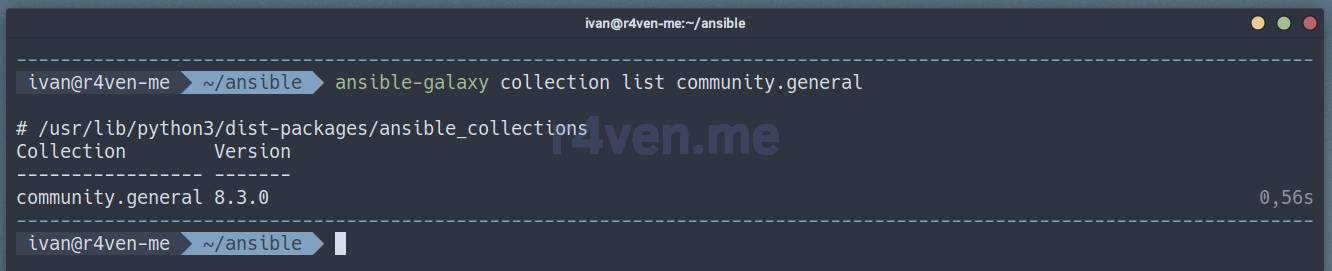
If they’re missing, install them:
ansible-galaxy collection install community.generalWe’ve finally finished with the preparation🤯.
Downloading and reviewing the Ansible role
Next we’ll download the project files from my repository on GitHub (we’ll need the git utility) and copy the needed role into the ansible working directory, in my case ~/ansible:
~is an alias for the user’s home directory.
# install git
sudo apt install -y git

# clone the repository into a temporary folder
git clone https://github.com/r4ven-me/ansible /tmp/ansible

# copy the role into the working folder
cp -r /tmp/ansible/roles/linux-base-config ~/ansible/roles/

# cleanup
rm -rf /tmp/ansible

# change to the working folder
cd ~/ansible/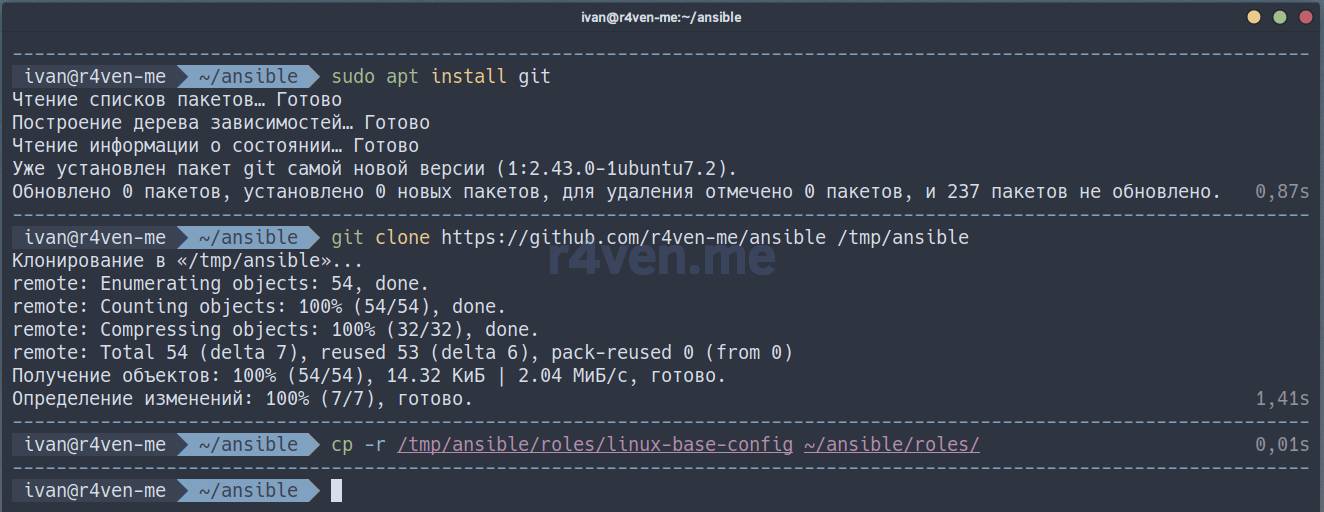
The role’s contents look like this:
ls -l --tree --sort=type ./roles/linux-base-config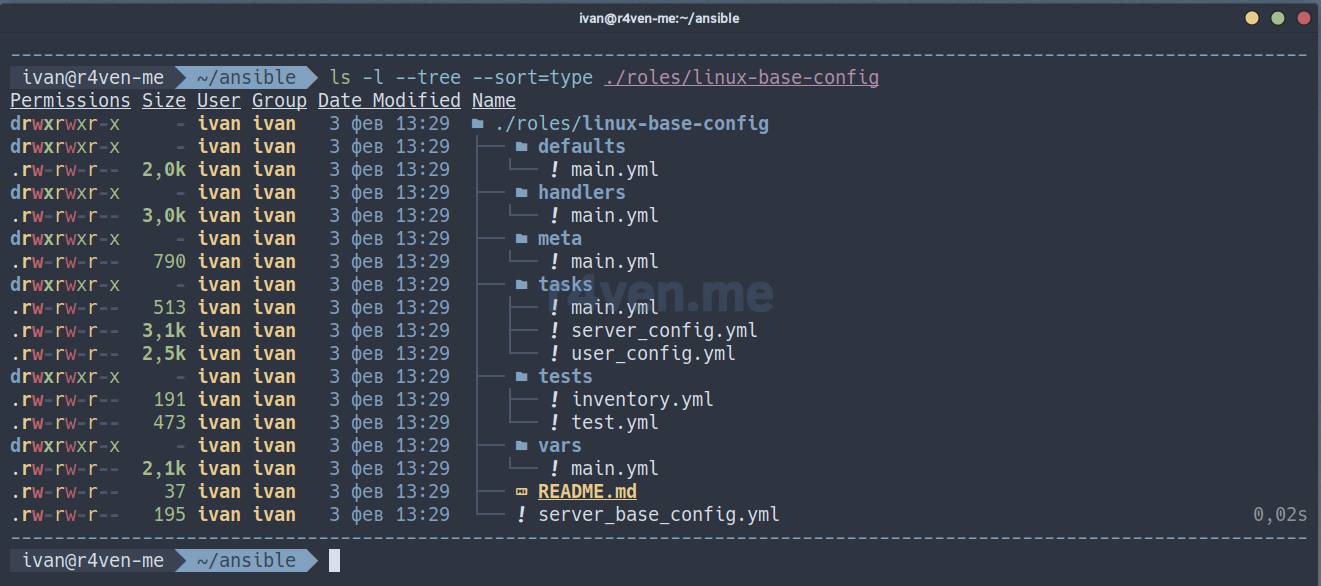
Liked the output of the
lscommand? You can easily set this up yourself by following the article: bat, exa — syntax highlighting of standard output in the Linux terminal (cat, less, tail, and ls).
Below are the role’s files as of the time of writing, with comments👇.
If you don’t want to dig too deep into all the files, just study
defaults/main.yml, which contains the variables you need to edit according to your preferences.
defaults/main.yml — the file with default variables
---
### Default variables

# --- FLAGS --- #
server_config: false
server_reboot: false
user_config: false

# --- USER --- #
user_name: "ivan"
user_home: "/home/{{ user_name }}"
# use 'mkpasswd --method=sha-512' command to generate password hash (whois pkg)
user_password: "$6$gKi8acqF5AxMpHKK$mSaoEkOH8WMjvMxEH2/azDr08ypzu1OGIUaprYhwsoGFAG69S917bCZ4SRP1I5.iRpk4.Mw6pLHo/mklYPA7g0"
user_groups:
  - "users"
  - "adm"
  - "sudo"
user_shell: "/usr/bin/zsh"
user_ssh_pubkey: "ssh-ed25519 AAAAC3NzaC1lZDI1NTE5AAAAINQdlmVhGAz7z3NrJ6/goVtpeVf+xEjeZfZWfA55whZO ivan@r4ven-me"
user_pkgs:
  - "zsh"
  - "neovim"
  - "tmux"
  - "fzf"
  - "git"
  - "curl"
  - "shellcheck"
  - "pylint"
  - "yamllint"
  - "bat"
  - "{{ 'exa' if ansible_facts['distribution'] == 'Debian' and ansible_facts['distribution_major_version'] <= '12' else 'eza' }}"

# --- SERVER --- #
server_root_password: "$6$jGYWmPob7wv9CQgB$KZPaEoXI39GPQp4pi08T1e9d6CT9BqNqGixBJ.CXn1ArUQQ1Lnnlr0lD7pFnVw7r3/5syDebNbK7HkSGLTHX8."
server_timezone: "Europe/Moscow"
server_hostname: "{{ inventory_hostname }}"
server_hosts:
  - "127.0.0.1 {{ server_hostname }}"
  - "127.0.1.1 {{ server_hostname }}"
server_locales:
  - "en_US.UTF-8"
  - "ru_RU.UTF-8"
server_swap_size: "2048"
server_journald_params:
  - {key: "SystemMaxUse", value: "800M"}
  - {key: "MaxFileSec", value: "2week"}
server_ssh_port: "2222"
server_ssh_params:
  - {key: "Port", value: "{{ server_ssh_port }}"}
  - {key: "AddressFamily", value: "inet"}
  - {key: "PermitEmptyPasswords", value: "no"}
  - {key: "PermitRootLogin", value: "no"}
  - {key: "PubkeyAuthentication", value: "yes"}
  - {key: "PasswordAuthentication", value: "no"}
  - {key: "AllowUsers", value: "{{ user_name }}"}
server_ufw_ports:
  - "22"
  - "{{ server_ssh_port }}"
  - "443"
  - "80"
  - "53"
server_pkgs:
  - "sudo"
  - "locales"
  - "ufw"
  - "software-properties-common"
  - "ca-certificates"
  - "net-tools"
  - "dnsutils"
  - "mtr-tiny"
  - "nload"
  - "ncat"
  - "wget"
  - "curl"
  - "git"
  - "mc"
  - "neovim"
- "tmux"handlers/main.yml — the handler tasks file
---
### Handlers

- name: Enable swap on startup  # Enables swap at system boot
  ansible.builtin.lineinfile:
    path: "/etc/fstab"  # Mount configuration file
    regexp: "^/swap"  # Checks for a line starting with /swap
    line: '/swap none swap sw 0 0'  # Adds a line to mount swap
    state: present  # Ensures the line is present in the file

- name: Reload sysctl  # Applies sysctl settings
  ansible.builtin.shell: "sysctl -p"
  ignore_errors: true  # Ignores errors during execution

- name: Restart journald service  # Restarts systemd-journald
  ansible.builtin.systemd_service:
    name: systemd-journald  # Service name
    state: restarted  # Restart the service

- name: Restart ufw service  # Restarts UFW (firewall)
  ansible.builtin.systemd_service:
    name: ufw  # Service name
    state: restarted  # Restart the service
    enabled: true  # Enable the service at boot

- name: Restart sshd service  # Restarts the SSH server (name depends on the OS)
  ansible.builtin.systemd_service:
    name: >-
      {%- if ansible_facts['distribution'] == 'Debian' -%}
        sshd
      {%- elif ansible_facts['distribution'] == 'Ubuntu' -%}
        ssh
      {%- else -%}
        ssh
      {%- endif -%}
    daemon_reload: true  # Reloads the systemd config on changes
    state: restarted  # Restart the service

- name: Reboot system  # Reboots the system
  ansible.builtin.shell: "sleep 5 && reboot"
  async: 1  # Runs the command asynchronously
  poll: 0  # Doesn't wait for the command to complete

- name: Delete ufw rule for default ssh port  # Removes the UFW rule for port 22
  community.general.ufw:
    rule: allow  # Rule type (allow)
    port: 22  # Port being removed
    proto: tcp  # Protocol (TCP)
    delete: true  # Delete the rule
  when: server_config == true and ansible_facts['user_id'] == "root" # Execution conditions

- name: Wait for online  # Waits until the server becomes available
  ansible.builtin.wait_for_connection:
    connect_timeout: 15  # Connection timeout
    sleep: 5  # Pause before the next attempt
    delay: 40  # Delay before starting to wait
    timeout: 300  # Total wait time
  become: false # Runs as an unprivileged user
  vars:
    ansible_port: "{{ server_ssh_port }}" # Update the connection port value
ansible_user: "{{ user_name }}" # Update the connection user valuemeta/main.yml — role metadata
---
### Role meta information

galaxy_info:
  author: Ivan Cherniy  # Role author
  description: Basic configuration for linux server  # Role description
  company: r4ven.me  # Company or project name

  license: GPL-2.0  # License under which the role is distributed

  min_ansible_version: 2.1  # Minimum Ansible version required for the role

  platforms:  # Supported platforms
    - name: Debian
      versions:
        - 12  # Supported Debian version
    - name: Ubuntu
      versions:
        - 24  # Supported Ubuntu version

  galaxy_tags: []  # Tags for searching in Ansible Galaxy (none set)

dependencies: [] # Dependencies (other roles required, if any)tasks/main.yml — the main tasks file
---
### Task file for basic server configuration

- name: Check flags  # Checks whether at least one of the flags is set
  ansible.builtin.debug:
    msg: "At least one of the flags should be set to true:
      server_config | user_config | server_reboot"  # Prints a message if no flags are set
  changed_when: true  # Marks the task as changed (to correctly trigger handlers)
  when: (server_config and user_config and server_reboot) != true  # Checks that at least one flag is set
  tags:
    - check_flags  # Tag for running this task separately

- import_tasks: server_config.yml  # Import server configuration tasks
  when: server_config == true and ansible_facts['user_id'] == "root" # Runs if server_config is true and the user is root
  tags:
    - server_config  # Tag for conveniently running this part of the tasks

- import_tasks: user_config.yml  # Import user configuration tasks
  when: user_config == true  # Runs if user_config is true
  tags:
    - user_config  # Tag for running this part of the tasks

- name: Init reboot handlers  # Initializes the handlers for rebooting the server
  ansible.builtin.debug:
    msg: "Running handlers..."  # Prints a message that handlers are running
  notify:  # Triggers handlers on changes
    - Reboot system  # Reboots the system
    - Delete ufw rule for default ssh port  # Removes the UFW rule for the default SSH port
    - Wait for online  # Waits until the server becomes available again
  when: server_reboot == true  # Runs if server_reboot is true
  changed_when: true  # Marks the task as changed
  tags:
- reboot # Tag for running this part of the taskstasks/server_config.yml — the server configuration tasks file
---
### Server configuration

- name: Change root password  # Sets the root password
  ansible.builtin.user:
    name: "root"  # Username
    password: "{{ server_root_password }}"  # New password
  tags:
    - root  # Tag for filtering tasks

- name: Set timezone  # Sets the timezone
  community.general.timezone:
    name: "{{ server_timezone }}"  # Timezone from the variable
  tags:
    - timezone

- name: Change hostname  # Changes the hostname
  ansible.builtin.lineinfile:
    path: "/etc/hostname"  # File with the hostname
    regexp: "^.*$"  # Replaces the entire line
    line: "{{ server_hostname }}"  # New hostname
  tags:
    - hostname

- name: Set hosts  # Adds entries to /etc/hosts
  ansible.builtin.lineinfile:
    path: "/etc/hosts"  # Hosts file
    line: "{{ item }}"  # Line with the entry
    state: present  # Ensures the line is present
  loop: "{{ server_hosts }}"  # Iterates over the list of hosts
  tags:
    - hosts

- name: Config locales  # Sets up locales
  community.general.locale_gen:
    name: "{{ item }}"  # Locale name
    state: present  # Ensures the locale is installed
  loop: "{{ server_locales }}"  # Iterates over the list of locales
  tags:
    - locales

- name: Update system and install pkgs  # Updates the system and installs packages
  block:
    - name: Cache update and system upgrade  # Updates the package cache and upgrades the system
      ansible.builtin.apt:
        upgrade: true  # Upgrades the system
        update_cache: true  # Updates the package cache

    - name: Install pkgs  # Installs the required packages
      ansible.builtin.apt:
        name: "{{ server_pkgs }}"  # List of packages
        state: present  # Ensures the packages are installed
  when: ansible_distribution == 'Debian' or ansible_distribution == 'Ubuntu'  # Runs only for Debian and Ubuntu
  tags:
    - pkgs

- name: Config SWAP  # Configures the swap file
  block:
    - name: Checking if swap partition exists  # Checks whether swap exists
      ansible.builtin.shell: "swapon -s | grep -q /"
      register: swap_status  # Stores the command's execution status
      ignore_errors: true  # Ignores errors
      changed_when: false  # Doesn't mark the task as changed
      failed_when: false  # Doesn't treat the error as critical

    - name: Make swap file  # Creates the swap file
      ansible.builtin.command: "{{ item }}"
      loop:
        - "dd if=/dev/zero of=/swap bs=1M count={{ server_swap_size }}"  # Creates the file
        - "chmod 600 /swap"  # Sets access permissions
        - "mkswap /swap"  # Formats the swap file
        - "swapon /swap"  # Enables swap
      when: swap_status.rc != 0  # Runs if swap is absent
      notify: Enable swap on startup  # Triggers the task to enable swap at startup
  tags:
    - swap

- name: Disable ipv6 in system  # Disables IPv6 in the system
  ansible.builtin.lineinfile:
    path: "/etc/sysctl.conf"  # sysctl configuration file
    regexp: "^{{ item.key }}"  # Searches for a line by key
    line: "{{ item.key }} = {{ item.value }}"  # Adds or replaces the line
    state: present  # Ensures the line is present
    create: true  # Creates the file if it doesn't exist
  loop:
    - {key: "net.ipv6.conf.all.disable_ipv6", value: "1"}
    - {key: "net.ipv6.conf.default.disable_ipv6", value: "1"}
    - {key: "net.ipv6.conf.lo.disable_ipv6", value: "1"}
  notify: Reload sysctl  # Restarts sysctl to apply the changes
  tags:
    - ipv6

- name: Disable ipv6 in UFW  # Disables IPv6 in UFW (firewall)
  ansible.builtin.lineinfile:
    path: /etc/default/ufw  # UFW configuration file
    regexp: "^IPV6=yes"  # Searches for the line with IPv6 enabled
    line: "IPV6=no"  # Disables IPv6
  tags:
    - ipv6

- name: Allow ports from list in UFW  # Allows the list of ports in UFW
  community.general.ufw:
    rule: allow  # Allows connections
    port: "{{ item }}"  # Port number
    proto: tcp  # TCP protocol
    state: enabled  # Enables UFW
  loop: "{{ server_ufw_ports }}"  # Iterates over the list of ports
  notify:
    - Restart ufw service  # Restarts UFW
  tags:
    - ufw

- name: Config journald  # Configures systemd-journald
  ansible.builtin.lineinfile:
    path: /etc/systemd/journald.conf  # Configuration file
    regexp: "^{{ item.key }}="  # Searches for the line with the parameter
    line: "{{ item.key }}={{ item.value }}"  # Adds or replaces the parameter
    backup: true  # Creates a backup of the file before changing it
  loop: "{{ server_journald_params }}"  # Iterates over the configuration parameters
  notify: Restart journald service  # Restarts journald after changes
  tags:
    - journald

- name: Config SSH daemon  # Configures the SSH server
  ansible.builtin.lineinfile:
    path: /etc/ssh/sshd_config  # SSH configuration file
    regexp: "^{{ item.key }}"  # Searches for the parameter by key
    line: "{{ item.key }} {{ item.value }}"  # Adds or changes the parameter
    validate: "/usr/sbin/sshd -t -f %s"  # Validates the configuration before saving
    backup: true  # Creates a backup of the file
  loop: "{{ server_ssh_params }}"  # Iterates over the SSH parameters
  notify:
    - Restart sshd service  # Restarts SSH after changes
  tags:
- sshdtasks/user_config.yml — the user configuration tasks file
---
### User configuration

- name: Create user with shell, groups and password  # Creates a user with a shell, groups, and password
  ansible.builtin.user:
    name: "{{ user_name }}"  # Username
    shell: "{{ user_shell }}"  # User shell (e.g. /bin/zsh)
    groups: "{{ user_groups }}"  # List of groups the user is added to
    append: true  # Adds the user to groups without replacing current ones
    password: "{{ user_password }}"  # Sets the password
  when: ansible_distribution == 'Debian' or ansible_distribution == 'Ubuntu'  # Runs only for Debian/Ubuntu
  tags:
    - user  # Tag for convenient execution

- name: Create ssh directory  # Creates the .ssh directory for the user
  ansible.builtin.file:
    path: "{{ user_home }}/.ssh/"  # Path to the directory
    state: directory  # Ensures it's a directory
    owner: "{{ user_name }}"  # Sets the owner
    group: "{{ user_name }}"  # Sets the group
    mode: "0700"  # Sets access permissions (owner only)
  tags:
    - ssh

- name: Add user ssh public key  # Adds the user's SSH key
  ansible.builtin.lineinfile:
    path: "{{ user_home }}/.ssh/authorized_keys"  # File with authorized keys
    line: "{{ user_ssh_pubkey }}"  # SSH public key
    create: true  # Creates the file if it doesn't exist
    owner: "{{ user_name }}"  # Sets the owner
    group: "{{ user_name }}"  # Sets the group
    mode: "0600"  # Sets permissions (read/write for the owner only)
  tags:
    - ssh

- name: Install user pkgs  # Installs packages for the user
  ansible.builtin.apt:
    name: "{{ user_pkgs }}"  # List of packages to install
    state: present  # Ensures the packages are installed
    update_cache: true  # Updates the cache before installing
  when: ansible_distribution == 'Debian' or ansible_distribution == 'Ubuntu'  # Only for Debian/Ubuntu
  tags:
    - user_pkgs

- name: Create dots dir  # Creates directories for dot files
  ansible.builtin.file:
    path: "{{ item }}"  # Path to the directory being created
    state: directory  # Ensures it's a directory
    owner: "{{ user_name }}"  # Sets the owner
    group: "{{ user_name }}"  # Sets the group
    recurse: true  # Recursively creates nested directories
  loop:
    - "{{ user_home }}/.local/share/nvim/site/autoload/"  # Folder for nvim plugins
    - "{{ user_home }}/.config/nvim/"  # Folder for Neovim configuration
    - "{{ user_home }}/.config/tmux/"  # Folder for tmux configuration
  tags:
    - dots

- name: Download dot files  # Downloads dot files from the repository
  ansible.builtin.shell:
    cmd: "sudo -u {{ user_name }}
          curl -fsSL https://raw.githubusercontent.com/{{ item.key }}
          -o {{ user_home }}/{{ item.value }}"  # Downloads the file and saves it to the specified location
  loop:
    - {key: "r4ven-me/dots/main/.zshrc", value: ".zshrc"}  # Zsh configuration
    - {key: "junegunn/vim-plug/master/plug.vim", value: ".local/share/nvim/site/autoload/plug.vim"}  # Neovim plugin installer
    - {key: "r4ven-me/dots/main/.config/nvim/init.vim", value: ".config/nvim/init.vim"}  # Main Neovim config
    - {key: "r4ven-me/dots/main/.config/nvim/plugins.vim", value: ".config/nvim/plugins.vim"}  # List of Neovim plugins
    - {key: "r4ven-me/dots/main/.config/tmux/tmux.conf", value: ".config/tmux/tmux.conf"}  # tmux configuration
  tags:
    - dots

- name: Apply config for dot files  # Applies the dot file settings
  ansible.builtin.shell: "sudo -u {{ user_name }} {{ item }}"
  loop:
    - "zsh -c 'source {{ user_home }}/.zshrc'"  # Loads the Zsh configuration
    - "nvim -e -c 'PlugInstall' -c 'qall!'"  # Installs Neovim plugins
    - "git clone https://github.com/tmux-plugins/tpm {{ user_home }}/.config/tmux/plugins/tpm"  # Downloads the tmux plugin manager
    - "{{ user_home }}/.config/tmux/plugins/tpm/bin/install_plugins"  # Installs tmux plugins
  ignore_errors: true  # Ignores errors
  changed_when: true  # Marks the task as changed
  failed_when: false  # Doesn't treat the error as critical
  no_log: true  # Hides output (e.g. for passwords)
  tags:
- dotstests/test.yml — the test tasks file
---
### Test tasks

- name: Test playbook  # Test playbook
  vars:
    ansible_become_password: "password"  # Password for sudo
    user_pkgs:  # List of packages to install
      - "zsh"
      - "tmux"
      - "neovim"
  hosts: localhost  # Run on localhost
  # remote_user: root  # (Commented out) User for remote connection
  gather_facts: true  # Gather system facts
  become: true  # Run with superuser privileges (sudo)
  force_handlers: true  # Force handler execution
  # roles:
  #   - role: ../server-base-config  # (Commented out) Include the role
  connection: local  # Use a local connection (without SSH)

  tasks:
    - name: Start debug  # Debug output of variables
      debug:
        msg:
          - "{{ ansible_distribution }}"  # Prints the system distribution
          - "{{ user_pkgs }}"  # Prints the list of packages
      tags:
- debug # Tag for running debug separatelytests/inventory.yml — the test inventory file
---
### Test inventory

all:  # Global host group
  hosts:
    localhost:  # Defines the local host
      ansible_host: localhost  # Uses the local address
      # ansible_port: 22  # (Commented out) SSH port, default 22
      # ansible_user: user  # (Commented out) Username for the connection
# ansible_ssh_private_key_file: ~/.ssh/id_ed25519 # (Commented out) Path to the private SSH keyvars/main.yml — the variables file
A file with variables that override the ones in default/main.yml. We’ll talk about it further below.
README.md — the readme file
A file with a brief guide in markdown format (work in progress).
server_base_config.yml — the initializing playbook file
---
### Playbook for initializing the role

- name: Basic server configuration  # Basic server configuration
  hosts: all  # Applies to all hosts in the inventory
  # remote_user: root  # (Commented out) User for remote connection
  gather_facts: true  # Gather system facts
  become: true  # Run with superuser privileges (sudo)
  force_handlers: true  # Force handler execution
  roles:
- role: ../server-base-config # Run the roleSpecifying your own variable values
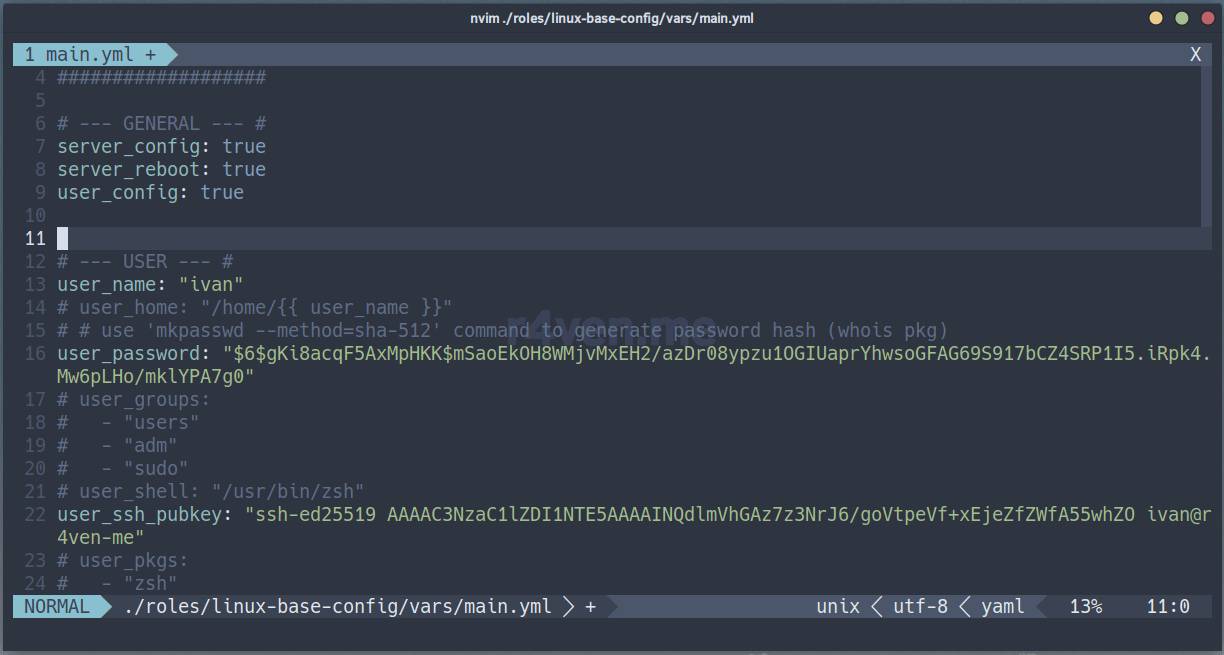
Before running the Ansible role, you need to specify your own values for the required variables✍️.
This can be done in two places: ./default/main.yml and ./vars/main.yml. The first, as its name suggests, contains the default variables, while the second overrides the variable values from the first. I recommend leaving ./default/main.yml as a template and setting your own values in ./vars/main.yml.
Here you should take into account the variable override hierarchy. See the comment below this post.
Let’s open it for editing:
nvim ./roles/linux-base-config/vars/main.ymlYou can uncomment and change any values; I’ll just point out the required ones.
Flags (true, false):
server_config— iftrue, runs the pool of tasks for server configuration;server_reboot— iftrue, reboots the server after all tasks are complete;user_config— iftrue, runs the pool of tasks for configuring the user environment.
At least one flag must be set to true.
Variables:
user_name— the name of the new useruser_password— the user’s password as a SHA-512 hash string (see below on how to get it)user_ssh_pubkey— the public SSH key (see below on how to get it)server_root_password— the root user’s password, also SHA-512server_ssh_port— the new SSH server portserver_ufw_ports— the list of UFW firewall TCP ports that need to be opened
Be sure to include the current SSH port in the UFW port list, so you don’t lose access to the server during configuration.
Liked my Neovim config?

You can easily create a similar one by following the article: Neovim — Installing and configuring a code editor with IDE features in just a few commands.
You can specify user passwords explicitly (ansible will still turn them into a SHA-512 string on the server), but this is not recommended☝️. The safest approach is to specify them as a hash string. By the way, local Linux user passwords are stored in the /etc/shadow file in a similar way.
Password as a SHA-512 string
To get the password hash in SHA-512, use the mkpasswd utility (from the whois package) or openssl (from the openssl package):
mkpasswd --method=sha-512

# or

openssl passwd -6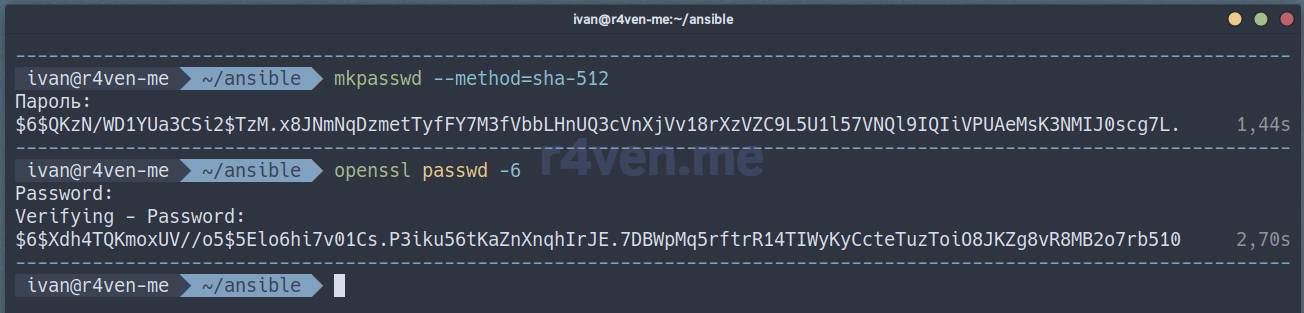
Generating a public SSH key
If you already have SSH keys, just copy the public one and paste it into the corresponding variable: user_ssh_pubkey. To generate a new SSH key, use this command:
# generate a new key
ssh-keygen -t ed25519 -f ~/.ssh/id_ed25519

# print the public key
cat ~/.ssh/id_ed25519.pub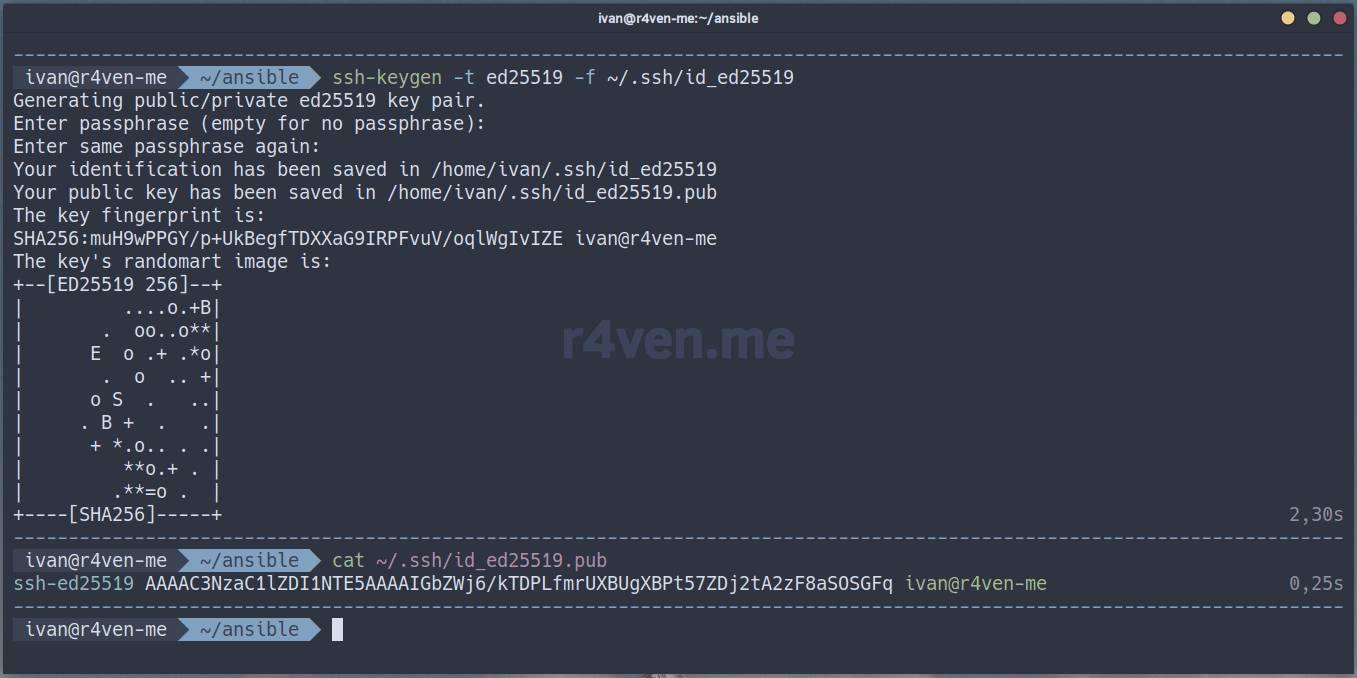
I discussed SSH keys in more detail in previous articles here and here.
Example of running the playbook on two hosts
My Ansible inventory has two hosts named debian12 and ubuntu24. I’ll use them as an example to show how to run the Playbook. To make sure the ansible tasks you’ve written are correct, it’s always recommended to run playbooks in dry run mode🏃. Just keep in mind that not all Ansible modules support this — for example, it’s impossible to predict the outcome of custom shell commands🤷♂️.
Running in dry run mode
Here’s the command to run the playbook in check mode (--check) for specific hosts from the inventory file (the -l or --limit flag + comma-separated hosts):
ansible-playbook ./roles/linux-base-config/linux_base_config.yml \
    --limit debian12,ubuntu24 --check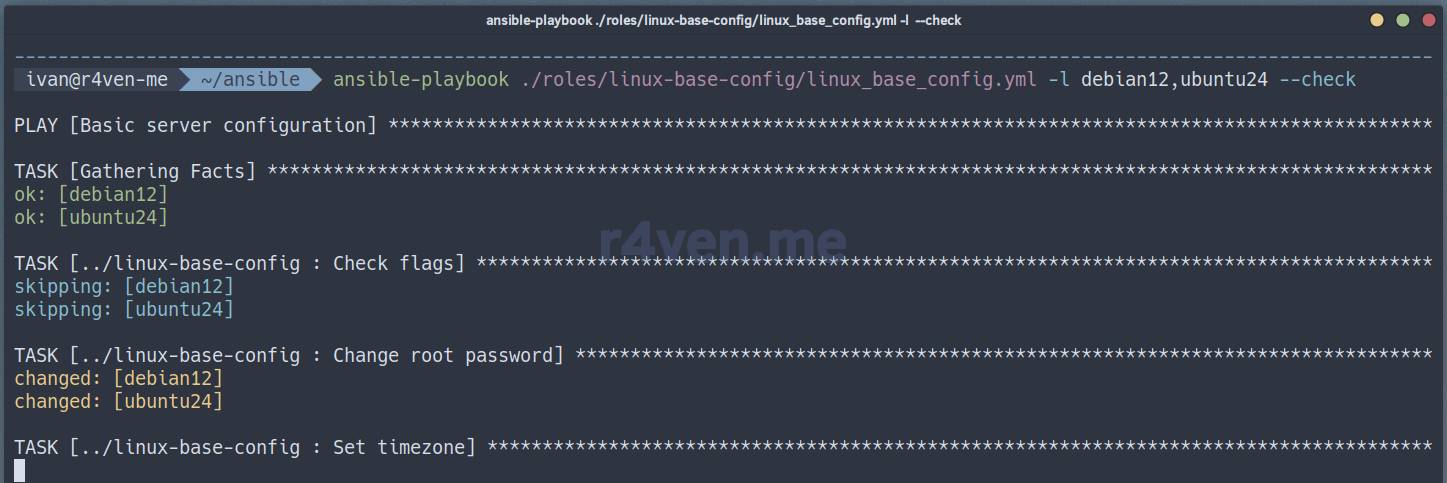
Some tasks will be skipped.
All tasks in this role have tags. To run a pool by tag(s), use the -t or --tags flag:
ansible-playbook ./roles/linux-base-config/linux_base_config.yml \
--limit debian12,ubuntu24 --check --tags sshdTags can also be used to exclude tasks: --skip-tags tag1,tag2.
To view the list of available role tags, run:
ansible-playbook ./roles/linux-base-config/linux_base_config.yml --list-tagsProduction run
WARNING❗️ This playbook changes the sshd daemon’s port number and disables password access to the server over SSH. It’s highly recommended to run untested playbooks in test environments. You perform all actions at your own risk. I warned you)
Now let’s run the playbook, which will make real changes to the hosts:
ansible-playbook ./roles/linux-base-config/linux_base_config.yml \
--limit debian12,ubuntu24Done👌. If any of the tasks fail😢, study the output, fix the role files if needed, and run the playbook again (or reach out to our chat for help). Remember that ansible operates on the principle of idempotency, i.e. it brings the system to a given state. Most often, if a task completed successfully, it will run again without making changes on the next run.
At the end of its run (if the corresponding flag is set), ansible will send a system reboot command to the remote hosts and remove port 22 from the list of ports open in the firewall. On success, the playbook should finish successfully with the “Wait for online” task.
After it finishes, let’s check the connection to the hosts using the new credentials.
If you just need to configure the environment for a user, for example root, you can do it like this:
ansible-playbook ./roles/linux-base-config/linux_base_config.yml \
--limit debian12,ubuntu24 -t dots -e 'user_name=root' -e 'user_home=/root'Additionally: installing a powerline font for a GUI session
If you performed the user environment configuration, then for the icons in your terminal to render correctly during a graphical session, you need to use a special monospaced icon powerline font🤯, for example from the Nerd fonts project.
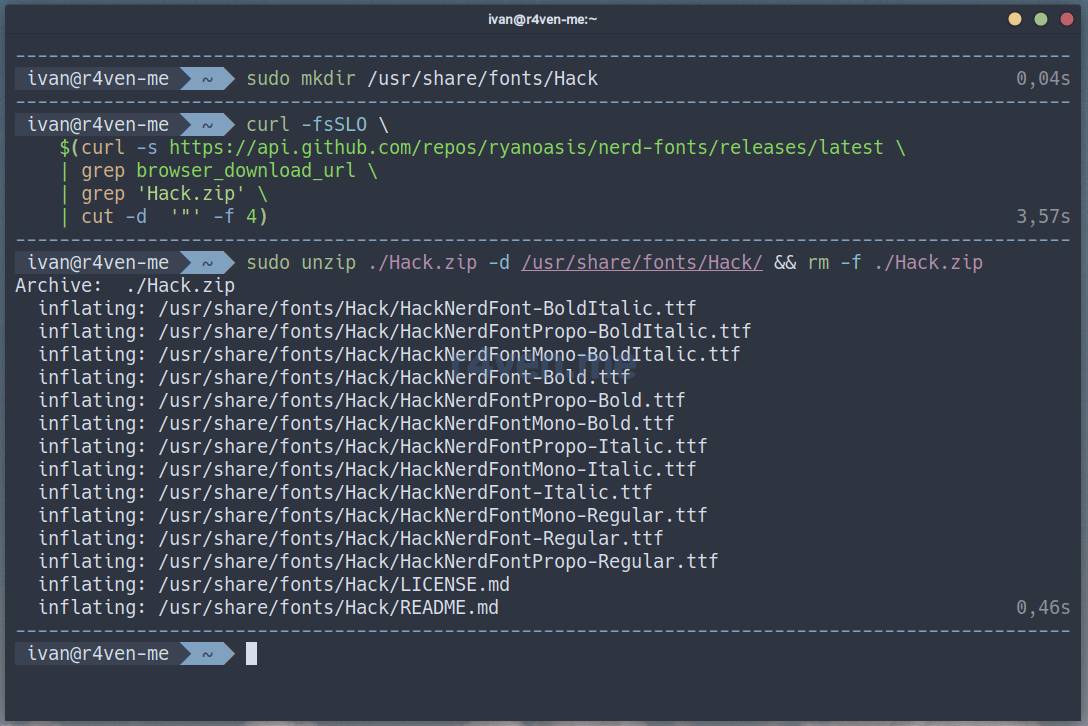
My readers know that I prefer the Hack font ☝️. Here’s a simple example of how to install it:
📝 Note
Please note that sudo rights are required to execute these commands. Alternatively, install fonts only for the current user in the ~/.local/share/fonts directory.
# create font directory
sudo mkdir /usr/share/fonts/Hack

# download font archive
curl -fsSLO \
    $(curl -s https://api.github.com/repos/ryanoasis/nerd-fonts/releases/latest \
    | grep browser_download_url \
    | grep 'Hack.zip' \
    | cut -d  '"' -f 4)

# unpack archive, copy fonts to system
sudo unzip ./Hack.zip -d /usr/share/fonts/Hack/ && rm -f ./Hack.zip📝 Note
The curl command uses a command-line substitution mechanism. That is, the main download command: curl -fsSLO is passed an argument, which is the result of executing another command within the $(command) construct, performed beforehand. As a result, the main command will receive a direct URL to the zip file of the latest Hack font release from GitHub. The command is universal.
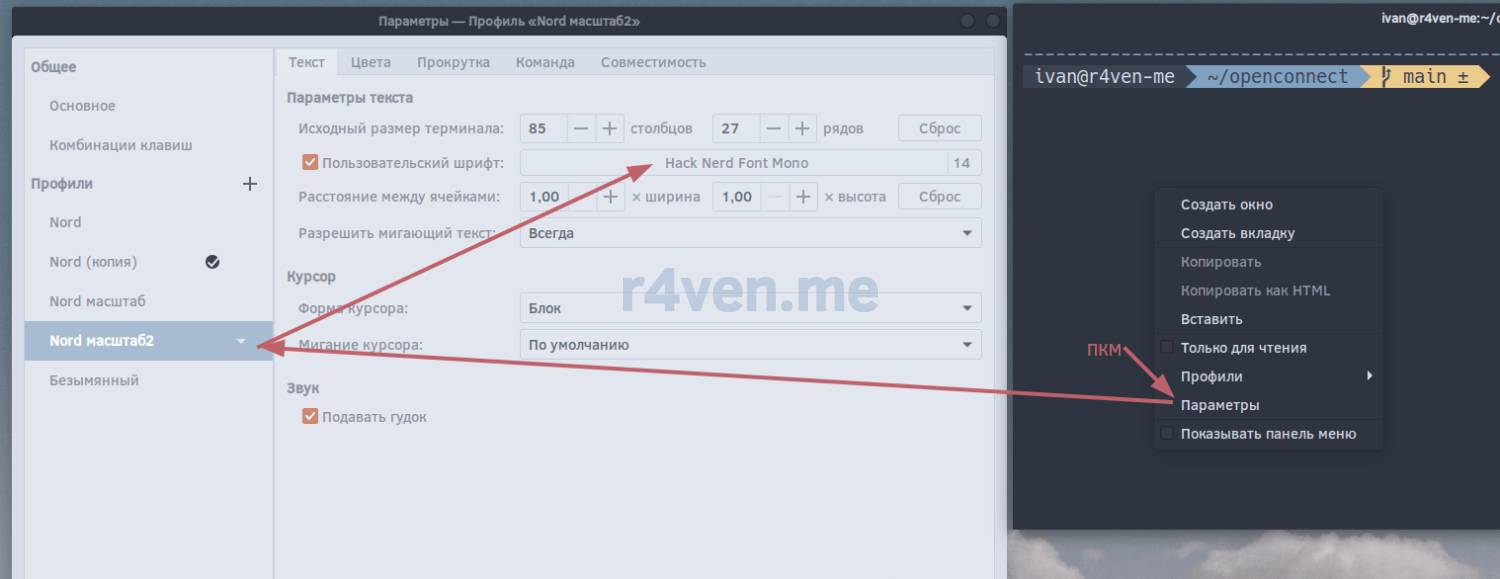
After installing the font, activate it in your terminal settings🛠.
In Gnome-terminal, this is done as follows:
Afterword
That’s how automation reduces the amount of manual work by tens of times.
Thanks for reading 😊. Once again, I’ll remind you that the current versions of the files from the article are available in my repository on GitHub.
Be sure to subscribe to our telegram channel: @r4ven_me, notifications about new site content arrive there on the day of publication. And if you have questions – I invite you to our friendly Raven Chat 🚶♀️🐧🚶🐧🚶♂️🐧.
All the best!
Useful materials
- Initial configuration of a Linux server using Debian as an example
- Neovim – Installing and configuring a code editor with IDE features in just a few commands
- ZSH – Interactive command shell for Linux + Oh-My-Zsh
- bat, exa – syntax highlighting for standard output in the Linux terminal (cat, less, tail and ls)
- Tmux – installation and customization + Nord theme
- Example of installing a Debian 12 server
- SSH – Secure connection to remote hosts: introduction
- Ansible – configuration management system: an introduction
- Idempotency | Wiki
Comments
📝 Note
Ivan Cherniy:
A useful comment from the chat:
Thank you for sharing your experience! I liked the article.
The only thing I’d like to emphasize (Specifying your own variable values):
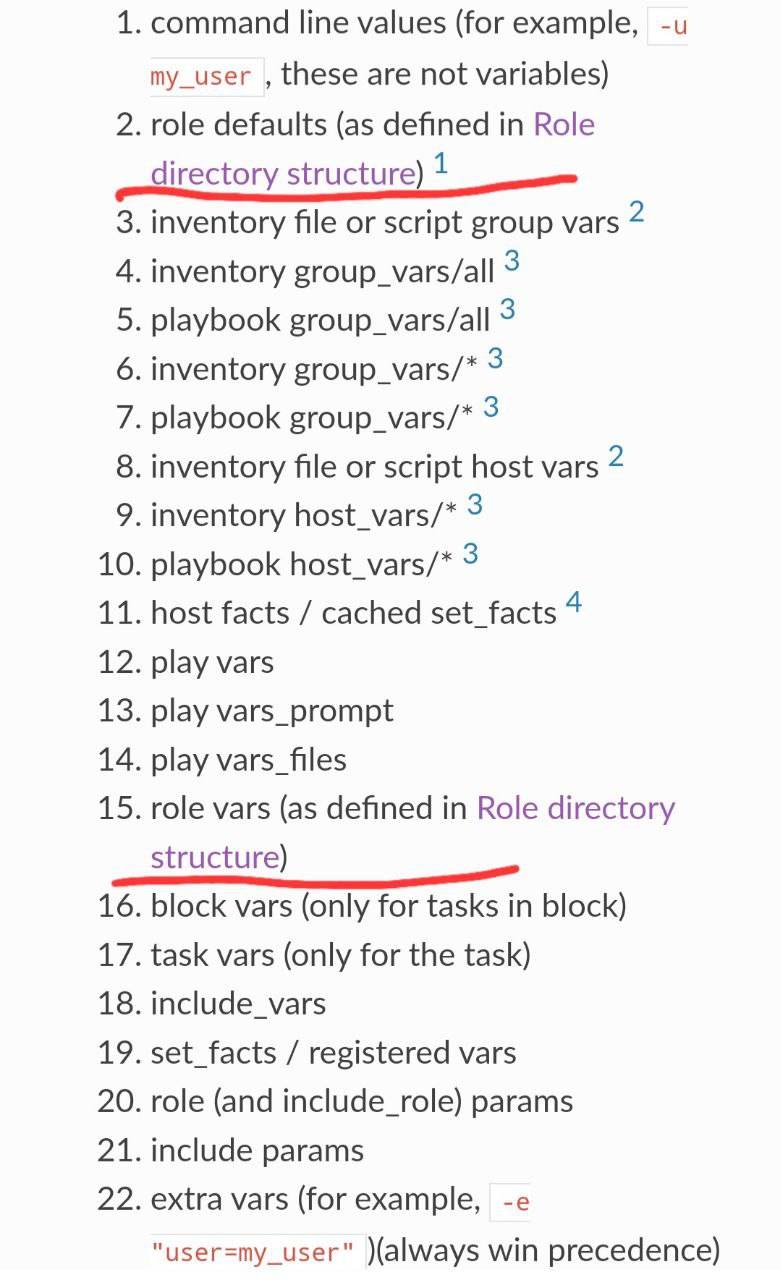
I would still recommend defining variables in ./default/main.yml. When using variables from ./vars/main.yml, in most cases you lose the ability to override the role’s variables (https://docs.ansible.com/ansible/latest/playbook_guide/playbooks_variables.html#understanding-variable-precedence), including via external group_vars, host_vars files (https://docs.ansible.com/ansible/latest/inventory_guide/intro_inventory.html#organizing-host-and-group-variables). Only —extra-vars has the highest priority and will let you override a role variable’s value when running the playbook.
In group_vars, host_vars you can describe all the necessary variables for entire groups of servers or a host, including secret data (passwords, logins, etc.), and these files can be safely encrypted with Ansible Vault.
Overall, you can define the variables themselves for use in the role in ./default/main.yml, without values or with examples of the required values, and then feed the needed values through external files for all roles. That’s fine if there are just a couple of roles, but if there are several dozen, which may contain both common and individual variables, including secret ones, it’s a different story.
Comments