
` Greetings!
Here is the list of snippets itself:
Snippet No. 1 - shebang and basic script variables
 1#!/usr/bin/env bash
 2# Shebang: runs bash found through env - more portable than /bin/bash
 3
 4# Safety parameters (improves script reliability and predictability)
 5set -Eeuo pipefail
 6# -e - exit on error
 7# -E - trap ERR works in functions/subshell
 8# -u - error when referencing an unset variable
 9# -o pipefail - pipeline fails if any command fails
10
11# Explicit PATH definition
12# Removes dependency on the environment and protects against command substitution
13export PATH="/usr/local/bin:/usr/bin:/bin:/usr/local/sbin:/usr/sbin:/sbin"
14
15# Basic variables
16SCRIPT_PID=$$  # Script PID, useful for logs and unique files
17# Absolute path to the script directory (without symlinks)
18SCRIPT_DIR=$(cd "$(dirname "${BASH_SOURCE[0]}")" &>/dev/null && pwd -P)
19SCRIPT_NAME="$(basename "${BASH_SOURCE[0]}")"      # Script file name
20SCRIPT_LOG="${SCRIPT_DIR}/${SCRIPT_NAME%.*}.log"   # Log file
21SCRIPT_LOG_PREFIX='[%Y-%m-%d %H:%M:%S.%3N]'        # Timestamp format
22SCRIPT_LOCK="${SCRIPT_DIR}/${SCRIPT_NAME%.*}.lock" # Lock file
23# Used for logging and preventing simultaneous executionThe script enables strict safety mode (set -Eeuo pipefail), sets a safe PATH, defines basic variables - its PID, path, and name, as well as files for the log and lock, so that logs can be written and simultaneous execution can be prevented.
Snippet No. 2 - lock to prevent repeated script execution
 1#!/usr/bin/env bash
 2
 3SCRIPT_PID=$$  # Script PID
 4# Absolute path to the script directory
 5SCRIPT_DIR=$(cd "$(dirname "${BASH_SOURCE[0]}")" &>/dev/null && pwd -P)
 6SCRIPT_NAME="$(basename "${BASH_SOURCE[0]}")"      # Script file name
 7SCRIPT_LOCK="${SCRIPT_DIR}/${SCRIPT_NAME%.*}.lock" # Lock file
 8
 9# Lock function
10setup_lock() {
11    # Open the lock file and save the descriptor
12    exec {fd_lock}>> "${SCRIPT_LOCK}"
13
14    # Try to acquire the lock (without waiting)
15    if ! flock -n "$fd_lock"; then
16        echo "Script instance is already running, exiting..."
17        exit 1   # Exit if the file is already locked
18    fi
19
20    # Write the current process PID to the lock file
21    echo "$SCRIPT_PID" > "$SCRIPT_LOCK"
22}
23
24# Lock initialization
25setup_lockThis code prevents several instances of the same script from running simultaneously.
More details
When the script starts:
- A lock file is created next to the script (
.lock), associated with thefd_lockfile descriptor. flocktries to set an exclusive lock.- if another instance is already running, the lock is busy - the script prints a message and exits
- if the lock is free, the current process receives exclusive access
- The PID is written to the lock file, which simplifies diagnostics (you can see which process holds the lock).
This mechanism is used in system and cron scripts to avoid running several copies of one task in parallel (for example, backup or synchronization).flock guarantees atomicity - two processes cannot acquire the same lock file at the same time.
Snippet No. 3 - cleanup actions when the script exits
 1#!/usr/bin/env bash
 2
 3SCRIPT_PID=$$   # Script PID
 4# Absolute path to the script directory
 5SCRIPT_DIR=$(cd "$(dirname "${BASH_SOURCE[0]}")" &> /dev/null && pwd -P)
 6SCRIPT_NAME="$(basename "${BASH_SOURCE[0]}")"      # Script file name
 7SCRIPT_LOCK="${SCRIPT_DIR}/${SCRIPT_NAME%.*}.lock" # Lock file
 8
 9# Open the lock file and save the descriptor
10exec {fd_lock}>> "${SCRIPT_LOCK}"
11# Try to acquire the lock (without waiting)
12flock -n "$fd_lock"
13# Write the current process PID to the lock file
14echo "$SCRIPT_PID" > "$SCRIPT_LOCK"
15
16# Cleanup function called when the script finishes (trap fires)
17cleanup() {
18    # Reset all installed traps to avoid recursive calls
19    trap - SIGINT SIGTERM SIGHUP SIGQUIT ERR EXIT
20
21    # If the file descriptor was opened, close it
22    [[ -n "${fd_lock-}" ]] && exec {fd_lock}>&-
23
24    # Check whether the lock file exists and contains the current process PID
25    # This prevents accidental deletion of someone else's lock file
26    if [[ -f "$SCRIPT_LOCK" && $(< "$SCRIPT_LOCK") -eq $SCRIPT_PID ]]; then
27        # Delete the lock file, freeing the resource
28        rm -f "$SCRIPT_LOCK"
29    fi
30}
31
32# Set a trap,
33# so that cleanup is called when the script exits
34# Try to end traps with the exit command
35trap 'RC=$?; cleanup; exit $RC' SIGINT SIGHUP SIGTERM SIGQUIT ERR EXITThis snippet demonstrates using trap to call the cleanup function, which ensures correct script termination and resource cleanup (using lock file removal as an example).
More details
In this snippet, deleting the lock file is only an example of using the trap mechanism, demonstrating how you can:
- catch signals (
SIGINT,SIGTERM,SIGHUP,SIGQUIT) and errors (ERR,EXIT); - execute a single termination block (
cleanupfunction), regardless of the reason why the script exits; - guarantee correct cleanup and completion of any operations (not only lock files - this may include temporary files, network connections, mounts, and so on).
Snippet No. 4 - configuring script output logging
 1#!/usr/bin/env bash
 2
 3# Basic variables
 4SCRIPT_DIR=$(cd "$(dirname "${BASH_SOURCE[0]}")" &> /dev/null && pwd -P)
 5SCRIPT_NAME="$(basename "${BASH_SOURCE[0]}")"
 6SCRIPT_LOG="${SCRIPT_DIR}/${SCRIPT_NAME%.*}.log"
 7SCRIPT_LOG_PREFIX='[%Y-%m-%d %H:%M:%S.%3N]' # Timestamp format
 8
 9# Logging parameters
10LOG_TO_STDOUT=1    # Log to stdout
11LOG_TO_FILE=0      # Log to file
12LOG_TO_SYSLOG=0    # Log to syslog
13
14# Function for processing and redirecting logs
15log_pipe() {
16    while IFS= read -r line; do
17        log_line="$(date +"${SCRIPT_LOG_PREFIX}") - $line" # Add a timestamp
18        (( LOG_TO_STDOUT )) && echo "$log_line" # Output to stdout
19        (( LOG_TO_FILE ))   && echo "$log_line" >> "$SCRIPT_LOG" # To file
20        (( LOG_TO_SYSLOG )) && logger -t "$SCRIPT_NAME" -- "$line" # To syslog
21    done
22}
23
24# Redirect stdout/stderr through log_pipe
25exec > >(log_pipe) 2>&1
26
27# Test output
28echo test123
29echo "Hello Friend"
30printf "|%s|%s|\n" "Hello" "Friend"
31
32echo "----------------------------------"This Bash script configures logging by redirecting stdout and stderr to the log_pipe function, which adds timestamps and sends logs to stdout, a file, and/or syslog, depending on the specified parameters (stdout by default).
See more about this logging method in this note.
Snippet No. 5 - colored script output logging
 1#!/usr/bin/env bash
 2
 3# Color initialization function
 4setup_colors() {
 5    if [[ -t 1 ]] && [[ -z ${NO_COLOR-} ]] && [[ "${TERM-}" != "dumb" ]]; then
 6        RESET=$(tput sgr0)
 7        RED=$(tput setaf 1)    GREEN=$(tput setaf 2)
 8        YELLOW=$(tput setaf 3) BLUE=$(tput setaf 4)
 9        PURPLE=$(tput setaf 5) CYAN=$(tput setaf 6)
10    else
11        RESET="" RED="" GREEN="" YELLOW="" BLUE="" PURPLE="" CYAN=""
12    fi
13}
14
15log_info() { printf "${BLUE}[INFO] - %s\n${RESET}" "$*"; }
16log_warn() { printf "${YELLOW}[WARN]} - %s\n${RESET}" "$*"; }
17log_error() { printf "${RED}[ERROR] - %s\n${RESET}" "$*" >&2; exit 1; }
18
19# Color initialization and output example
20setup_colors
21
22log_info "Informational message"
23log_warn "Warning message"
24log_error "Error message + script exit"This snippet checks whether colored text can be output safely: it makes sure that STDOUT is connected to a real terminal, that the NO_COLOR variable is not set (that is, color is not explicitly forbidden), and that the current terminal is not “dumb” and supports control sequences. If all conditions are met, the script enables color code output; otherwise, it disables colors.
More details
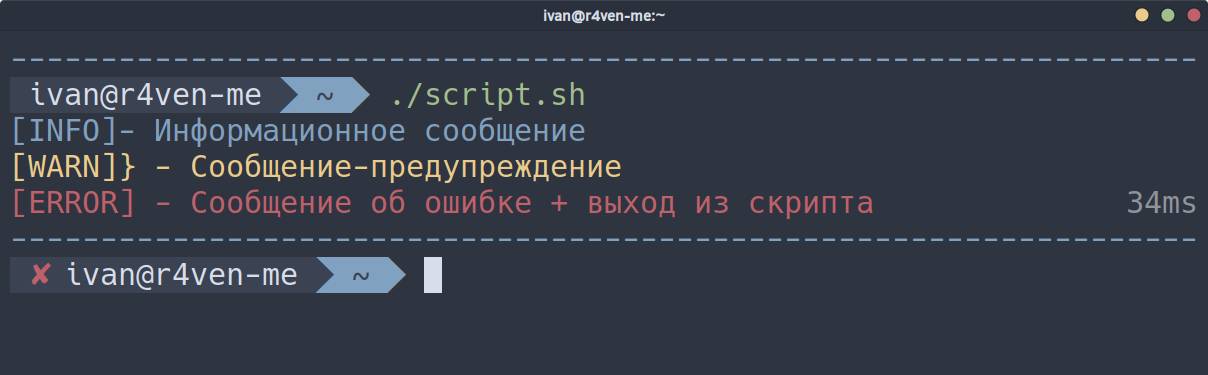
[[ -t 1 ]]- stdout is a terminal (the script is running in an interactive terminal, not in a pipe/file);[[ -z ${NO_COLOR-} ]]- theNO_COLORvariable is NOT set - color output is allowed;[[ "${TERM-}" != "dumb" ]]- the terminal is not dumb (which means it supports control sequences).
If you prefer control sequences, here they are:
RESET='\033[0m'
RED='\033[0;31m'    GREEN='\033[0;32m'
YELLOW='\033[0;33m' BLUE='\033[0;34m'
PURPLE='\033[0;35m' CYAN='\033[0;36m'Why tput instead of explicitly specifying control sequences?
tput setaf uses terminfo and selects the correct escape sequences for a specific terminal.
This matters if the script may run:
- on different Linux distributions
- inside tmux/screen
- in Docker containers
- in non-standard terminals (for example, alacritty, kitty, vt100, xterm, macOS Terminal)
ANSI codes (\033[0;31m) are an xterm-compatible option. They work in 95% of cases, but not guaranteed everywhere.
Snippet No. 6 - checking whether a utility exists in the system
 1#!/usr/bin/env bash
 2
 3# Error message output function
 4log_error() { printf "[ERROR] - %s\n" "$*" >&2; exit 1; }
 5
 6# Check function
 7check_utils() {
 8    local utils=("$@")
 9
10    for util in "${utils[@]}"; do
11        if ! command -v "$util" &> /dev/null; then
12            log_error "Utility $util is not installed"
13        fi
14    done
15}
16
17# Example utility check
18check_utils "ping" "mtr" "curl" "ssh"The check_utils function accepts the name of a utility (one or several) as an argument and checks whether it is installed in the system using the command -v command. If the utility is not found, log_error is called to print an error message and terminate the script.
More about command -v
command -v is a shell builtin command that checks whether a command is a Bash function, a Bash builtin command, an alias, or an executable file located in directories from the $PATH environment variable. In the latter case, it prints the full path to the executable file. command -v is often used as an alternative to which, which is an external utility.
Snippet No. 7 - command-line argument handling
 1#!/usr/bin/env bash
 2
 3# Safety parameters
 4set -Eeuo pipefail
 5
 6# Script help
 7usage() {
 8cat <<EOF
 9Usage: ${BASH_SOURCE[0]} [OPTIONS] --backup DIR SRC_FILES
10
11Options:
12  -h, --help            show this help
13  -v, --verbose         verbose mode (set -x)
14  -c, --check           dry run mode
15  -b, --backup-dir DIR  backup directory
16      --backup-dir=DIR  alternative syntax
17
18Examples:
19  ${BASH_SOURCE[0]} -b bkp_dir src_dir
20  ${BASH_SOURCE[0]} --check --backup /mnt/backup /opt/data/data.db
21EOF
22}
23
24parse_params() {
25    BACKUP_DIR=""
26    CHECK_MODE=0
27
28    # Manual argument parsing (short and long options)
29    while [[ $# -gt 0 ]]; do
30        local key="$1"
31        case "$key" in
32            -h|--help) usage; exit 0 ;;         # help
33            -v|--verbose) set -x ;;             # verbose
34            -c|--check) CHECK_MODE=1 ;;         # check mode
35            -b|--backup-dir)                    # backup dir
36                [[ -n "$2" ]] || { echo "Option "$1" needs arg" >&2; exit 1; }
37                BACKUP_DIR="$2"; shift ;;
38            --backup-dir=*) BACKUP_DIR="${1#*=}" ;; # --backup-dir=DIR
39            --) shift; break ;;                 # end of parameters
40            -*) usage; exit 1 ;;                # unknown parameter
41            *) break ;;                         # positional arguments
42        esac
43        shift
44    done
45
46    # Positional arguments
47    SRC_FILES="$@"
48
49    # Check for required parameters
50    [[ -n $BACKUP_DIR && -n $SRC_FILES ]] || { usage; exit 1; }
51}
52
53parse_params "$@"
54
55echo -e "Starting backup...\n"
56
57if (( CHECK_MODE )); then
58    echo "Dry run mode. Command to run:"
59    echo "tar --create --verbose --gzip --file=${BACKUP_DIR}/archive.tgz ${SRC_FILES[@]}"
60else
61    tar --create --verbose --gzip --file="${BACKUP_DIR}"/archive.tgz "${SRC_FILES[@]}"
62fiThis snippet demonstrates an example (I EMPHASIZE, only an EXAMPLE) of manual handling and use of command-line arguments in Bash. Short and long options, required parameter checks, option and positional argument separation before running the main logic are supported, using backup as an example.
More details
set -Eeuo pipefail - Enables safe execution mode: exit on errors, unset-variable control, and pipeline error handling;
usage() - Help output function: launch syntax, option list, and examples;
parse_params() - Main argument parser:
while [[ $# -gt 0 ]]- loop over arguments;case- handling short and long options;-h/--help- show help;-v/--verbose- enable tracing (set -x);-c/--check- dry-run mode;-b/--backup-dir- backup directory;--- end of options;shift- move to the next argument.
SRC_FILES="$@" - all remaining arguments are treated as positional (list of files for backup).
After parsing, the required variables are checked: backup directory and at least one source file/directory.
And at the end, the main logic:
- check mode - simply print the command (
tar); - normal mode - execute the command.
Snippet No. 8 - checking used space on a partition
 1log_info() { printf "[INFO] - %s\n" "$*"; }
 2log_error() { printf "[ERROR] - %s\n" "$*" >&2; exit 1; }
 3
 4check_disk_space() {
 5    local output_dir="${1-}"
 6    log_info "Checking available disk space..."
 7
 8    local disk_usage_percent
 9    disk_usage_percent=$(df "$output_dir" --output=pcent | tail -n 1 | tr -d ' %')
10
11    if (( disk_usage_percent > 95 )); then
12        log_error "More than 95% of disk space is used: ${disk_usage_percent}%. Terminating..."
13    else
14        log_info "Disk usage: ${disk_usage_percent}%"
15    fi
16}
17
18check_disk_space "/opt"
19
20check_disk_space "/var/lib"The check_disk_space function accepts a path to a directory and determines disk usage percentage with the df command. If disk usage exceeds 95%, the script prints an error message and terminates abnormally; otherwise, it prints an informational message with the current percentage of used space.
Snippet No. 9 - sending messages and files to Telegram
 1#!/usr/bin/env bash
 2
 3# Variables
 4TG_CHAT_ID="1234567890"
 5TG_BOT_TOKEN="12345678980:ABC1deFgh2i_3J4k5_LmnOPqR6S7t8UvWxy"
 6
 7# Function for sending simple text
 8send_tg_message() {
 9    local message="${1-}"
10
11    curl \
12        --silent \
13        --request POST \
14        --header 'Content-Type: application/json' \
15        --data '{
16            "chat_id": '"$TG_CHAT_ID"',
17            "text": "'"${message}"'",
18            "parse_mode": "Markdown"
19        }' \
20        "https://api.telegram.org/bot${TG_BOT_TOKEN}/sendMessage"
21}
22
23# Function for sending a file with or without a caption
24send_tg_file() {
25    local file_path="${1-}"
26    local file_caption="${2-}"
27
28    curl \
29        --silent \
30        --request POST \
31        --form "chat_id=${TG_CHAT_ID}" \
32        --form "document=@${file_path}" \
33        --form "caption=${file_caption}" \
34        --form "parse_mode=Markdown" \
35        "https://api.telegram.org/bot${TG_BOT_TOKEN}/sendDocument"
36}
37
38# Example of sending messages to Telegram
39send_tg_message "Test123"
40send_tg_file "/tmp/script.log"
41send_tg_file "/tmp/script.log" "Send file with caption."This Bash snippet contains functions for sending messages and files to Telegram using the Telegram Bot API. API access credentials are specified in the TG_CHAT_ID and TG_BOT_TOKEN variables. The send_tg_message function accepts one argument as input: the message text. The send_tg_file function accepts at least one argument: the path to the file to send. The 2nd argument is optional and allows adding a file description (caption). All interaction with the API is performed through the curl utility.
👨💻And…
Don’t forget about our Telegram channel 📱 and chat
Or maybe you want to become a co-author? Then click here🔗
💬 All the best ✌️
That should be it. If not, check the logs 🙂

Comments