
Today we’ll write a useful Bash script🧑💻 that performs various host availability checks on the network🌐. As an example, I’ll show how to check connectivity using the ping 🏓 utility and run a traceroute when it’s lost⚡. Naturally, with the output saved to a log📑.
🖐️Hey!
Subscribe to our Telegram channel @r4ven_me📱, so you don’t miss new posts on the website 😉. If you have questions or just want to chat about the topic, feel free to join the Raven chat at @r4ven_me_chat🧐.
A bit of backstory📜. I wrote this script when a colleague and I were troubleshooting an issue: on one of the Linux servers, at random moments, network connectivity to a list of hosts would briefly drop. One of the diagnostic methods we set up was: quickly running a traceroute to the problematic hosts at the moment they became unavailable, using a script.
The check_hosts.sh script
This script is a universal availability monitoring tool that runs permanently and asynchronously performs a number of actions, namely:
- 1️⃣ runs the necessary checks;
- 2️⃣ when a problem is detected (after a set number of failed attempts), it runs a diagnostic (or any other) command;
- 3️⃣ when availability is restored, it also runs a separate command.
The host entity here is conditional. The script lets you conveniently configure any checks, and if they fail, the desired action is run. This way you can not only check network availability, but also monitor OS processes, parse logs, and so on.
In my example, the script:
- runs
pingagainst a list of hosts; - if a problematic host is unavailable, runs a traceroute command:
mtrin report mode-wb; - upon recovery, simply prints the text “Recovery command example for
”.
The script also supports logging to stdout, to a file, or to syslog, can run either via Systemd or standalone, and also prevents duplicate launches using a lock file (flock).
Below is the script itself📑:
#!/usr/bin/env bash

# Script safety settings
set -Eeuo pipefail

# =============================================================
# ========== START OF USER SETTINGS SECTION ==========

# Explicit PATH definition
export PATH="/usr/local/bin:/usr/bin:/bin:/usr/local/sbin:/usr/sbin:/sbin"

# Run the script with Systemd
SYSTEMD_USAGE=false

# Logging settings
LOG_TO_STDOUT=true    # just to stdout
LOG_TO_FILE=false     # log to file (<script_name>.log)
LOG_TO_SYSLOG=false   # log to syslog (tag=<script_name>)

# Check settings
CHECK_INTERVAL=5     # delay between checks
CHECK_THRESHOLD=3    # number of failed attempts
CHECK_HOSTS=(        # list of hosts to check
    "r4ven.me"
    "arena.r4ven.me"
    "192.168.122.1"
    "1.1.1.1"
    "8.8.8.8"
)
CHECK_UTILS=("ping" "mtr") # utilities used (their presence is checked)

# Check command
check_cmd() { timeout 6 ping -c 1 -W 5 "${1-}" &> /dev/null; }
# Command run after $CHECK_THRESHOLD failed attempts
fail_cmd() {
    fail_cmd_result=$(mtr --report-wide --show-ips "${1-}")

    echo "[${1-}]: Fail command output:"
    echo "----------------------------------"
    echo "$fail_cmd_result"
    echo "----------------------------------"
}
# Command run after availability is restored
restore_cmd() { echo "Recovery command example for ${1-}"; }

# ========== END OF USER SETTINGS SECTION ==========
# ============================================================

# Internal variables
SCRIPT_PID=$$
SCRIPT_DIR=$(cd "$(dirname "${BASH_SOURCE[0]}")" &> /dev/null && pwd -P)
SCRIPT_NAME="$(basename "${BASH_SOURCE[0]}")"
SCRIPT_LOG="${SCRIPT_DIR}/${SCRIPT_NAME%.*}.log"
SCRIPT_LOG_PREFIX='[%Y-%m-%d %H:%M:%S.%3N]'
SCRIPT_LOCK="${SCRIPT_DIR}/${SCRIPT_NAME%.*}.lock"
SYSTEMD_SERVICE="${SCRIPT_NAME%.*}.service"

# Cleanup on handler triggers
cleanup() {
    trap - SIGINT SIGTERM SIGHUP SIGQUIT ERR EXIT

    [[ -n "${fd_lock-}" ]] && exec {fd_lock}>&-

    if [[ -f "$SCRIPT_LOCK" && $(< "$SCRIPT_LOCK") == "$$" ]]; then
        rm -f "$SCRIPT_LOCK"
    fi

    if [[ -n "${monitor_pids-}" ]]; then
        kill -9 "${monitor_pids[@]}" 2> /dev/null || true
    fi
}

trap cleanup SIGINT SIGTERM SIGHUP SIGQUIT ERR EXIT

# Prevent a duplicate instance of the script from running
exec {fd_lock}>> "${SCRIPT_LOCK}"

if ! flock -n "$fd_lock"; then
    echo "An instance of the script is already running, exiting..."
    exit 1
fi

echo "$SCRIPT_PID" > "$SCRIPT_LOCK"

# Output logging
log_pipe() {
    while IFS= read -r line; do
        log_line="$(date +"${SCRIPT_LOG_PREFIX}") - $line"
        if [[ "${LOG_TO_STDOUT}" == "true" ]]; then echo "$log_line"; fi
        if [[ "${LOG_TO_FILE}" == "true" ]]; then echo "$log_line" >> "$SCRIPT_LOG"; fi
        if [[ "${LOG_TO_SYSLOG}" == "true" ]]; then logger -t "${SCRIPT_NAME}" -- "$line"; fi
    done
}

exec > >(log_pipe) 2>&1

# Check for required utilities
for util in "${CHECK_UTILS[@]}"; do
    if ! which "$util" &> /dev/null; then
        echo "Error: utility $util is not installed"
        exit 1
    fi
done

# Configure running the script via Systemd
if [[ "$SYSTEMD_USAGE" == "true" ]]; then
    # check root privileges
    if [[ $EUID -ne 0 ]]; then
      echo "Please run as root"
      exit 1
    fi

    # check whether the script was launched via Systemd
    if [[ $PPID -ne 1 ]]; then
      if [[ ! -f /etc/systemd/system/"$SYSTEMD_SERVICE" ]]; then
        cat << EOF > /etc/systemd/system/"${SYSTEMD_SERVICE}"
[Unit]
Description=$SCRIPT_NAME
After=network-online.target
Wants=network-online.target

[Service]
Restart=on-failure
RestartSec=5
ExecStart=$SCRIPT_DIR/$SCRIPT_NAME

[Install]
WantedBy=multi-user.target
EOF
        systemctl daemon-reload
        systemctl enable "$SYSTEMD_SERVICE"
        systemctl start "$SYSTEMD_SERVICE"
        exit 0
      else
        systemctl start "$SYSTEMD_SERVICE"
        exit 0
      fi
    fi
fi

# Availability monitoring function
monitor_host() {
    local host="${1-}"
    local check_count=0
    local is_failed=0  # 0 - host available, 1 - host unavailable

    echo "Starting availability check for $host"

    while true; do  # infinite loop
        if check_cmd "$host"; then  # run the availability check command
            if [[ "$is_failed" -eq 1 ]]; then  # actions on recovery after unavailability
                echo "[$host]: Availability restored"
                echo "[$host]: Running the recovery command..."

                restore_cmd "$host" || true

                is_failed=0     # reset the unavailability flag
                check_count=0   # reset the counter

            else
                check_count=0   # host available, reset counter
            fi
        else  # actions in case of unavailability
            ((++check_count))  # increment the counter

            echo "[$host]: Failed availability check ($check_count/$CHECK_THRESHOLD)"

            if [[ "$check_count" -ge "$CHECK_THRESHOLD" && "$is_failed" -eq 0 ]]; then  # threshold actions
                echo "[$host]: Running the unavailability command..."

                fail_cmd "$host" || true

                is_failed=1     # set the unavailability flag

                sleep $CHECK_INTERVAL  # delay before the next check
            fi
        fi

        sleep $CHECK_INTERVAL   # wait before the next loop iteration
    done
}

# Print the list of hosts to check
echo "Availability monitoring started for the following hosts:"
echo "${CHECK_HOSTS[@]}"

# Start monitoring for each host in a separate process
declare -a monitor_pids=()

for host in "${CHECK_HOSTS[@]}"; do
    monitor_host "$host" &
    monitor_pids+=("$!")
done

# Wait for all background processes to finish (effectively forever)
wait💡The script is also available in my repository on GitHub.
Enough wall of text, let’s move on to practice 🖥️.
Demonstration
Let’s download the script, for example, to ~/.local/bin and make it executable:
curl --create-dirs -fsSL https://raw.githubusercontent.com/r4ven-me/bash/main/check_hosts.sh \
    --output ~/.local/bin/check_hosts

chmod +x ~/.local/bin/check_hosts💡We talked in more detail about file permissions in Linux here.
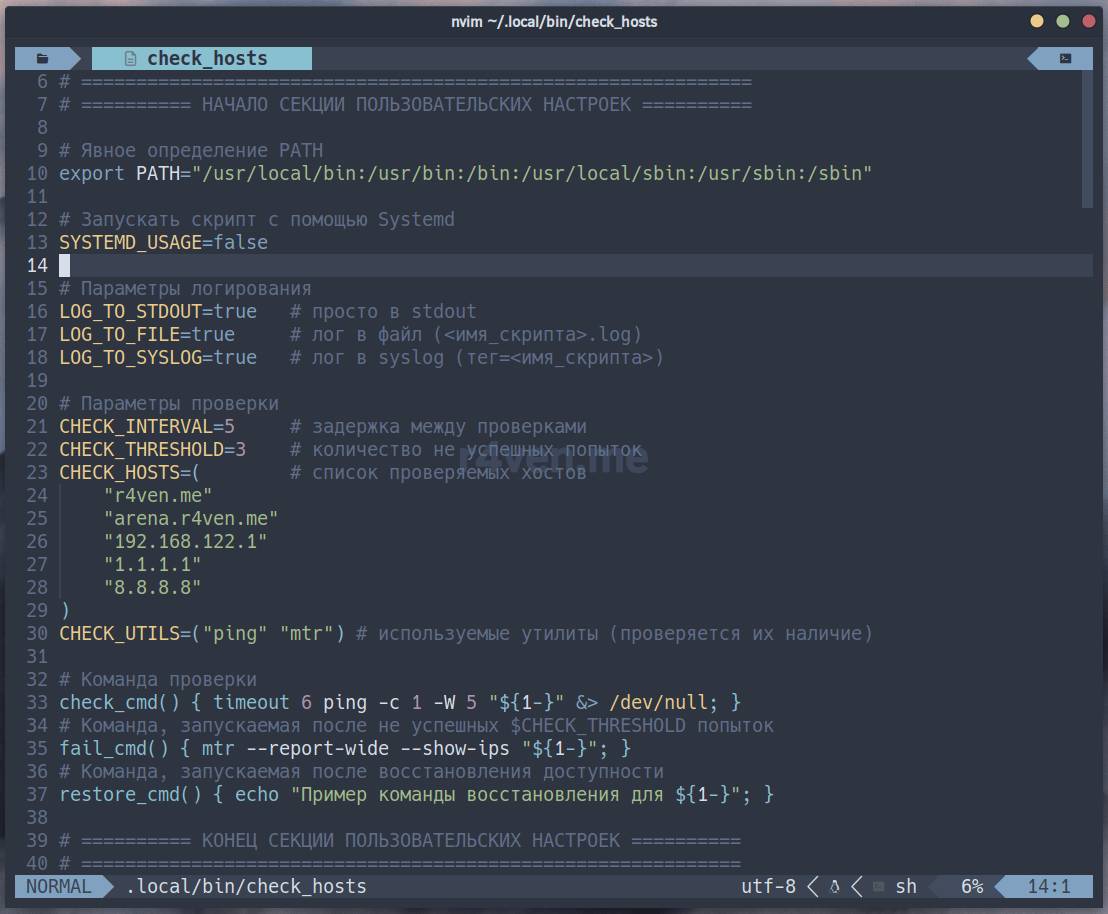
Before using it, you need to set your own values. Open the script for editing in any editor you like, for example:
nvim ~/.local/bin/check_hostsHere you need to set the following variables to suit your needs:
SYSTEMD_USAGE— a flag (true|false) that indicates whether to run the script as a systemd service;LOG_TO_STDOUT— a flag (true|false) that determines whether to output logs to standard output;LOG_TO_FILE— a flag (true|false) that determines whether to save logs to a file located in the same directory as the script;LOG_TO_SYSLOG— a flag (true|false) that enables sending logs to the system journal usinglogger;CHECK_INTERVAL— the interval between host availability checks (in seconds);CHECK_THRESHOLD— the number of consecutive failed checks after which a host is considered unavailable and thefail_cmd()command is run;CHECK_HOSTS— an array of IP addresses/domains/other elements to check;CHECK_UTILS— an array of utilities (e.g.ping,ssh,curl,nc) used to check availability (the script verifies they are present on the system);
And the corresponding commands:
check_cmd()— a function that endlessly performs the host availability check;fail_cmd()— a function called once (until the counter resets) when the host transitions into an unavailable state (e.g. sending a notification, restarting a service);restore_cmd()— a function called once (until the counter resets) when the host’s availability is restored (also, e.g., a notification, running recovery actions, etc.).
Demonstration of the script running:
check_hosts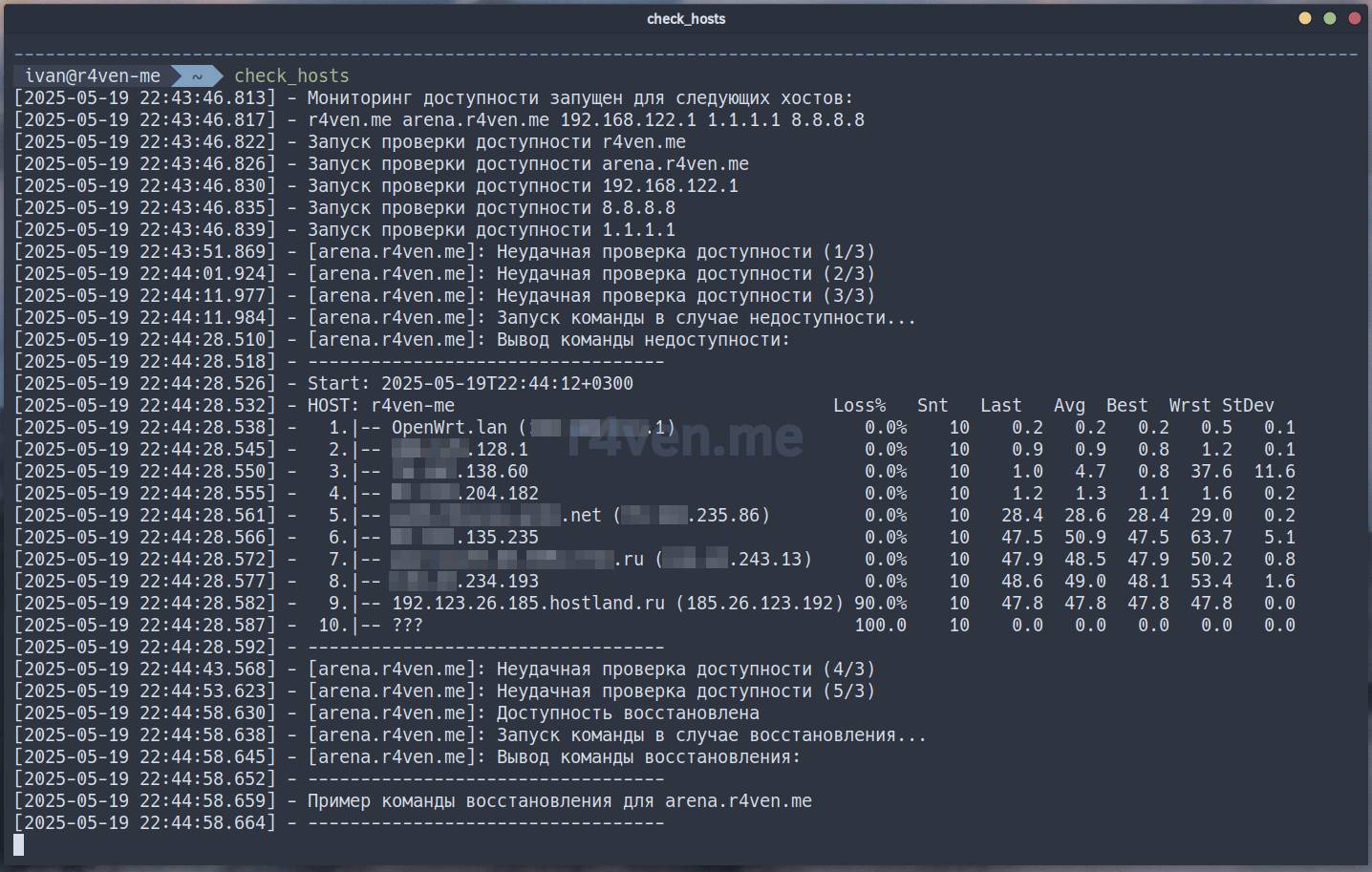
Here we can see that the host arena.r4ven.me (from $CHECK_HOSTS) was unavailable, a traceroute was run, and after it was restored, the corresponding command ran (printing a message💬).
Everything works🙃.
Running with Systemd
For the script to work as a Linux daemon, it’s possible to run it via the Systemd init system.
All the necessary settings for such a launch are already in the script. To activate it, open the script:
nvim ~/.local/bin/check_hostsAnd set the SYSTEMD_USAGE variable to true, save, close, and run the script as the superuser root, for example, using sudo:
💡If needed, adjust the contents of the unit file: the here-doc block (
cat << EOF).
sudo ~/.local/bin/check_hosts

sudo systemctl status check_hosts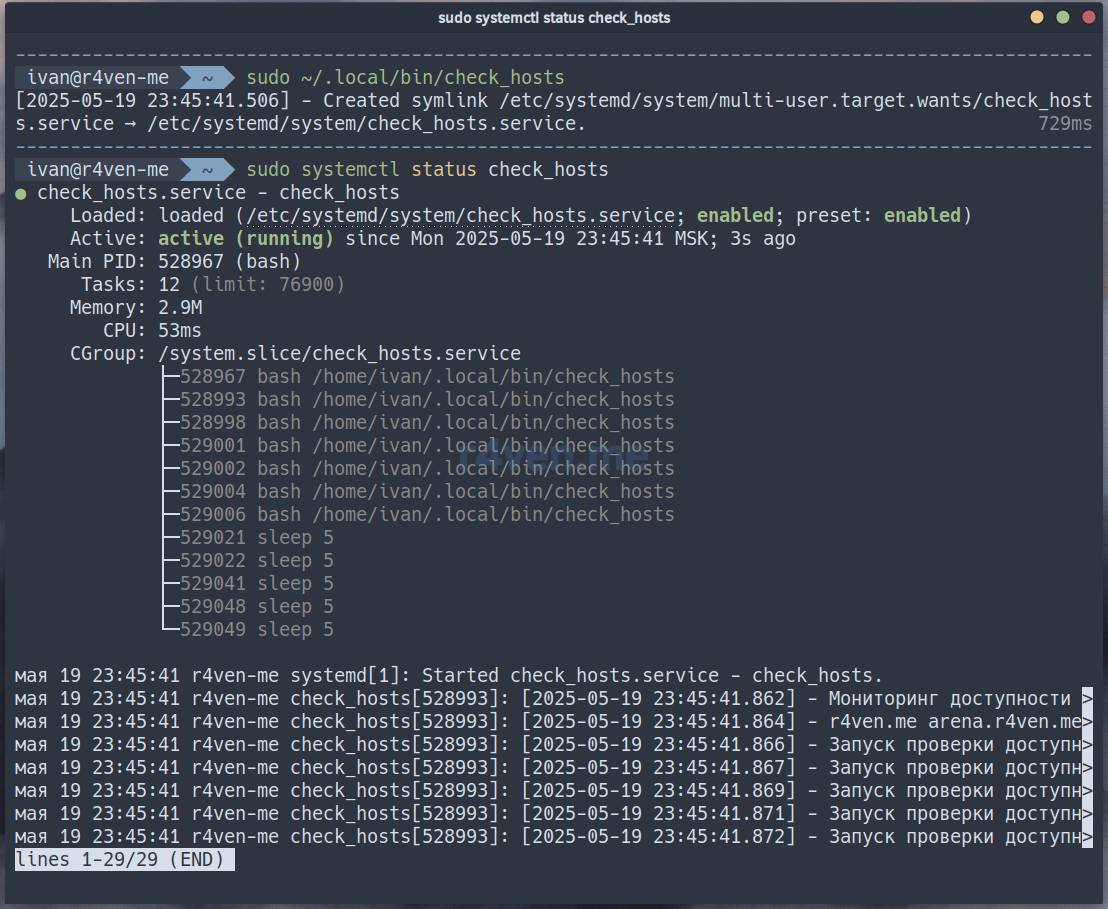
💡By default, autostart of the Systemd service on OS boot is enabled.
You can view the script’s output in the system journal:
sudo journalctl -fu check_hosts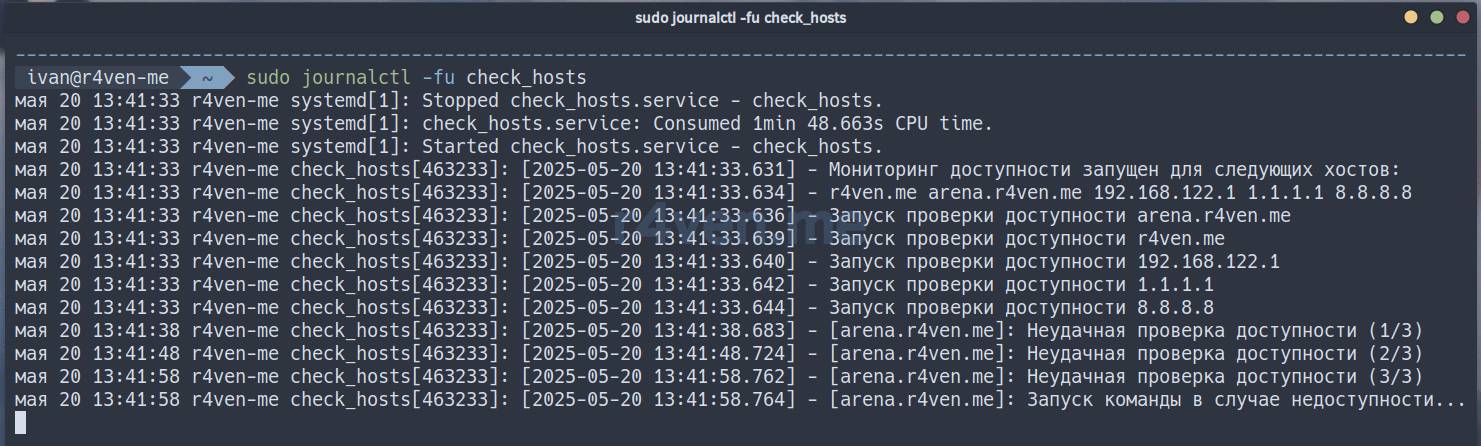
Other usage examples
Below are some usage examples for the check_hosts.sh script. As mentioned earlier, you just need to set your own parameters/commands.
Option #1 — check URL availability and restart the web server:
CHECK_HOSTS=("r4ven.me" "arena.r4ven.me" "192.168.122.150")
CHECK_UTILS=("curl" "ssh")
check_cmd() {
    [[ $(curl -w "%{http_code}" -o /dev/null -fsSL https://"${1-}"/status) -eq 200 ]]
}
fail_cmd() {
    ssh \
    -o UserKnownHostsFile=/dev/null \
    -o StrictHostKeyChecking=no \
    -i "${HOME}"/.ssh/id_ed25519_web \
    -l ivan \
    -p 2222 \
    "${1-}" \
    sudo systemctl restart nginx
}
restore_cmd() {
    ssh \
    -o UserKnownHostsFile=/dev/null \
    -o StrictHostKeyChecking=no \
    -i "${HOME}"/.ssh/id_ed25519_web \
    -l ivan \
    -p 2222 \
    "${1-}" \
    systemctl status nginx
}Option #2 — check TCP port availability and send data to Zabbix:
CHECK_HOSTS=("r4ven.me" "arena.r4ven.me" "192.168.122.150")
CHECK_UTILS=("nc" "zabbix_sender")
check_cmd() { nc -w 5 -z "${1-}" 443; }
fail_cmd() {
    zabbix_sender \
    -c /etc/zabbix/zabbix_agent2.conf \
    -k 'site.status' \
    -o 0
}
restore_cmd() {
    zabbix_sender \
    -c /etc/zabbix/zabbix_agent2.conf \
    -k 'site.status' \
    -o 1
}Option #3 — check Docker container status and send Email notifications using the console SMTP client msmtp:
CHECK_HOSTS=("unbound" "pi-hole" "openconnect")
CHECK_UTILS=("docker" "msmtp")
check_cmd() {
    [[ $(docker inspect --format='{{.State.Health.Status}}' unbound 2> /dev/null "${1-}") != "healthy" ]]
}
fail_cmd() {
    echo "Subject: Docker status\n\nContainer ${1-} is unhealthy" | msmtp kar-kar@r4ven.me
}
restore_cmd() {
    echo "Subject: Docker status\n\nContainer ${1-} is healthy again" | msmtp kar-kar@r4ven.me
}I hope you found this material useful😇. You can find other posts on shell scripting under the tag: #scripting 🐚.
👨💻And…
Don’t forget about our Telegram channel 📱 and chat
Or maybe you want to become a co-author? Then click here🔗
💬 All the best ✌️
That should be it. If not, check the logs 🙂

Comments